


What Is Automation Testing? Types, Benefits & Best Practices

 17 MIN
 09 Sep 2025
Automation testing – also known as automated testing or test automation – is a software testing approach where tests are executed with minimal human intervention using scripts and tools. Instead of a person manually clicking through an application or reading logs, automated tests run predefined steps and check results on their own. This method automates repetitive test cases that would be tedious or error-prone to do by hand, ensuring software works as expected before release.
Table of content
Automation testing has transformed modern QA by speeding up test execution, improving accuracy, and enabling continuous validation in development. If you’re a beginner in quality assurance or transitioning from manual testing, this guide will help you understand the fundamentals of automation in testing, its benefits, and how to get started – all in a friendly, digestible way.
Automation testing meaning
Automation testing is the process of using software tools and scripts to execute tests on a software application without direct human input. In simple terms, it means the computer runs the test steps and checks the outcomes for you. For example, instead of a tester manually typing in a login form repeatedly, an automated test script can enter usernames and passwords, click the login button, and verify the resulting behaviour automatically. This approach converts manual test procedures into machine-executable tests, which can run quickly and consistently at any time.
Key points defining what automation testing is include:
- Automated Test Scripts – These are the core of test automation. A script is written (in code or a tool’s language) to perform actions and validations. Once created, an automated test script can be run any number of times on-demand. This reusability is a huge advantage: write once, test often.
- Testing Tools – Automation relies on special testing software (frameworks or tools) that execute the test scripts against the application. These tools simulate user actions (like clicks, typing, API calls) and log results for each test run. Popular tools range from open-source solutions to commercial automated testing software suites (we’ll cover examples later).
- Faster Feedback Loop – Because tests run automatically at computer speed, teams get feedback on new code much faster than with manual testing. Automated tests can run 24/7, even overnight, and alert the team if something breaks. This rapid feedback is essential s essential for agile development and continuous testing.
Did you know?
Automated testing has been around since the 1950s – Yes, long before Agile, DevOps practices, or even the internet, early developers were already writing basic programs to test machine behavior. Some of the earliest references to automation date back to the 1950s, with rudimentary scripts used to test mainframe logic and operating system behavior. IEEE Xplore and early quality engineering literature confirm this surprising history.
Automation testing is commonly applied across many types of tests. Tests at various levels – like unit tests (small code components), integration tests (API testing or module interactions), regression tests (re-checking existing functionality after changes), and UI tests – can all be automated.
In fact, many organisations now automate around half of their test cases or more to keep up with fast release cycles. That said, automation doesn’t replace all testing. Sure, automation can speed up test cycles – but that’s not its only superpower. It also improves:
- Repeatability (tests always run the same)
- Coverage (more test data and combinations)
- Scheduling (tests run overnight or on weekends)
- Confidence (in regression or after changes)
As experts explain, automated tests act like living documentation, giving teams clarity and confidence.
Automation testing types at a glance
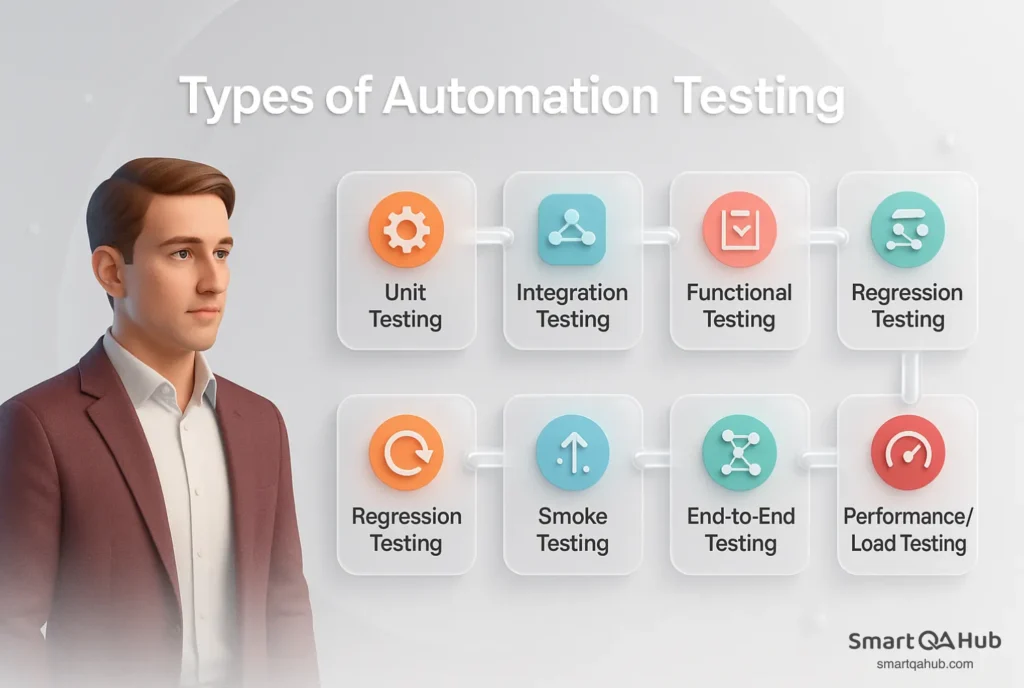
Automation testing covers everything from checking small code units to validating complete user journeys. Each type serves a unique purpose in ensuring software quality, stability, and performance.
Unit testing (component testing)
Tests individual components (such as functions, methods, or classes) in isolation from the rest of the system. The goal is to validate that each unit performs as expected. These tests are usually written and run by developers during coding to catch defects early.
Example: Verifying that a tax calculation function returns correct values for various input amounts.
Integration testing
Focuses on testing the interfaces and interactions between integrated components or systems. It comes after unit testing and ensures that data is correctly passed and processed between modules, services, or systems.
Example: Testing that your application’s data access layer correctly retrieves data from the database using a real or simulated connection.
System testing
Validates the entire, integrated system against defined functional and non-functional requirements. It is black-box testing typically done by testers (independent from developers) and simulates real-world use.
Example: Checking that the entire login process – from input validation to dashboard display – works correctly when the system is deployed as a whole.
Functional testing
A subset of system testing that focuses specifically on what the system does — its functional requirements. It involves providing inputs and checking whether the outputs match expected results.
Example: Testing that submitting a form correctly saves data and triggers a confirmation message.
Regression testing
Involves re-running previously executed test cases to confirm that new code changes have not introduced new defects or reactivated old ones. It’s typically automated and run frequently, especially in CI/CD pipelines.
Example: After implementing a new feature, executing the full test suite to ensure existing functionality still works.
Smoke testing
A high-level set of basic tests run after a new build or deployment to confirm that the most critical features work and the application is stable enough for deeper testing.
Example: After a nightly software build, checking that the application starts, the homepage loads, and the user can log in.
End-to-end testing
Validates complete user workflows across the full technology stack, from the front-end to back-end and external integrations. It simulates how a real user would interact with the system in a production-like environment.
Example: Simulating a user placing an order on an e-commerce site—from selecting products, adding to cart, checking out, to receiving an order confirmation email.
Performance testing (Load testing)
This type of non-functional testing evaluates how the system performs under expected or extreme conditions, focusing on response time, throughput, scalability, and stability. These tests are usually run in staging environments before major releases.
Example: Simulating 10,000 concurrent users on a web app to ensure the software can handle peak traffic without degrading performance.
Understanding the basics of test automation
Automation in software testing can seem complex at first, but its basics boil down to knowing when to automate, why it’s beneficial, and what challenges to expect. Whether you’re testing web apps, mobile apps, or APIs, understanding the core principles of software automated testing helps you make smarter decisions and avoid common mistakes. Let’s break down these fundamentals in beginner-friendly terms.
When to use automated testing vs. manual testing
Both automated and manual testing have important roles in quality assurance. Manual testing involves a human executing test steps in the software development, thinking creatively, and using their judgment to find issues. Automated testing uses scripts to run tests and is ideal for repetitive, well-defined tasks. Understanding when to use each approach (or a combination) is key to effective testing:
| Aspect | Manual Testing | Automated Testing | Combined Approach |
|---|---|---|---|
| Best for | Exploratory testing, UX evaluation, visual checks | Repetitive, high-volume, and critical test cases | Balancing both to maximise coverage and efficiency |
| Human input | Relies on intuition, creativity, and observation | Minimal human intervention once tests are scripted | Humans design the strategy; automation executes predictable checks |
| Examples | Checking usability, design alignment, assessing user flow intuitiveness | Regression testing, data-driven tests, performance checks across configurations | Automating login, forms, calculations; manually exploring new features |
| Efficiency | Slower, especially with repeated execution | Fast and scalable; can run across environments simultaneously | Speeds up repetitive checks and frees time for deeper, manual testing |
| ROI | Lower when applied to repetitive tasks | High when applied to repeatable and stable scenarios | Offers best ROI when each method is used where it’s most effective |
| Limitations | Time-consuming, error-prone with repetition | Requires setup, maintenance, and technical skills; not suited for subjective evaluations | Requires planning to allocate the right tests to the right method |
| Value to beginners | Builds critical thinking and domain understanding | Teaches scripting and automation tools, boosts productivity | Encourages a well-rounded skillset in both manual and automated testing |
In summary, automate the routine and repetitive to gain efficiency, but continue doing exploratory and usability testing manually to catch issues scripts might miss. For a simple mental model: if you could explain a test’s steps and expected outcome clearly to someone else, you can probably automate it. If a test involves subjective judgment or unpredictable user behaviour, it’s safer in human hands. The goal of automation is to reduce the number of manual test cases, not eliminate manual testing entirely – human testers are still very much needed for what machines can’t evaluate.
Key benefits of automation in software testing
Why go through the effort of learning test automation? There are compelling benefits that automation in testing brings to software projects. Here are some of the top advantages, especially relevant to new software testers and teams:
- Saves time and effort: Automated tests run quickly and repeatedly without the need for manual intervention. Tasks that could take hours when done manually can be completed in minutes or even seconds with automation. This allows your team to focus on more valuable and complex testing activities instead of repetitive work.
- Fewer bugs in production: Automation helps catch regressions and critical bugs early in the development cycle. When integrated into continuous integration and deployment pipelines, automated tests act as a safety net that immediately notifies you when something breaks. This reduces the risk of delivering faulty software to users and helps maintain product quality.
- Lets you focus on smarter testing: By automating repetitive test cases, testers can dedicate more time to exploratory testing and investigating edge cases. Human creativity and intuition can be applied where it matters most, improving overall test effectiveness. This shift leads to higher software quality and better user experiences.
- Increases test coverage: Automation enables running a vast number of test scenarios across different inputs, environments, and configurations — far more than would be feasible manually. This broader coverage increases confidence that the software works as expected in varied conditions. It also allows tests to be executed frequently, catching issues earlier.
- Supports agile and CI/CD workflows: Modern software development relies on rapid feedback to keep up with fast release cycles. Automated testing provides immediate validation of code changes, enabling teams to detect and fix issues quickly. This support is essential for Agile practices and continuous integration/continuous deployment pipelines.
These benefits explain why automated software testing has become so popular in the software industry. It accelerates development, enhances reliability, and ultimately contributes to leading to higher-quality software. As a beginner, experiencing these benefits firsthand – like watching a script do in minutes what used to take you hours – can be very motivating. But before diving in, it’s wise to be aware of some common challenges in testing automation, so you can avoid or mitigate them.
What types of software tests should be automated?
Not every test should be automated — the key is to choose wisely to maximize the value of your automation testing efforts. Automating the wrong tests can waste time and increase maintenance overhead. So, what kind of tests should you automate? Here are the most important criteria:
- Repetitive tests: Tests that need to be run frequently, such as after every build or release, are prime candidates for automation. Repeating the same steps manually is tedious and error-prone. Automation handles repetition effortlessly and consistently, saving you time and reducing human error.
- Tests involving multiple data sets or configurations: If your test must run across different input values, browsers, devices, or operating systems, automation is invaluable. Running these variations manually is often impractical. Automation enables efficient, repeatable testing across many scenarios, increasing coverage and confidence.
- Tests with clear pass/fail outcomes: Automation works best when test results are deterministic — meaning it’s obvious whether the test passed or failed. Tests that require subjective judgment or visual inspection are generally poor candidates. Focus on tests where the expected result is unambiguous and can be easily validated by a script.
- Time-consuming or labor-intensive tests: Some tests, like importing large data files or running complex workflows, can take a long time to complete manually. Automating these allows the tests to run unattended, even overnight, freeing up valuable human resources.
- Business-critical tests: Features that are essential to your product’s functionality — for example, login, payment processing, or data integrity — must be tested reliably and often. Automating these ensures they are consistently verified with every code change, reducing the risk of major issues reaching customers.
Final tip: Focus on high ROI tests
Start by automating the small percentage of tests that consume most of your testing time — usually regression tests and repetitive workflows. This approach lets you gain quick wins and build confidence in your automation test framework before expanding further.
How to automate your tests
Automating tests can improve efficiency, consistency, and coverage, but this testing requires a strategic approach. Here’s how to get started:
1. Identify tests to automate
Start by selecting tests that are repetitive, time-consuming, and critical to your application – like regression tests, smoke tests, and key workflows.
2. Choose the right tool
Pick a test automation tool that supports your application’s technology stack, integrates with your environment, and suits your team’s skills.
3. Design maintainable test scripts
Write clear, modular, and reusable scripts. Avoid hardcoding values; use variables and data-driven approaches to handle different test scenarios easily.
4. Set up test environment and data
Prepare consistent test environments and datasets to ensure reliable, repeatable results. Automate environment setup where possible.
5. Integrate with CI/CD pipeline
Automate test execution by integrating tests into your continuous integration/continuous deployment pipeline for fast feedback on code changes.
6. Review and maintain automated tests regularly
Update your tests to reflect application changes, remove obsolete tests, and continuously improve test coverage and reliability.
AI and machine learning are transforming test automation
Artificial Intelligence (AI) and Machine Learning (ML) are transforming how automation software testing is developed and managed. Unlike traditional automation — which often requires extensive manual scripting and frequent updates — AI-powered test automation software brings smarter, more adaptive approaches to testing.
One major advancement is smart test generation. Automated tools like Testim, Functionize, and TestCraft can analyze your application’s structure and user flows to automatically create relevant test cases, helping you uncover edge cases you might not think of manually.
Another game-changer is self-healing test scripts. When UI elements or APIs change, tests often break. But AI-driven test automation software like Mabl, Tricentis Tosca, and Applitools can automatically detect these changes and update the scripts without human intervention, reducing flaky tests and saving hours of maintenance.
AI also improves test execution prioritization. Platforms like Launchable or SeaLights use historical data and code changes to predict which test cases are most likely to catch defects, so you don’t have to run your entire test suite every time. This speeds up pipelines and optimizes resources.
In short, AI and ML are making automation software testing more intelligent, reliable, and scalable — helping teams release better software, faster, and with less manual effort.
Best practices for successful test automation
Automation testing can dramatically improve your software quality and delivery speed – but only if done right. Using the right automated testing software and following best practices helps you build a reliable, efficient, and maintainable test suite that truly supports your development process. Here are the key principles to ensure your test automation success.
- Start small and scale gradually: Begin with automating high-value, repetitive tests. Build your framework step-by-step to avoid overwhelming and costly mistakes.
- Keep tests independent and reliable: Create automated tests that are independent and always yield reliable results. Flaky tests waste time and erode trust in automation.
- Use clear and maintainable code: Write clean, readable, and well-documented test scripts. This makes maintaining and updating tests easier as the product evolves.
- Integrate with CI/CD pipelines: Automate test execution on every code change to catch issues early and speed up delivery.
- Regularly review and update tests: Keep your test suite relevant by removing outdated tests and adding new ones as features change.
FAQ: Frequently asked questions about the automation testing
What is the difference between manual testing and automation testing in software development?
Which types of tests are best suited for automation?
What are the main benefits of automation testing?
What are the best test automation tools for beginners?
Unlock the power of automation
Automation in software testing is a game changer, allowing you to perform more tests in less time with greater accuracy and confidence. The benefits of software automation testing are clear: faster feedback loops, broader test coverage, and reduced human error — all seamlessly integrated into continuous delivery pipelines. While manual testing remains vital for exploratory and usability testing, combining it with smart, automated testing processes delivers the best overall quality.
For anyone starting out, focusing on automating routine and repetitive test cases is a practical way to unlock the true power of test automation. Over time, expanding your automation suite will improve efficiency and help catch issues earlier. Embracing automation in software testing not only speeds up your workflow but also strengthens your team’s ability to deliver reliable, high-quality software.


