


What Is Accessibility Testing and How It Works?
 16 MIN
 11 Sep 2025
Accessibility testing has become vital in today’s digital world, as an estimated 1.3 billion people live with some form of disability. This highlights the importance of ensuring that web and mobile applications are usable by everyone. Software testers and developers therefore focus on creating solutions that provide equal access for users with different disabilities.
Table of content
We must ensure our products don’t leave out nearly one-fourth of potential users. Recent Eurostat data reveals that 27% Europeans have some form of disability – representing 1 in 4 adult Europeans.
Accessibility experts must verify that applications work well for all users, including those relying on assistive technologies like screen readers, keyboard navigation, voice control, or captions. Thorough accessibility testing ensures compliance with standards such as WCAG and helps deliver an inclusive, usable experience.
Let’s make your applications truly available to everyone.
What is accessibility testing in software development?
When we talk about accessibility testing meaning, we refer to the practice of checking whether websites and applications can be used by people with different types of disabilities. Accessibility testing is not just a technical checklist — it’s about ensuring digital equality, making sure everyone can interact with your product without barriers. While it is closely related to usability testing, accessibility testing goes further by focusing on how your product works with assistive technologies such as screen readers, keyboard navigation tools, or other adaptive devices.
Everyone involved in building software plays a role — developers, designers, product managers, and testers. The goal of accessibility testing is clear: identify and remove anything that prevents users with disabilities from accessing content or functionality. This often means checking keyboard accessibility, screen reader compatibility, and proper color contrast.
Digital barriers affect a significant portion of the population. In the United States, about 27% of adults live with some form of disability. Globally, the number is around 1 billion people — roughly 15% of the world’s population. Educational platforms deserve special attention: 21% of undergraduate students report having a disability.
Modern software development no longer treats website accessibility testing and accessibility testing for other digital products as optional — it’s now a core part of agile workflows. Teams combine manual checks with automated tools to make sure digital solutions are truly usable for everyone.
Accessibility vs. usability
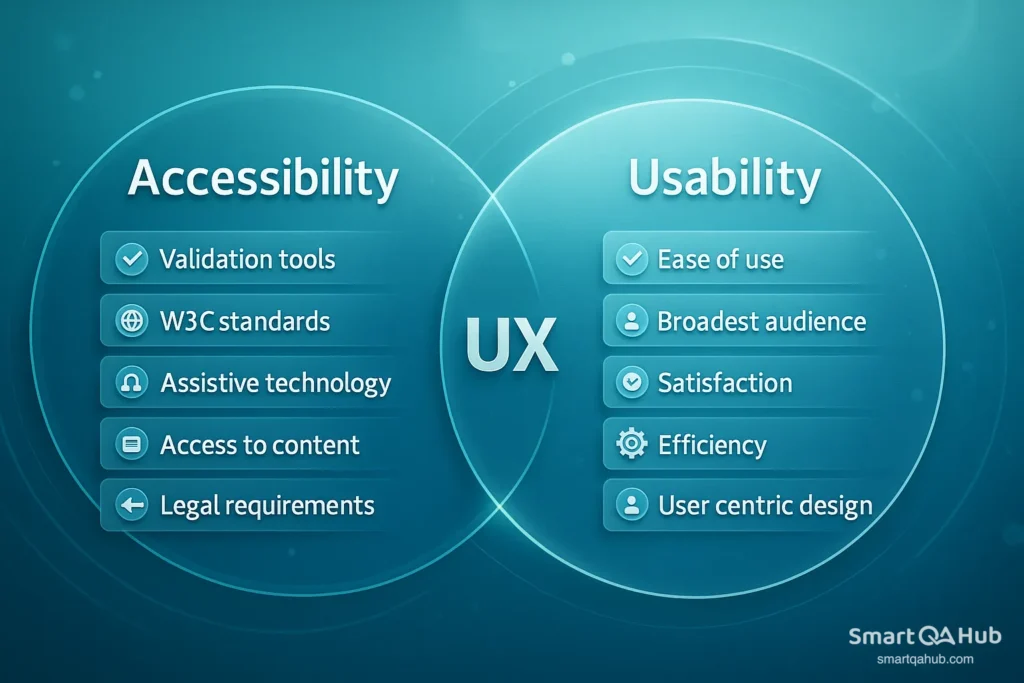
Although these two terms are often mixed up, in testing they mean different things.
Accessibility focuses on ensuring that a product can be used by people with disabilities – for example, those who are blind, visually impaired, deaf, have motor impairments, or cognitive challenges. It’s about removing barriers: making sure content is accessible and inclusive, readable by screen readers, navigation works with only a keyboard, and color contrasts are sufficient. Accessibility also has a legal dimension in many countries.
Usability, on the other hand, is about how easy, fast, and comfortable a product is to use for everyone, regardless of ability. Here we look at whether controls are intuitive, navigation is clear, and the user can achieve their goal without confusion or frustration.
Types of disabilities considered in accessibility testing process
By considering a wide range of disabilities, we can identify potential barriers and create more inclusive experiences for all users.
1. Visual disabilities: Blindness, low vision, and color blindness
Imagine you’re trying to book a train ticket online, but the text is tiny and the colors blend together. Without strong contrast and scalable fonts, the task becomes nearly impossible.
2. Auditory disabilities: Deafness and hearing impairments
Imagine watching an important product demo video with no captions. For someone who can’t hear, the entire message is lost.
3. Physical or motor disabilities: Limitations in mobility, dexterity, or coordination
Imagine needing to fill out an online form but you can’t use a mouse. If the site doesn’t support full keyboard navigation, you’re stuck.
4. Cognitive disabilities: Difficulties with memory, focus, comprehension, or problem-solving
Imagine using a banking app filled with long, complex instructions and cluttered layouts. For someone with a cognitive disability, completing even a simple transfer could be overwhelming.
5. Speech disabilities: Conditions that affect verbal communication
Imagine a voice-controlled assistant that doesn’t allow typed input. For someone with a speech impairment, that creates a complete barrier.
Accessibility testing is not just about ticking off compliance boxes — it’s a promise to design and build a digital space that works for everyone, regardless of their abilities.
Why accessibility matters in modern applications
Accessibility isn’t just about doing the right thing — it delivers measurable, practical benefits. Mobile and web applications that are built for everyone tend to be 35% more usable overall and cheaper to maintain in the long run. Yet the reality shows there’s still a long way to go: according to Webaim.org, 94.8% of the top one million home pages had detected at least one WCAG 2 failure.
Here are the main reasons mobile accessibility should be a priority in your development process:
1. Legal compliance
Many countries require digital accessibility by law. Examples include the Americans with Disabilities Act (ADA) in the US, EN 301 549 in the EU, AODA in Ontario (Canada), and similar legislation worldwide. Failing to comply can lead to lawsuits, fines, and reputational damage.
2. Wider customer reach
Around 1 billion people globally have some form of disability. Making your app accessible opens the door to a much larger audience.
3. Better usability for all
Features like clear navigation, high contrast, and captions benefit not just users with disabilities but everyone, including people using web and mobile apps in challenging environments.
4. Positive brand image
Accessible products show that your company cares about inclusivity, which improves customer trust and loyalty.
5. Lower maintenance costs
Building accessibility in from the start prevents costly retrofits later and often results in cleaner, more maintainable code.
6. SEO benefits
Many accessibility improvements (such as proper heading structure and alt text) also help search engines understand and index your content better.
Accessibility is, therefore, both a moral responsibility and a smart business decision. It improves user satisfaction, reduces legal risk, and makes your product more competitive.
Key accessibility standards and guidelines
The most widely recognized accessibility framework is the Web Content Accessibility Guidelines (WCAG), developed by the World Wide Web Consortium (W3C). Based on WCAG, there are three levels of accessibility compliance:
- Level A is the minimum level; addresses the most basic accessibility barriers.
- Level AA is the mid-range level; the most commonly required by law, balancing accessibility with practicality.
- Level AAA is the highest level of conformance; provides maximum accessibility but can be challenging to achieve for all content.
Other important standards include:
- Section 508 (US) – Federal accessibility requirements for technology used by government agencies.
- EN 301 549 (EU) – Accessibility requirements for ICT products and services in Europe.
- ISO/IEC 40500 – The ISO standard equivalent of WCAG 2.0.
Following standards ≠ full accessibility
Meeting WCAG or legal requirements doesn’t automatically make a product fully accessible. Standards for web accessibility set the baseline, but real accessibility depends on practical usability for people with disabilities.
Example:
Imagine a public building with a wheelchair ramp that meets the legal dimensions but is built at such a steep angle that it’s exhausting or even unsafe to use. On paper, it’s “compliant,” but in reality, it’s not truly accessible.
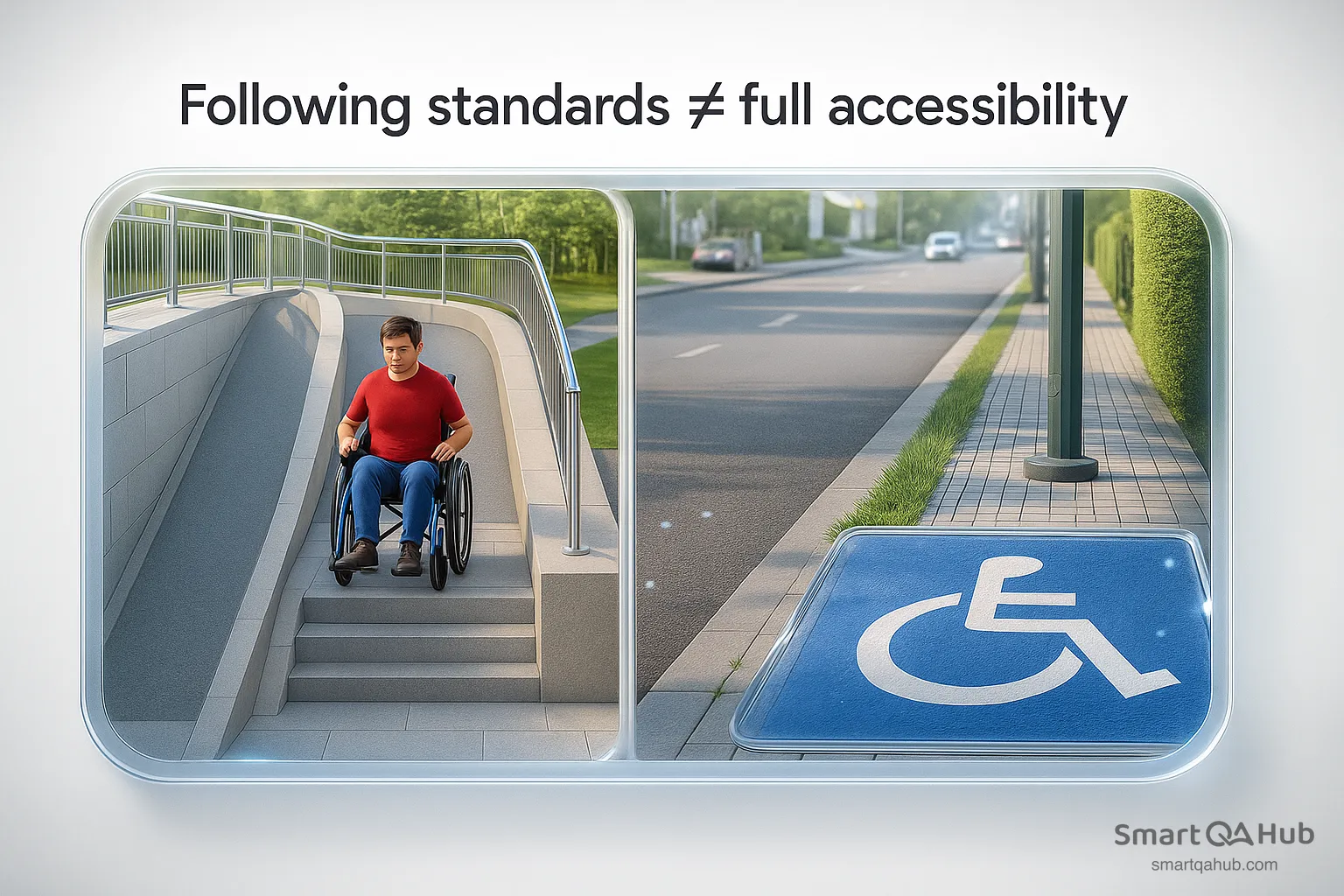
Inspired by http://www.griffinmobility.com/
The same thing happens in the digital world. A website might technically meet WCAG AA by including alt text for all images, but if the alt text just says “image” or “photo”, a screen reader user gains no meaningful information. Similarly, a form might allow full keyboard access, but if the tab order jumps around illogically, it still creates a barrier.
True accessibility means testing with real users, including those with disabilities, to ensure the product works in real-world scenarios — not just on paper.
Manual vs. automated accessibility testing
Ensuring a website is truly accessible requires understanding the strengths and limitations of both manual and automated testing methods.
Manual testing — the human perspective
Manual accessibility testing means human testers interact with a site the way real users do, including those with disabilities. This often involves assistive technologies such as screen readers (NVDA, JAWS, VoiceOver), magnifiers, or keyboard-only navigation.
Why it matters
Automated tools can only check code patterns, but humans can assess meaning and usability. For example:
- Is the alt text for an image actually useful, or is it just “image123.jpg”?
- Does the tab order make sense for someone navigating with only a keyboard?
- Are headings and labels logical and clear?
Key strengths
- Detects nuanced, context-specific issues automated scans will miss.
- Provides insights into the experience of individuals with disabilities.
- Essential for full WCAG compliance and true accessibility.
Limitations
- Time-intensive: a single page can take 1–3 hours to review thoroughly.
- Scaling to large websites can be difficult without dedicated testers.
Automated testing — the fast scanner
Automated accessibility testing uses software to scan site code against international standards like WCAG 2.1.
Examples include Axe, WAVE, Lighthouse, and Pa11y.
Why it matters
Using automated tools, common issues such as missing alt attributes, low color contrast, or improper heading structures can be quickly identified.
Key strengths
- Rapidly scans large sites — hundreds of pages in minutes.
- Delivers consistent, repeatable results.
- Can be built into CI/CD pipelines for ongoing checks.
- Cost-effective for frequent monitoring.
Limitations
- Finds only a fraction of real issues (studies show ~40% detection rate).
- Cannot judge if alt text is accurate or if a form is truly usable.
- Misses problems that require human interpretation.
Combining testing methods for detailed coverage
The solution isn’t about which method works better, you need both working together. A combined approach makes use of information from automated tools’ speed and consistency while adding crucial insights from human testers.
Have you thought about how your current testing approach might miss important accessibility barriers? By using automated scans with targeted manual testing, you’ll catch many more issues than either method alone could find.
Popular accessibility testing tools and technologies
Your testing efforts will work better when you pick the right accessibility testing tools. Here are some powerful tools that help you find accessibility issues in your digital products.
WAVE (Web Accessibility Evaluation Tool)
WAVE offers a comprehensive suite for evaluating web content and identifying WCAG errors. It provides visual feedback directly on your webpage using inline icons that highlight errors, contrast problems, alerts, features, structural elements, and ARIA attributes.
Unlike some automated tools, WAVE emphasizes education, helping developers understand accessibility principles rather than just pointing out violations of accessibility standards. The browser extensions for Chrome, Firefox, and Edge make it easy to test protected or local pages. Free.
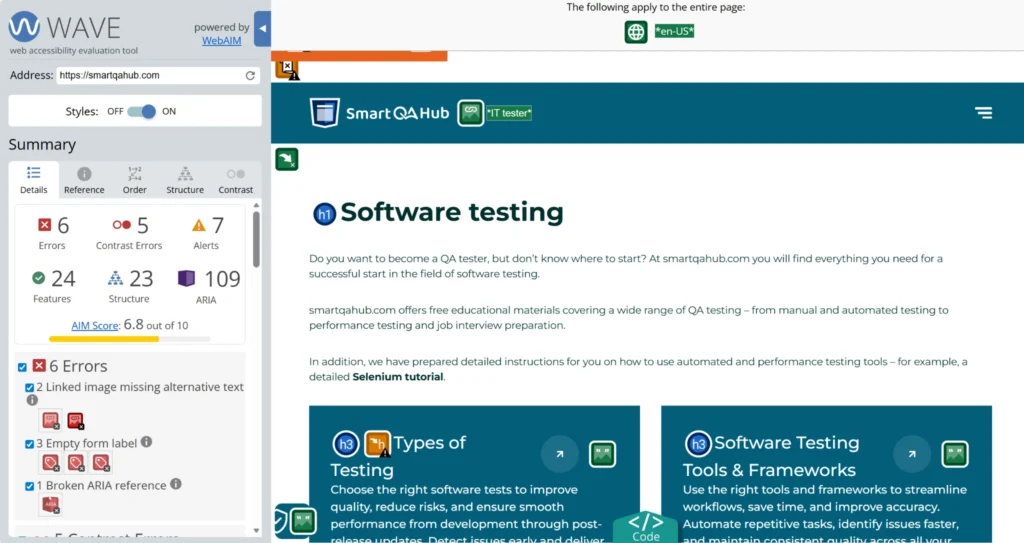
Source: https://lh3.googleusercontent.com/
Axe by Deque Systems
Axe is built on the widely used ax-core accessibility testing library and automatically detects roughly 57% of WCAG issues. Its main advantage is the accuracy of results, avoiding false positives that can waste time.
With browser extensions for Chrome, Firefox, and Edge, testers can quickly scan a page, identify accessibility issues, and see step-by-step recommendations to fix accessibility violations. For enterprise use or API integrations, paid plans are available. Free for browser extensions.
Lighthouse (Chrome DevTools)
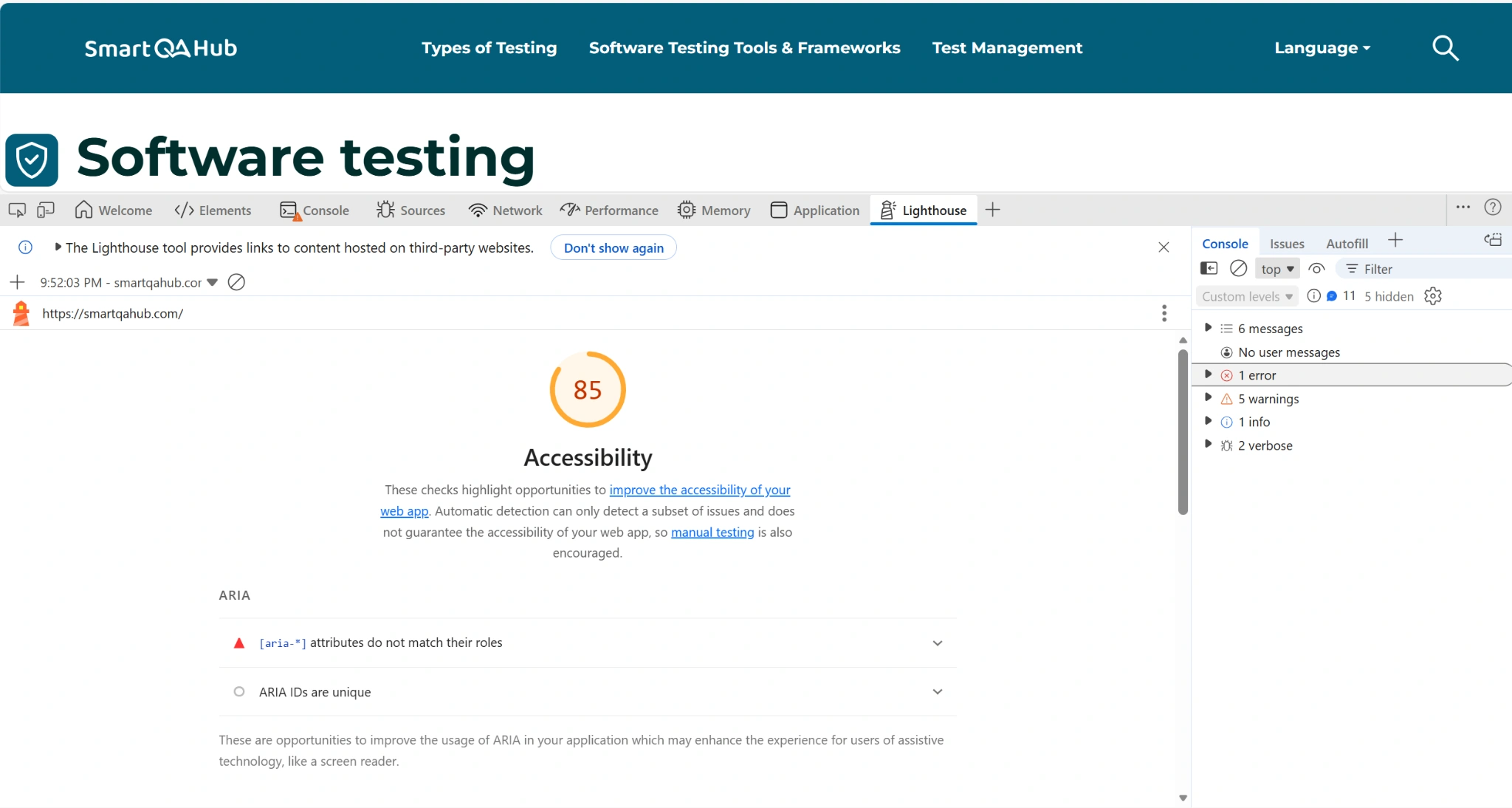
Lighthouse is integrated into Chrome DevTools and provides a comprehensive accessibility audit of web pages. It generates scores based on weighted checks and detailed reports that explain issues, suggest fixes, and allow comparison across sites.
You can run accessibility-only audits or combine them with performance, SEO, and best practices tests. Lighthouse is especially useful for developers who want a quick snapshot of overall accessibility compliance. Free.
Source: https://the-refinery.io/
NVDA (NonVisual Desktop Access)
NVDA is a free, open-source screen reader for Windows that allows developers and testers to experience websites as visually impaired users do. It supports over 50 languages, is highly portable, and offers customization options for different testing scenarios. NVDA is essential for manual accessibility testing, as it can reveal practical issues that automated tools cannot, such as the clarity of alt text or the logical flow of content. Free.
JAWS (Job Access With Speech)
JAWS is the industry-standard screen reader, widely used in professional accessibility testing. It provides robust features for navigating web pages and applications, giving a realistic view of how visually impaired users interact with digital products. While extremely powerful, JAWS is paid, with costs ranging from $90 to $1,475 per year, depending on the license.
Color contrast analyzers
Color contrast tools check whether text, interface elements, and graphical content meet WCAG contrast requirements. Tools like Deque Color Contrast Analyzer and TPGI Color Contrast Checker allow testers to select colors, measure contrast ratios, and simulate different types of color blindness. These tools are essential for ensuring readability and accessibility of visual content. Free.
Summary
For the best coverage in accesibility testing, use a combination of automated and manual tools. Automated tools like WAVE, axe, Lighthouse, and contrast analyzers are excellent for quickly detecting code-level and structural issues, while screen readers like NVDA and JAWS provide insight into the actual user experience, revealing barriers that technical checks alone may miss.
Essential accessibility test cases for websites and applications
Ensuring your website or application is accessible means addressing the barriers that prevent people with disabilities from fully using digital content. Here are the key test cases every team should cover:
1. Alternative text for images and media
Alt text isn’t just about describing an image – it’s about conveying meaning and purpose. Keep it brief, informative, and focused on what makes the image important. Avoid phrases like “image of” or “photo of.” Tailor your alt text to context:
- Logos: Identify them as logos.
- Icons and buttons: Explain their function, e.g., “Print Schedule” instead of “Printer icon.”
- Decorative images: Use empty alt text (alt=””) so screen readers skip them.
2. Keyboard navigation and focus management
Many users rely entirely on the keyboard. Test your interface by disconnecting the mouse and navigating with: Tab (forward), Shift+Tab (back), Enter (activate), and arrow keys. Make sure:
- Focus indicators are always visible.
- Tab order is logical and intuitive (left-to-right, top-to-bottom).
- No elements trap users, and skip navigation links appear when needed.
3. Color contrast and visual presentation
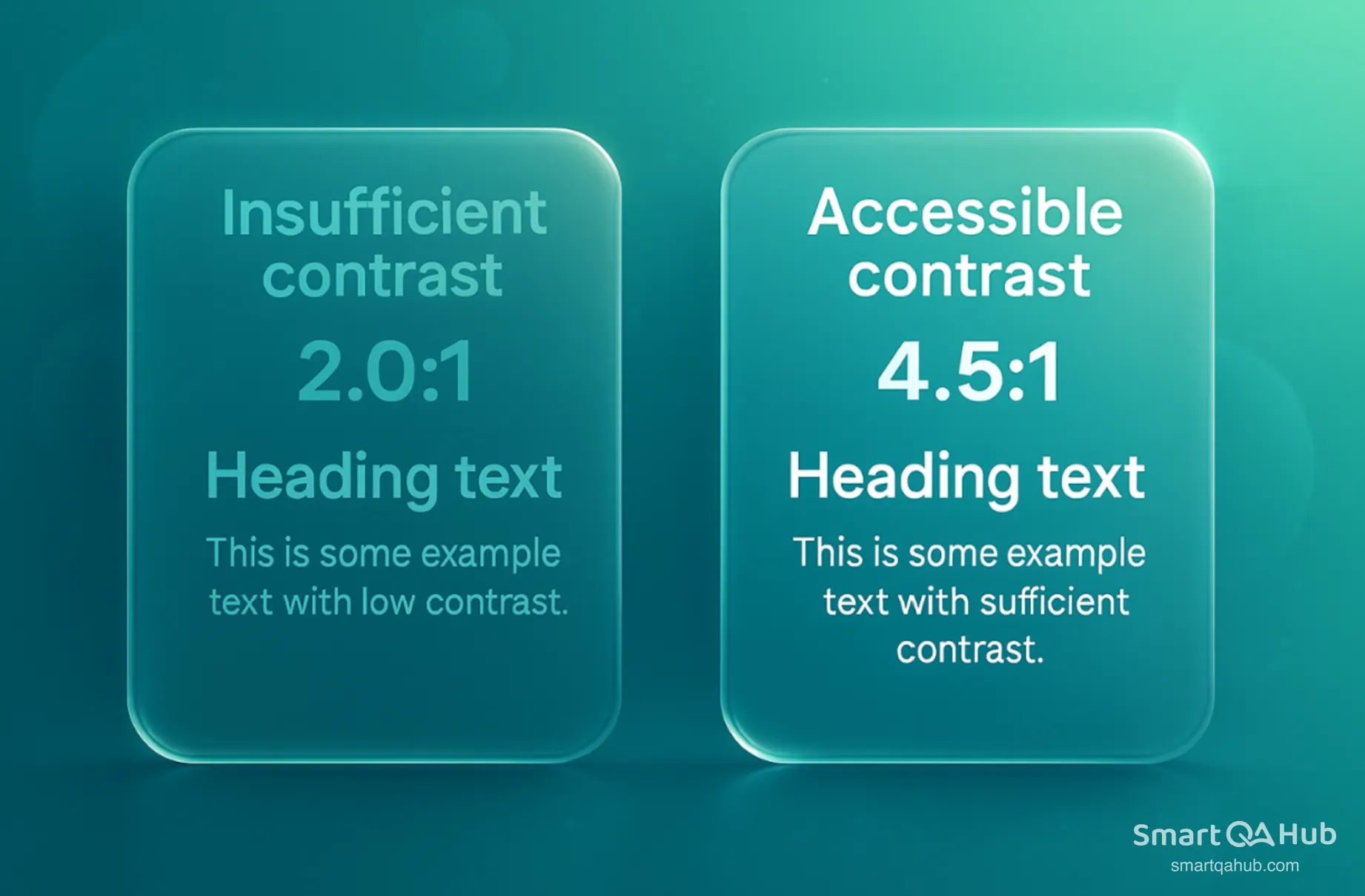
Text and interface elements must be readable for users with visual impairments. WCAG 2.0 Level AA requires:
- Minimum contrast of 4.5:1 for normal text.
- Minimum contrast of 3:1 for large text or UI graphics.
Use a contrast checker tool to verify your color choices and ensure clarity for all users.
Source: https://uxmovement.com/
4. Form labels and error identification
Forms must be clear and intuitive. Ensure:
- Every input has a clear label describing its purpose.
- Error messages are specific and actionable, e.g., “Email format invalid, use example@domain.com” rather than a generic “invalid input.”
- Error fields are highlighted, making it easy for users to correct mistakes.
5. Screen reader compatibility
Test your site with real screen readers like NVDA (free), JAWS, or VoiceOver to experience it as visually impaired users would. Verify that:
- Images have meaningful alt text.
- Headings follow a proper hierarchical structure.
- Form fields are clearly labeled.
- Links are descriptive, avoiding generic “click here.”
6. Time-based media accessibility
Audio and video content must include alternatives:
- Captions for all spoken content.
- Text transcripts for audio-only material.
- Audio descriptions for important visual details in videos.
Ensure media players are keyboard-friendly and allow users to pause, stop, or adjust volume.
How to implement accessibility testing in your workflow
Waiting until development ends to start accesiblity testing will get pricey and cause delays. Your team can achieve better results with fewer resources by using a planned approach throughout development.
Integrating testing early in development
Teams should include accessibility needs right from the start of development. Early testing catches common accessibility problems before they become part of your codebase. A pilot project helps collect metrics and shows where your team needs more training. Teams with no prior accessibility work find this method particularly helpful to understand the process better.
Creating an accessibility checklist
Complex WCAG requirements become manageable when broken down into specific tasks. Role-specific checklists help designers, developers, and content creators. Key areas to focus on:
- Common components and reusable elements
- Critical paths and workflows
- High-traffic areas of your site
- Essential documents that see frequent distribution
Involving users with disabilities in testing
People with disabilities give important feedback that automated tools cannot capture. Regular testing sessions should include participants with various disabilities – visual, auditory, cognitive, and mobility impairments. Setup and logistics need about 25% extra time.
Documenting and prioritizing accessibility issues
An accessibility-specific defect tracking system helps monitor issues systematically. Priority should depend on:
- User impact severity (critical, serious, moderate, minor)
- How often issues appear across your site
- Legal risk potential
Continuous monitoring and improvement
Accessibility needs regular audits as it’s an ongoing process. Teams should set metrics to verify progress and calculate return on investment. Automated tools merged into your CI/CD pipeline catch issues before deployment.
FAQs about the accessibility testing
What is the main purpose of accessibility testing?
What are the key principles of accessibility testing?
How does manual accessibility testing differ from accessibility testing automation?
What are some essential web accessibility test cases?
How can organizations integrate accessibility testing into their development workflow?
Accessibility is a journey – Thoughtful testing gets you started
Accessibility testing is essential for ethical, inclusive and accessible software. By making your products accessible, you open them up to 1.3 billion people worldwide with disabilities – and make them easier for everyone to use.
Effective accessibility testing combines automated tools like WAVE, axe, and Lighthouse with manual checks using screen readers and keyboard navigation. Automated scans are fast, but only real user testing uncovers true barriers. Your app might currently exclude many potential users. Start early in the development cycle, use role-based checklists, and continuously monitor accessibility.
Engage real individuals with disabilities – they provide accessibility insights for web no tool can replace. Start small, focus on high-impact areas, and grow your accessibility efforts gradually. Your users will notice and appreciate the inclusive experience.


