


Integration Testing: How to Verify That Software Components Work Together

 14 MIN
 27 Feb 2026
Integration testing is the practice that verifies all system connections actually work: that data flows correctly between components and the system behaves as expected when its parts combine. This matters because software rarely works in isolation. Your login module talks to a database. Your shopping cart communicates with inventory management. Your payment system exchanges data with external gateways. Integration testing ensures all these interactions function properly.
Table of content
While unit tests confirm that individual pieces of code do their job, they can’t tell you what happens when those pieces start talking to each other. That’s where integration testing steps in. This guide explains the integration testing meaning, explores approaches you can use, and walks through real examples that show how software integration testing works in practice. You’ll also learn how automation and continuous integration testing fit into the picture and which mistakes to avoid along the way.
What is integration testing and why does it matter
What is integration testing? It’s a level of software testing where individual components or modules are combined and tested as a group. The goal is to expose defects in the interfaces and interactions between integrated components.
Think of it this way: unit testing checks whether each instrument in an orchestra can play its part correctly. Integration testing checks whether the musicians can actually play together, whether the timing works, whether they’re reading from the same sheet, and whether the result sounds like music rather than noise.
In the software testing lifecycle, integration testing sits between unit testing and system testing. Unit tests verify isolated functions and testing methods. Software integration testing verifies the connections. System testing then validates the complete, integrated system against requirements.
What integration testing catches
Why does this matter? Because most bugs in production don’t come from broken individual components. They come from broken communication between modules or components. A function might work perfectly in isolation but fail when it receives unexpected data from another module. A database query might return correct results, but the module processing those results might misinterpret the data format.
Integration testing catches these issues before they reach users. It validates that:
- Data passes correctly between modules
- APIs return expected responses and handle errors gracefully
- Database operations work with real connections, not just mocks
- External service integrations behave as designed
- Component timing and sequencing work under real conditions
For testers joining a project, understanding integration points is often more valuable than memorizing individual function behaviors. The interfaces are where complexity lives and where problems hide.
Different types of integration testing: Choosing the right approach
Not all integration testing follows the same pattern. The approach you choose depends on your project structure, team size, and how much of the system is ready for testing. Here are the main types of integration testing and when each makes sense.
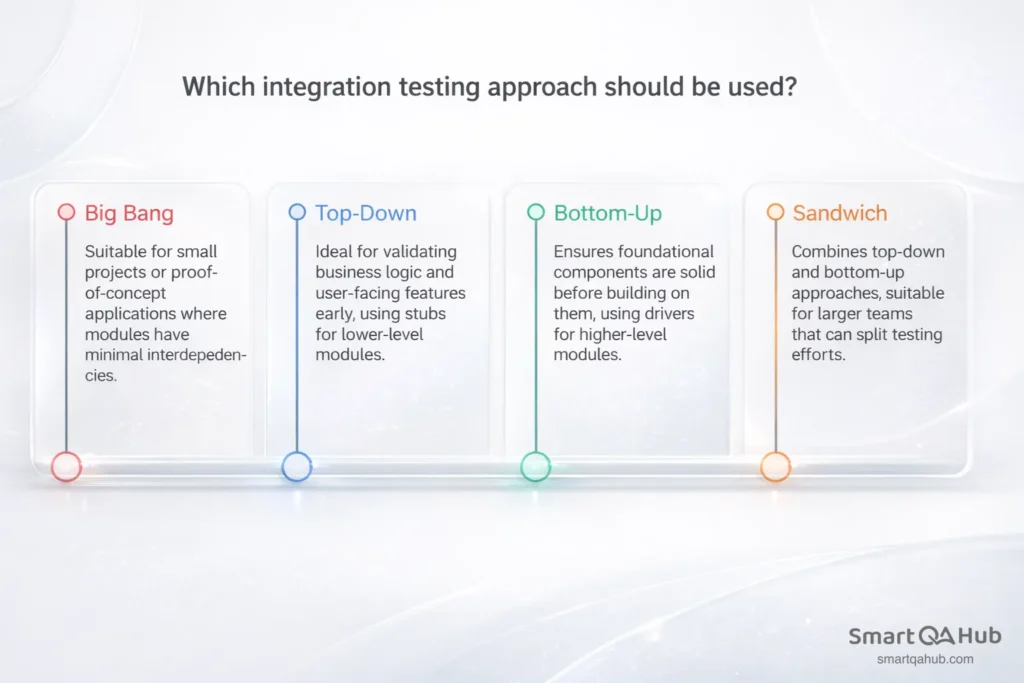
Big bang approach
The big bang approach integrates all modules at once and tests the whole system as a single unit. You wait until all components are ready, combine them, and run your tests.
When it works: Small projects with few components, proof-of-concept applications, or situations where modules have minimal interdependencies.
When it doesn’t: Large systems with many integration points. When everything is tested together, pinpointing the source of a failure becomes difficult. If the login module, database connection, and session management all integrate simultaneously and something breaks, which one caused the problem?
Big bang testing is straightforward but risky. Debugging is harder, feedback comes late, and testing teams often discover critical integration issues too close to release deadlines.
Incremental testing: Top-down, bottom-up, and sandwich
Incremental testing approaches integrate and test software modules step by step, adding different components gradually rather than all at once.
Top-down integration process starts with high-level modules and works downward. You test the main application flow first, using stubs (simplified placeholders) for lower-level modules that aren’t ready yet. Top down testing validates business logic and user-facing features early.
Bottom-up integration testing starts with low-level modules, such as utilities, database access layers, core services, and builds upward. You use drivers (test harnesses) to simulate higher-level modules. Bottom up testing ensures foundational components are solid before building on them.
Sandwich (hybrid) integration combines both approaches. Teams test high-level and low-level modules in parallel, meeting in the middle. Hybrid integration testing works well for larger teams that can split testing efforts.
| Approach | Starting point | Uses | Best for |
|---|---|---|---|
| Big bang | All modules at once | Nothing – full system | Small projects, quick validation |
| Top-down | High-level modules | Stubs for lower levels | Early UI/flow validation |
| Bottom-up | Low-level modules | Drivers for higher levels | Stable foundation first |
| Sandwich | Both ends simultaneously | Stubs and drivers | Large teams, parallel work |
For most projects, incremental approaches reduce risk. You find problems earlier, debugging is easier, and you get continuous feedback as integration progresses.
System integration testing process in practice
System integration testing takes integration testing a step further. While component integration testing verifies connections between different modules within your software application, system integration testing validates how your application interacts with external systems, such as databases, third-party APIs, message queues, and other services.
Consider an e-commerce platform. Component integration might test whether your cart module correctly updates inventory counts. System integration tests whether your entire application correctly communicates with the payment gateway, shipping provider API, and email notification service.
API integration testing
API integration testing deserves special attention because modern applications rely heavily on APIs, both internal and external. When testing API integrations, you verify:
- Request formatting: Does your application send correctly structured requests?
- Response handling: Does it correctly parse and use the data returned?
- Error scenarios: What happens when the API returns an error, times out, or sends unexpected data?
- Authentication: Do credentials and tokens work correctly across the integration?
A common mistake is testing only the “happy path”, that is successful requests with expected responses. Real systems encounter network failures, rate limits, malformed responses, and service outages. Your integration tests should cover these scenarios too.
Practical integration testing tools like Postman help explore APIs manually before writing automated tests. For automation, frameworks like REST Assured (Java) or requests library (Python) let you build repeatable API integration tests.
System integration testing often requires test environments that mirror production environments: same database types, similar network configurations, and access to sandbox versions of external services. This environment setup is one of the more challenging aspects, but it’s essential for meaningful results.
Integration testing example: A step-by-step walkthrough
Abstract concepts become clearer with concrete examples. Let’s walk through an integration testing example using a fictional but realistic scenario: an online bookstore’s checkout process.
The scenario
A customer adds books to their cart and proceeds to checkout. The process involves several integrated components:
- Cart module: Holds selected items and quantities.
- Inventory service: Checks stock availability.
- Pricing engine: Calculates totals including discounts.
- Payment gateway: Processes credit card transactions.
- Order service: Creates and stores the order record.
- Notification service: Sends confirmation email.
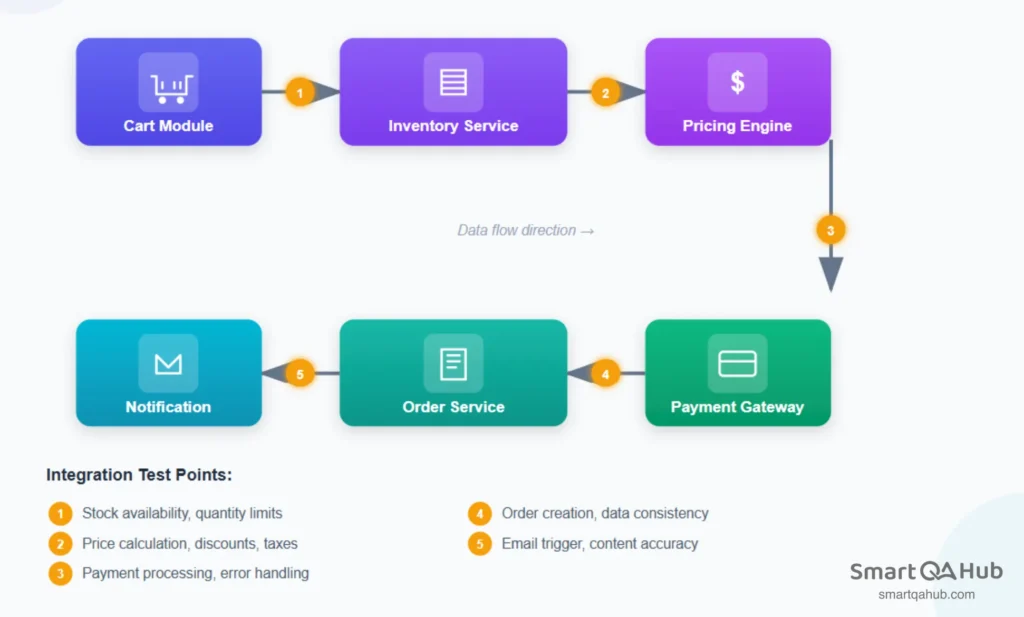
Each arrow between these components is an integration point and a potential failure point.
What to test at each integration point
Each integration point requires specific test scenarios to verify both successful data flow and proper error handling:
Cart → Inventory service:
- Does the cart correctly query current stock levels?
- What happens when an item is out of stock after being added to cart?
- Are quantity limits enforced correctly?
Cart → Pricing engine:
- Are item prices calculated correctly with current data?
- Do discount codes apply properly across the integration?
- Does the pricing engine handle currency and tax calculations?
Checkout → Payment gateway:
- Does payment data transmit securely?
- Are successful payments correctly confirmed?
- How does the system handle declined cards, network timeouts, or gateway errors?
Payment → Order service:
- Does a successful payment trigger order creation?
- Is all order data (items, prices, customer info) correctly passed?
- What happens if order creation fails after payment succeeds?
Order → Notification service:
- Does order confirmation trigger the email service?
- Does the email contain correct order details?
- What happens if the email service is unavailable?
Common bugs found at integration points
- Data format mismatches: The cart sends item IDs as strings; inventory service expects integers.
- Missing error handling: Payment gateway timeout crashes the checkout instead of showing a retry option.
- Race conditions: Two users buy the last item simultaneously; both orders succeed but only one item exists.
- State inconsistencies: Payment processes successfully but order creation fails, leaving the customer charged without an order.
This example illustrates why integration testing matters. Each component might work perfectly in isolation. The bugs emerge only when components interact.
Automated integration testing and CI pipelines
Manual integration testing works for initial exploration and smaller projects, but it doesn’t scale. As systems grow and teams ship faster, automated integration testing becomes essential.
Why automate integration tests
Automated tests run consistently, repeatedly, and quickly. They catch regressions immediately when code changes break existing integrations. They free testers to focus on exploratory testing and edge cases rather than repeatedly checking the same integration points.
Automation also enables continuous integration testing – running integration tests automatically whenever code is committed. This practice, central to CI/CD pipelines, provides rapid feedback. Developers learn within minutes whether their changes broke any integrations.
Integration testing frameworks and tools
Several integration testing framework options exist depending on your technology stack:
- Testcontainers: Spins up real databases, message queues, and other services in Docker containers for testing
- Selenium/Cypress: For testing integrations through the user interface
- REST Assured: Java library for API integration testing
- pytest with fixtures: Python testing with setup for integrated components
- Postman/Newman: API testing with command-line automation
The right choice of testing tools depends on what you’re testing. Database integrations might use Testcontainers. API integrations might use REST Assured or Postman. UI-driven integration tests might use Cypress.
Fitting into CI/CD pipelines
In a typical pipeline:
- Developer commits code.
- CI server triggers build.
- Unit tests run first (fast feedback).
- Integration tests run next (slower but essential).
- If all tests pass, code proceeds to deployment.
Integration tests are slower than unit tests because they involve real connections like actual database queries, real API calls, genuine service interactions. Teams often run a focused subset of integration tests on every commit, with full integration suites running nightly or before releases.
A practical approach for teams starting with automation: begin with manual integration testing to understand the integration points thoroughly. Once test scenarios are stable and well-understood, automate the most critical paths first. Expand automation coverage incrementally rather than trying to automate everything at once.
Integration testing vs. unit testing vs. system testing: Where it fits
Understanding where integration testing sits relative to other testing levels helps you apply the right approach at the right time.
The testing pyramid
The testing pyramid visualizes how different test types should be balanced:
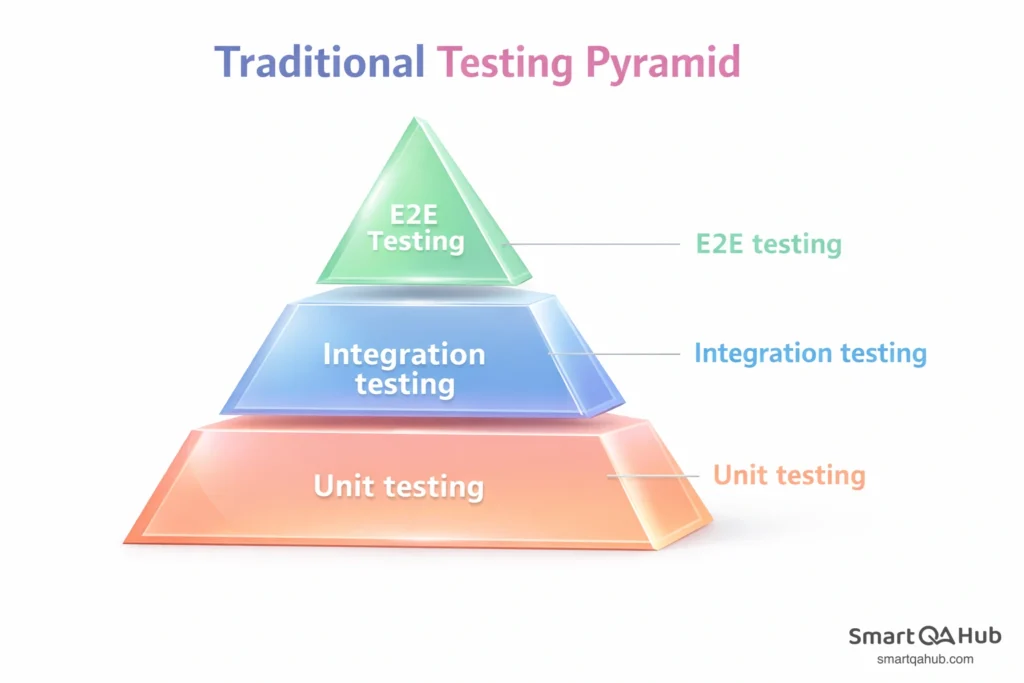
- Unit tests (base): Many small, fast tests covering individual functions and methods
- Integration tests (middle): Fewer tests covering component interactions
- System/E2E tests (top): Fewest tests covering complete user workflows
Each level has different characteristics:
| Aspect | Unit testing | Integration testing | System testing |
|---|---|---|---|
| Scope | Single function/method | Multiple components | Entire application |
| Speed | Very fast (milliseconds) | Moderate (seconds) | Slow (minutes) |
| Dependencies | Mocked/stubbed | Real or realistic | Full environment |
| Failure isolation | Easy: one function | Moderate: interface area | Hard: anywhere in system |
| Maintenance | Low | Medium | Higher |
How they complement each other
These testing levels don’t compete, they work together. Unit tests verify that individual testing pieces work correctly. Integration tests verify that pieces connect correctly. System tests verify that the complete product works correctly for users.
A bug might pass unit tests but fail integration tests. Your sorting function works perfectly (unit test passes), but it crashes when receiving data from the database because of an unexpected null value (integration test catches this). Similarly, integration tests might pass while system tests fail. All component connections work, but the complete user journey from login to checkout has a usability issue that only appears in end-to-end testing (e2e testing).
Relying on only one testing level creates blind spots. Teams that skip integration testing often face “works on my machine” problems – code that passes unit tests locally but fails when deployed because integration issues were never tested.
Integration testing in agile and DevOps environments
Traditional integration testing often happened at the end of software development cycles: all components built first, then integrated and tested. Agile and DevOps change this fundamentally. Testing shifts left, happens continuously, and becomes everyone’s responsibility.
Shift-left testing philosophy
Shift-left means moving testing activities earlier in the development process. Instead of waiting until features are complete, teams test integrations as soon as two components can connect.
In practice, this looks like:
- Developers write integration tests alongside feature code.
- Testers review integration points during sprint planning, not after development.
- Integration issues surface in days, not weeks.
- Fixes happen while context is fresh and code changes are small.
The earlier you find an integration bug, the cheaper it is to fix. A mismatched data format caught during development takes minutes to correct. The same bug found during release testing might require reworking multiple components.
Integration testing within sprints
Agile sprints demand that testing keeps pace with development. Waiting for a “testing phase” at the end doesn’t work when you’re shipping every two weeks.
Effective teams build integration testing into their sprint workflow:
- During planning: Identify integration points in upcoming stories. Which components will connect? What interfaces need testing?
- During development: Developers and testers collaborate on integration test cases. Automated tests are written alongside features, not afterward.
- During review: Integration tests run as part of the definition of done. A feature isn’t complete until its integrations are verified.
- During retrospectives: Teams discuss integration issues that slipped through. What tests were missing? How can test coverage improve?
This continuous approach replaces the big testing push at the end with steady, sustainable testing throughout.
Collaboration between developers and testers
DevOps blurs the line between development and operations. Similarly, modern integration testing blurs the line between who writes tests and who executes them.
Developers understand the code and can write integration tests that cover technical edge cases. Testers understand user workflows and can design tests that cover business-critical paths. The best integration test suites combine both perspectives.
Shared ownership also means shared tooling. When developers and testers use the same integration testing framework, tests become easier to maintain. A developer fixing a bug can update the related integration test. A tester discovering an issue can point directly to the failing test case.
Balancing speed with thoroughness
Agile and DevOps emphasize speed, but integration testing takes time. Real database connections, actual API calls, and genuine service interactions are slower than mocked unit tests. How do teams balance thorough testing with fast delivery?
Tiered test execution: Run critical integration tests on every commit. Run the full suite nightly or before releases. This provides fast feedback for most changes while maintaining comprehensive coverage.
Parallel execution: Integration tests that don’t share state can run simultaneously. A test suite that takes 30 minutes sequentially might complete in 5 minutes with parallelization.
Smart test selection: Some CI systems identify which integration tests are affected by a code change and run only those. If you modify the payment module, run payment integration tests — skip the unrelated inventory tests.
Risk-based prioritization: Not all integrations carry equal risk. Payment processing, user authentication, and data persistence deserve more testing attention than a logging service integration.
The goal isn’t to test everything on every commit. It’s to test the right things at the right time, catching integration issues before they reach production while maintaining development velocity.
FAQ: Frequently asked questions about integration testing
How long should integration tests take to run?
Should integration tests use a real database or a mock?
How many integration tests do I need?
Can I do integration testing without a dedicated QA environment?
What’s the difference between integration testing and end-to-end testing?
Who should write integration tests – developers or testers?
Start testing integrations that matter
Integration testing bridges the gap between isolated component testing and full system validation. It verifies that your software’s parts actually work together: that data flows correctly, interfaces behave as expected, and components communicate without breaking each other. The approach you choose matters: big bang testing works for simple systems, but incremental approaches like top-down, bottom-up, or sandwich reduce risk and make debugging easier for complex applications.
Start by mapping your system’s integration points and test the critical paths first. Build confidence in component connections before expanding to broader system testing. As your testing matures, automated integration testing and continuous integration practices help maintain quality at speed. The bugs hiding at interfaces are often the ones that hurt users most and integration testing finds them before they do.
Sources:
https://www.opkey.com/blog/integration-testing-a-comprehensive-guide-with-best-practices
https://testlio.com/blog/what-is-integration-testing/
https://www.parasoft.com/learning-center/iso-26262/integration-testing/
https://www.infoworld.com/article/2334355/a-new-kind-of-old-school-software-testing.html


