


Model Based Testing and the End of Endless Test Maintenance

 10 MIN
 15 Sep 2025
Model based testing is a practical, efficient way to design and automate tests. Instead of slogging through repetitive, manual test creation, you build models that generate full test suites in minutes. The result? Faster testing, broader coverage, and far less maintenance work.
Table of content
Model-based testing (MBT) helps you escape endless script maintenance and speed up testing. Instead of writing and constantly updating scripts, you build a model of the system that generates tests automatically. When requirements change, you just update the model, and tests adapt instantly.
Teams using MBT report cutting test cycles by more than half, improving coverage, and reducing repetitive work. Instead of wasting time on maintenance, you can focus on finding bugs and delivering value faster.
Want testing to be an accelerator, not a bottleneck? MBT makes it possible.
What is model-based testing and how does it work?
Model-based testing is a testing that shifts the focus from writing individual test cases to creating abstract models that describe the expected behavior of a system. These models act like a blueprint – instead of scripting every single test, you define the rules of how the system should respond, and MBT tools automatically generate the test cases for you.
During execution, the framework runs these generated tests against the application and verifies whether the actual behavior matches the expected one. When requirements change, you don’t need to rewrite scripts from scratch – you simply update the model, and the entire test suite adapts automatically. This makes MBT especially effective for complex applications with hundreds of possible user paths and scenarios.
What does MBT stand for testing? Unlike testing phases such as UAT (User Acceptance Testing) or SIT (System Integration Testing), MBT is not about when testing happens, but how it is performed. It transforms the creation, maintenance, and execution of tests throughout the software development lifecycle by separating what to test (system behavior in the model) from how to test (automatically generated scripts).
How models are created and used in MBT
Creating effective models starts with analyzing system requirements. Models typically capture:
- System states and transitions between them
- Business rules and decision logic
- User workflows and interactions
- Input/output relationships
- System boundaries and interfaces
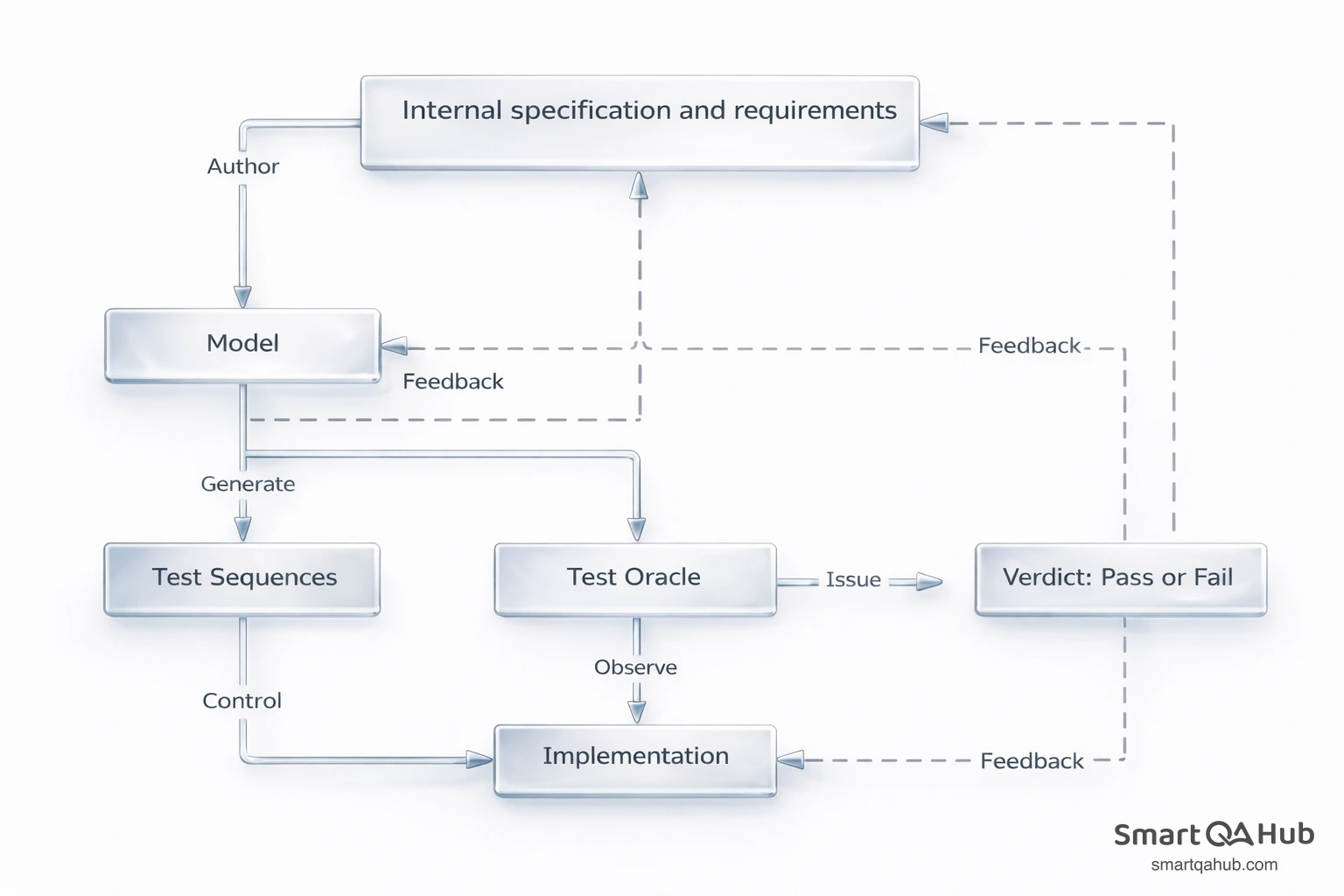
Source: https://msdn.microsoft.com/
A single model can generate thousands of test cases. For a banking application, one state model covering account transactions might produce 500+ test scenarios covering normal operations, edge cases, and error conditions. Creating these tests manually would take weeks – the model generates them in minutes.
Benefits of model-based testing
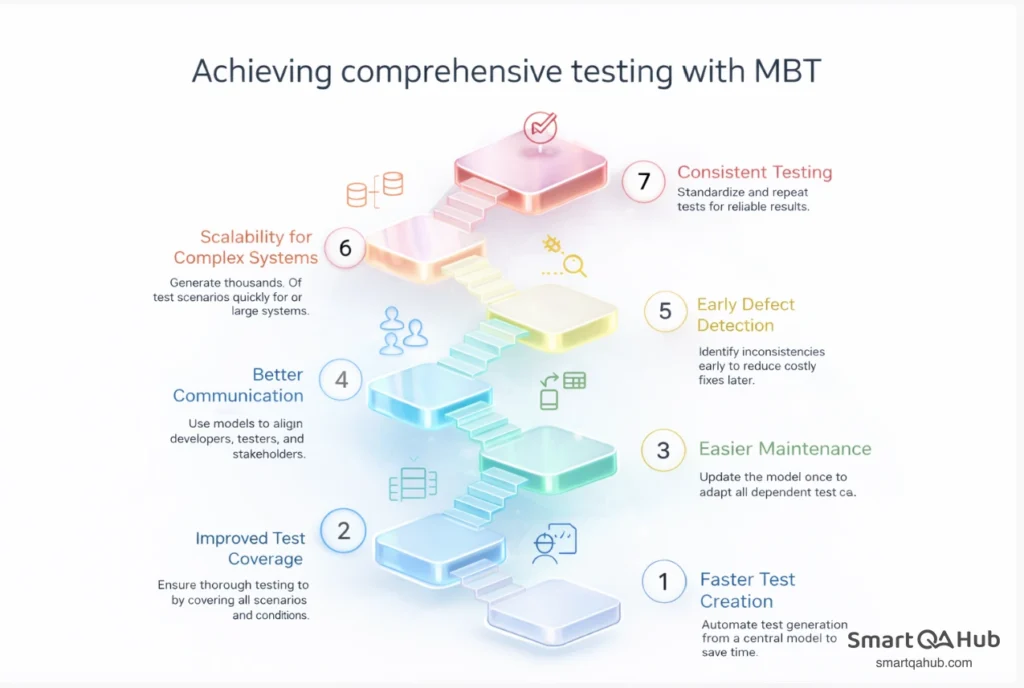
Model-based testing offers a structured approach to software testing by creating tests directly from system models. Below are the key benefits of adopting MBT.
1. Faster test creation
Instead of manually writing dozens or hundreds of test scripts, MBT allows you to generate tests automatically from a central model. This dramatically reduces the time needed to create comprehensive test coverage.
2. Improved test coverage
A single model can produce thousands of test cases, including normal scenarios, edge cases, and error conditions. This ensures that your testing is thorough and consistent, leaving fewer gaps in test coverage.
3. Easier maintenance
When system requirements change, you update the model once, and all dependent test cases adapt automatically. This eliminates the need to modify dozens of individual scripts and reduces the risk of human error.
4. Better communication
Models serve as a visual and structured representation of system behavior. They make it easier for teams – developers, testers, and stakeholders – to understand and align on requirements and workflows.
5. Early defect detection
By modeling system behavior before testing, MBT helps uncover inconsistencies, gaps, or ambiguities in requirements early in the software development process, reducing costly fixes later.
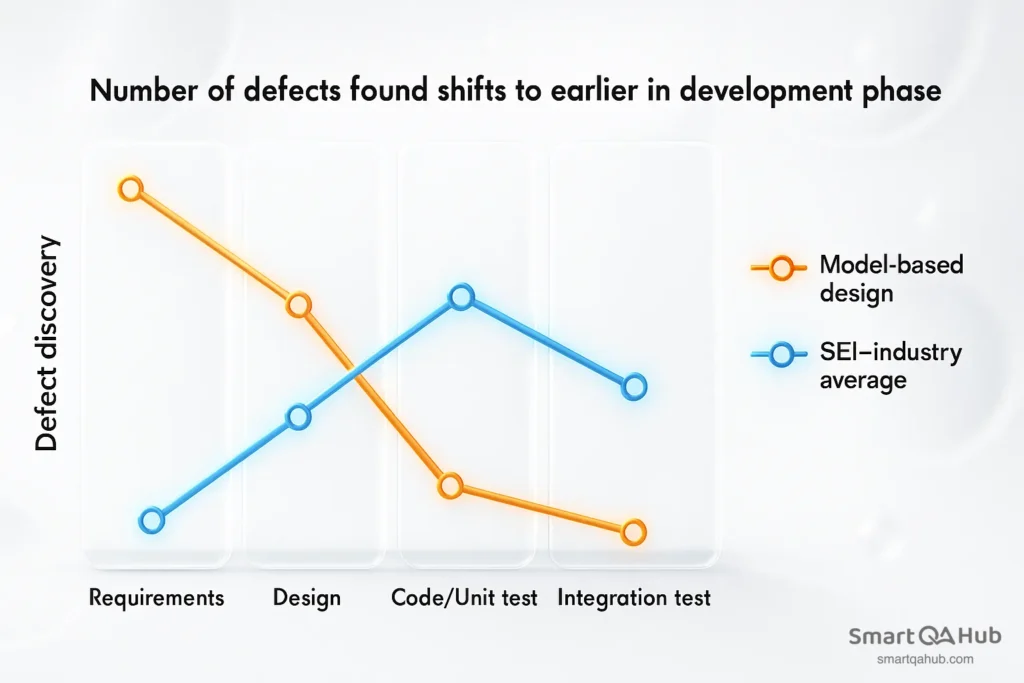
Source: https://www.mathworks.com/ (SEI = Software Engineering Institute)
6. Scalability for complex systems
For applications with hundreds of possible user paths or interactions, MBT can generate thousands of test scenarios quickly. This makes it ideal for large, complex software systems where manual testing would be slow and error-prone.
7. Consistent and repeatable software testing
Since new test cases are generated from the model, they are standardized and repeatable. This improves reliability and ensures that test results are consistent across different test cycles.
Pro tip: Treat MBT as an investment in efficiency and quality. By centralizing system knowledge in models, you not only speed up testing but also create a reusable asset that supports future development, regression testing, and risk analysis.
Model based testing techniques that improve efficiency
Model-based testing relies on creating abstract representations of the system to generate tests automatically. Several techniques are commonly used depending on the type of model and testing goals:
1. State-based testing
State-based testing uses state machines or state transition diagrams to represent the different states of a system and the events that trigger transitions between them. This technique generates tests that cover all possible states, transitions, and sequences of events, ensuring thorough verification of the system’s behavior.
It is ideal for applications with clearly defined workflows or operational modes, where it’s essential to test all possible interaction scenarios and ensure the system behaves as expected in every state.
2. Decision table testing
Represents business rules and conditions in a structured tabular format. Each row in the table corresponds to a specific combination of input conditions, with the expected output clearly defined.
This approach ensures that all possible rule combinations are tested, minimizing the risk of missed scenarios and providing comprehensive coverage of business logic.
3. Activity-based or workflow testing
These techniques use UML activity diagrams or flowcharts to model workflows and user interactions. This approach generates test sequences that cover different paths through the workflow, including parallel processes and decision points, ensuring that all possible user actions and process flows are thoroughly tested.
4. Sequence-based testing
Sequence diagrams are used to model interactions between system components over time. This approach focuses on validating correct communication, message passing, and the timing of interactions, ensuring the system behaves as expected during complex sequences of operations.
5. Control-flow or path testing
Control-flow or path analysis examines possible execution paths through the system, often using graph-based models. Tests are generated to exercise every path, helping to detect logic errors, unreachable states, and other issues that could compromise system reliability.
6. Model learning and adaptive techniques
Some MBT tools can automatically build models from system execution or logs. This technique is particularly useful for legacy systems or applications without complete documentation, allowing teams to generate test cases based on observed behavior rather than manually creating models from scratch.
Popular model-based testing tools and frameworks
Choosing the right tool can make the difference between a smooth model based software testing implementation and endless setup struggles. Several frameworks and tools have proven their value across different environments and project types, helping teams automate testing, improve coverage, and save time.
GraphWalker: Path-based testing made simple
GraphWalker is an open-source Java-based tool designed for teams taking their first test steps into model-based testing. Instead of writing individual test cases, you create models as directed graphs, where nodes represent states and edges represent transitions.
Tests are generated automatically by “walking” through these graphs using various algorithms. You can control how thorough the testing is by setting coverage criteria like “visit all edges” or “visit all vertices”.
With a command-line interface and REST API, GraphWalker integrates easily into existing CI/CD pipelines, allowing teams to start MBT without complicated setup. Its lightweight, flexible design makes it an excellent choice for projects with limited budgets or teams exploring model-based testing for the first time.
Spec Explorer: MBT for .NET applications
Spec Explorer is a popular choice for teams working in Microsoft environments. Fully integrated with Visual Studio, it uses a C#-based notation called Cord to create models of system behavior.
Once the models are defined, Spec Explorer automatically generates test cases that check whether the implementation matches the expected behavior. One of its standout features is visualization, which allows teams to see complex state relationships and workflows before running tests. This helps identify potential issues in the testing early, reduces errors, and improves overall automation testing efficiency.
Conformiq Creator: Enterprise-grade MBT
For large-scale enterprise projects with complex requirements, Conformiq Creator is a top choice. This commercial tool supports UML activity diagrams and state machines, enabling comprehensive modeling of system behavior.
It offers powerful enterprise features such as automatic test case prioritization, requirements traceability, and multi-platform test generation from a single model. For applications where manual testing would be slow or impractical due to scale, Conformiq Creator efficiently handles complexity, allowing teams to generate and manage extensive test suites with confidence and reliability.
MBT support in Selenium and Appium
For teams that want to adopt model-based testing without abandoning their existing automation frameworks, modern tools provide a practical path forward. Selenium can execute automated test cases generated by MBT tools, combining automated test generation with powerful testing capabilities.
Similarly, Appium integrates MBT-generated tests for mobile applications, allowing teams to validate complex testing workflows across devices. This approach enables organizations to gradually introduce model-based testing while keeping their current test execution infrastructure intact, making MBT accessible even in established testing environments.
Metrics: Test coverage vs. time spent comparison
Organizations that adopt model-based testing (MBT) consistently report measurable improvements across critical testing metrics. The transformation is often striking, showing not just time savings but also enhanced quality and efficiency in the testing process.
Test creation time
Before implementing MBT, creating a comprehensive set of test cases could take 100 hours or more. Testers had to manually design scripts for every scenario, update them with each requirement change, and maintain them throughout the development cycle. After adopting MBT, the same test coverage can often be achieved in just 35 hours, thanks to automated test generation from central models. This reduction in manual testing effort allows teams to focus on exploratory testing, edge cases, and higher-value activities rather than repetitive scripting.
Requirement coverage
Initial requirement coverage without MBT typically hovered between 65–75%, leaving gaps that could allow defects to slip through. With MBT, requirement coverage often jumps to 90–98%, because the modeling approach ensures that all states, transitions, workflows, and business rules are considered. By systematically generating tests from models, teams can achieve more thorough coverage than would be feasible with traditional test design methods.
Defect detection
In traditional testing, defects are frequently discovered late in the testing process, which increases the cost and complexity of fixing them. MBT shifts defect detection to earlier phases by validating system behavior directly against the model. Early detection not only reduces downstream defects but also improves overall software quality and reliability.
The bigger picture
These metrics highlight a key advantage of MBT: it doesn’t just save time, it transforms the testing process. Teams can deliver more robust software, detect issues earlier, and maintain a high level of confidence in their software releases – all while reducing the manual effort required for test creation and maintenance.
Pro tip: Tracking these metrics over multiple projects can help build a business case for MBT adoption, showing leadership how automation and modeling directly impact productivity, quality, and risk mitigation.
FAQ: Frequently asked questions about the model based testing
What is model based testing in software testing?
How does model-based test automation differ from traditional testing methods?
How much time can model based testing save compared to traditional methods?
What are some popular tools for implementing model based testing?
What types of models are commonly used in model based testing?
How does model based testing improve test maintenance?
Choose model-based testing for faster and smarter test automation
Model-based testing (MBT) replaces manual test creation with models that automatically generate complete test suites, cutting test design and maintenance time by 50–70% while improving coverage to 90–98%. Instead of writing individual scripts, teams create state transition diagrams, decision tables, or activity diagrams that represent system behavior; MBT tools then generate and maintain the tests.
This approach to testing centralizes updates – changing the model updates all affected tests – reduces costly late-stage defect fixes through early model validation, and scales easily across large, complex applications. Proven in industries from telecom to finance, MBT delivers faster regression cycles, broader coverage, and significantly less maintenance effort.


