


How CI/CD Tools Help Teams Build, Test and Ship Better Software
 14 MIN
 04 Mar 2026
CI/CD tools automate the building, testing and deployment of software and they’re changing how modern teams deliver quality products. Whether you’re running your first test case or trying to understand what “the pipeline failed” actually means, this guide breaks down everything you need to know. You’ll learn what continuous integration and continuous delivery really mean, how a CI/CD pipeline works and which tools your team might already be using. By the end, you’ll understand why these automated workflows matter for testers and how they make your job easier.
Table of content
What does CI/CD actually mean?
You’ve probably heard developers mention CI/CD in standups, seen it in job descriptions or noticed a Slack notification saying “CI/CD pipeline failed.” But what does it actually mean?
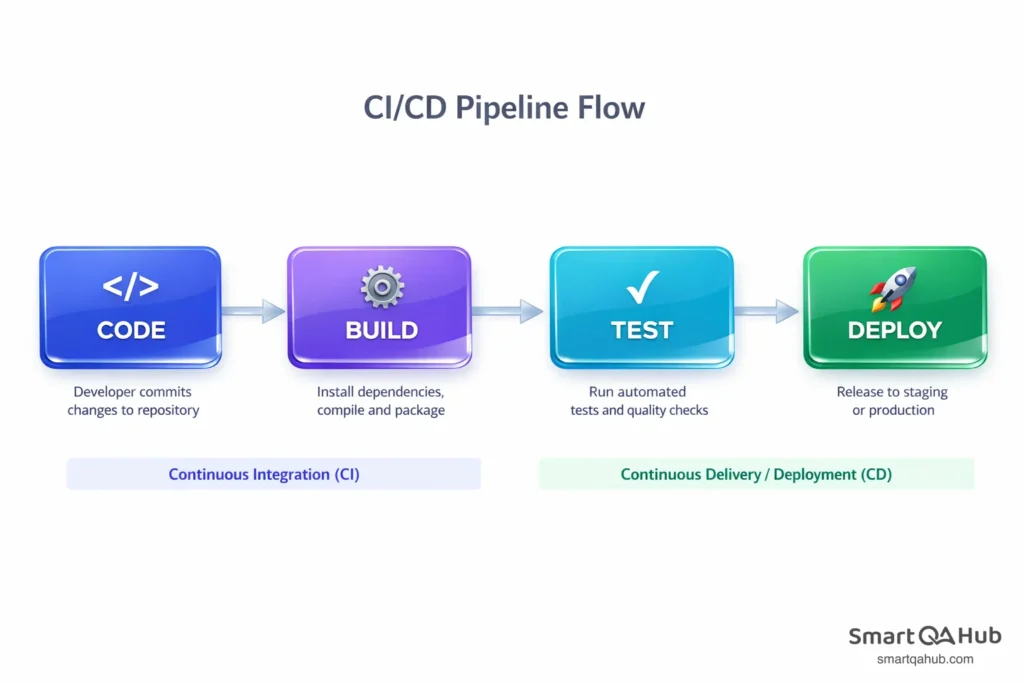
CI/CD stands for Continuous Integration and Continuous Delivery (or Continuous Deployment, more on that difference later). At its core, it’s a set of practices and tools that automate how software gets built, tested and released. Instead of developers manually compiling code, running tests and deploying to servers, CI/CD tools handle these repetitive tasks automatically.
Think of CI/CD as an assembly line
Think of it like an assembly line in a car factory. Raw materials (source code) enter at one end, pass through various stations (build, test, deploy) and a finished product (working software) comes out the other side. Each station has quality checks and if something fails inspection, the line stops before a faulty product reaches customers.
The CI/CD meaning becomes clearer when you break it into two parts. The “CI” focuses on regularly merging code changes and automatically testing them. The “CD” handles getting that tested code ready for release or actually releasing it. Together, they create a smooth, automated path from a developer’s laptop to your users’ screens.
Why should testers care? Because CI/CD fundamentally changes how and when testing happens. Instead of receiving a massive code dump at the end of a sprint, you get smaller, more frequent updates. Automated tests run constantly, catching issues early. And when something breaks, you know exactly which change caused it.
Continuous integration or CI: Where it all starts
Continuous integration is the foundation of CI/CD. The concept is straightforward: developers regularly merge their code changes into a shared source code repository and each merge triggers automated builds and tests.
Before CI became standard practice, development teams often worked in isolation for weeks or months. When it came time to combine everyone’s work, chaos ensued. Code conflicts everywhere, bugs that nobody could trace and the dreaded “it works on my machine” excuse. Integration was painful, unpredictable and often delayed releases by days or weeks.
Continuous integration flips this approach. Instead of one massive, painful integration at the end, teams integrate continuously, often multiple times per day. Each time a developer pushes code, the CI system automatically compiles the application, runs tests and reports the results within minutes.
CI in action: A real-world example
Here’s a practical example. Imagine an e-commerce team building a new feature. Developer A works on the payment form, Developer B handles the shipping calculator and Developer C updates the order confirmation page. With continuous integration, each developer pushes their changes to the shared repository several times daily. The CI system immediately builds the complete application and runs automated tests. If Developer A’s payment form accidentally breaks Developer C’s confirmation page, everyone knows within minutes, not weeks later during a stressful integration phase.
The most common continuous integration tools include Jenkins, GitLab CI, GitHub Actions and CircleCI. These tools monitor your code repository, detect changes and automatically execute your build and test scripts.
How continuous integration benefits testing
For testers, continuous integration is a game changer. Here’s why:
- Bugs surface early: When automated tests run on every code change, defects get caught while the code is still fresh in the developer’s mind. Fixing a bug discovered minutes after writing the code takes far less time than fixing one found weeks later.
- Faster feedback loops: You don’t wait until the end of a sprint to discover problems. CI provides constant visibility into code quality. If test failures spike after a particular commit, the cause is obvious.
- Consistent environments: CI systems build and test code in standardized environments. This eliminates the “it works on my machine” problem because everyone’s code runs through the same automated process.
- More time for meaningful testing: When automated tests handle regression checking and basic functionality, testers can focus on exploratory testing, usability and edge cases that require human judgment.
The CD explained: Delivery vs deployment
If continuous integration handles the building and testing, continuous delivery and continuous deployment handle what happens next. This is where the “CD” in CI/CD comes in and where some confusion often arises.
The terms sound similar, but they represent different levels of automation. Understanding the distinction helps you know what to expect in different work environments.
Continuous delivery means that every code change, after passing automated tests, is automatically prepared for release to production. The software is always in a deployable state. However, the actual deployment to production requires a manual approval step. Someone, a release manager, team lead or product owner, clicks a button to push the release live.
Continuous deployment takes automation one step further. Every change that passes the automated tests goes directly to the live production environment without human intervention. There’s no manual gate, no approval button. Code goes from a developer’s commit to live users automatically.
Putting it into practice
What is continuous delivery in practice? Imagine your team merges code on Monday. By Tuesday morning, that code has been automatically built, tested across multiple environments and packaged for release. It sits ready in a staging environment, fully tested and deployable. When the product team decides the timing is right, maybe after a marketing announcement or at the start of a new billing cycle, they approve the release and it goes live within minutes.
Continuous deployment works differently. That same code merged on Monday might be live in production by Monday afternoon, assuming all tests pass. No waiting, no manual approval. This approach requires exceptional confidence in your automated testing because there’s no human safety net.
Continuous delivery vs continuous deployment: What’s the difference?
Here’s a side by side comparison to clarify continuous delivery vs continuous deployment:
| Aspect | Continuous Delivery | Continuous Deployment |
|---|---|---|
| Automation level | Automated up to production | Fully automated including production |
| Manual step | Requires approval to deploy | No manual intervention |
| Release frequency | When business decides | Every successful build |
| Risk tolerance | Lower with human oversight | Higher, relies on test quality |
| Best for | Regulated industries, complex releases | Fast moving products, frequent updates |
| Testing requirements | Comprehensive | Extremely comprehensive |
When do teams choose one over the other? Continuous delivery suits organizations that need control over release timing, perhaps for compliance reasons, marketing coordination or complex deployment windows. Banks, healthcare software and enterprise applications often use this approach.
Continuous deployment process fits teams that prioritize speed and have built robust automated testing. Think of web applications, SaaS products and consumer apps where rapid iteration matters more than scheduled releases. Companies like Netflix and Etsy famously deploy to production hundreds of times per day.
Most teams start with continuous delivery and evolve toward continuous deployment as their testing matures and confidence grows.
Inside a CI/CD pipeline: How the pieces fit together
A CI/CD pipeline is the automated workflow that moves code from the software development process to production. It’s called a “pipeline” because code flows through it in stages, like water through pipes. Each stage has a specific job and code only advances if it passes the current stage’s checks.
Understanding pipeline stages helps you interpret those notifications and know where testing fits in the bigger picture.
Stage 1: Code commit: Everything starts when a developer pushes code to the repository. This triggers the pipeline automatically.
Stage 2: Build: The CI system compiles the code and creates executable artifacts. For web applications, this might mean bundling JavaScript files. For mobile apps, generating installable packages. If the code doesn’t compile, the pipeline fails here.
Stage 3: Unit tests: Fast, focused tests check individual components. These run in seconds or minutes and catch obvious bugs early. A failing unit test stops the pipeline immediately.
Stage 4: Integration tests: More comprehensive tests verify that different parts of the application work together. These take longer but catch issues that unit tests miss.
Stage 5: Deploy to staging: The tested build moves to a staging environment, a copy of production where further testing happens. This environment mirrors production as closely as possible.
Stage 6: Additional testing: Depending on the team, this might include performance tests, security scans, user acceptance testing or manual exploratory testing.
Stage 7: Deploy to production: The final step pushes the release to live users. In continuous software delivery, this requires approval. In continuous deployment, it happens automatically.
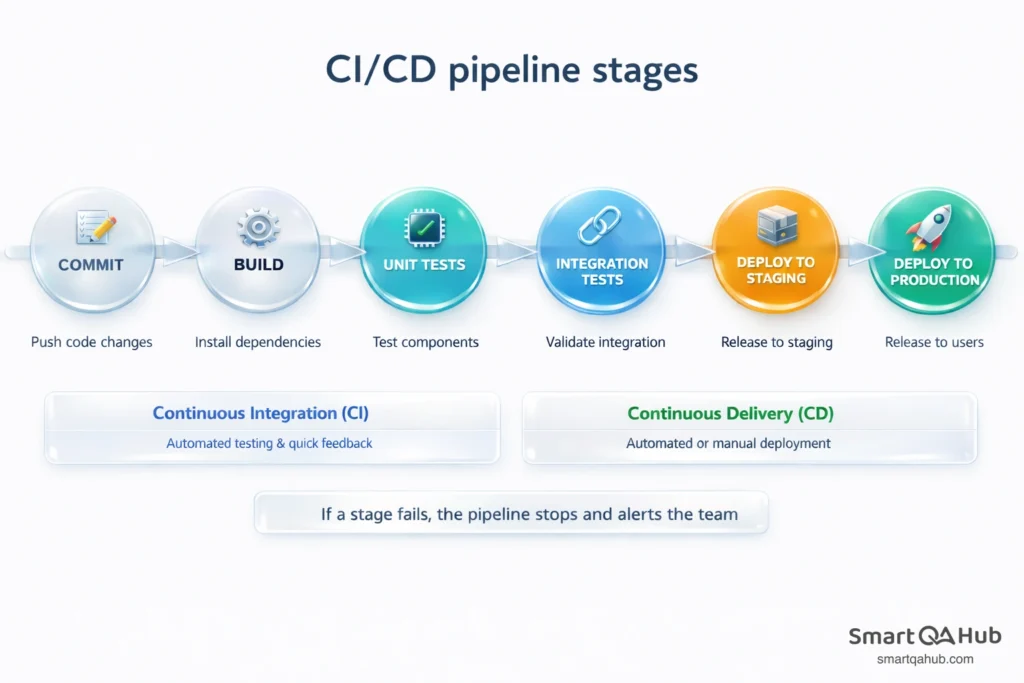
What does “pipeline failed” actually mean? Simply that code didn’t pass one of these stages. The notification usually tells you which stage failed. “Build failed” means compilation problems. “Unit tests failed” means code changes broke existing functionality. “Deployment failed” might indicate infrastructure issues.
Where testers fit in the pipeline
Your role touches multiple pipeline stages, even if you’re not writing the automation yourself.
- During unit and integration tests: These automated tests often come from developers, but testers frequently contribute test cases, identify scenarios worth automating and review test coverage.
- In the staging environment: This is where manual testing, exploratory testing and user acceptance testing typically happen. You verify that the application behaves correctly in a production-like setting.
- Monitoring test results: Understanding how to read pipeline results helps you quickly identify what broke and where. Most CI/CD tools provide detailed logs and test reports.
- When tests fail: You’ll often help investigate failures. Sometimes automated tests catch real bugs. Other times, the tests themselves need updating because requirements changed.
- The key insight: CI/CD doesn’t replace testers. It amplifies your impact by handling repetitive checks automatically, freeing you to focus on the testing that requires human insight.
Popular CI/CD tools you’ll encounter
The CI/CD tools landscape can feel overwhelming, but you’ll likely work with just one or two throughout your career. Here’s a practical overview of the major players.
Jenkins is an open source veteran. It’s been around since 2011 and remains incredibly popular, especially in enterprise environments. Jenkins is highly customizable with thousands of plugins, but that flexibility comes with complexity. Setting up and maintaining Jenkins requires dedicated expertise. You’ll recognize it by its butler logo and somewhat dated interface.
GitLab CI/CD comes built into GitLab repositories. If your team uses GitLab for version control, CI/CD is already there, no separate tool needed. Configuration lives in a .gitlab-ci.yml file in your repository. It’s popular with teams that want an all in one solution for code hosting, issue tracking and CI/CD.
GitHub Actions serves the same purpose for GitHub users. Workflows are defined in YAML files and can automate almost anything, not just building and testing code. Its tight integration with GitHub makes it especially convenient for open source projects and teams already on that platform.
CircleCI is a cloud based option known for fast builds and easy setup. It works with both GitHub and Bitbucket repositories. Many startups and mid-sized companies choose CircleCI for its balance of power and simplicity.
Azure DevOps is Microsoft’s comprehensive solution. It includes not just CI/CD (called Azure Pipelines) but also project management, artifact hosting and test planning. Enterprises using Microsoft technologies often standardize on Azure DevOps.
Travis CI gained popularity in the open source community with its simple configuration and free tier for public repositories. It’s less common now but still powers many projects.
TeamCity from JetBrains offers deep integration with their development tools like IntelliJ IDEA. Teams already using JetBrains products often find TeamCity a natural fit.
Which tool should you learn first?
Start with whatever your team uses. Seriously. The concepts transfer between tools and hands-on experience with your actual pipeline teaches more than tutorials about a tool you’ll never touch.
If you’re learning independently, GitHub Actions or GitLab CI/CD offer the gentlest introduction. Both have generous free tiers, extensive documentation and you can practice on personal projects without any infrastructure setup.
Don’t stress about mastering every tool. Understanding CI/CD concepts matters more than memorizing specific syntax. Once you grasp how pipelines work, adapting to a new tool takes days, not months.
Why CI/CD matters for software testers
CI/CD isn’t just a developer thing. It fundamentally changes how testing works and understanding it makes you significantly more effective.
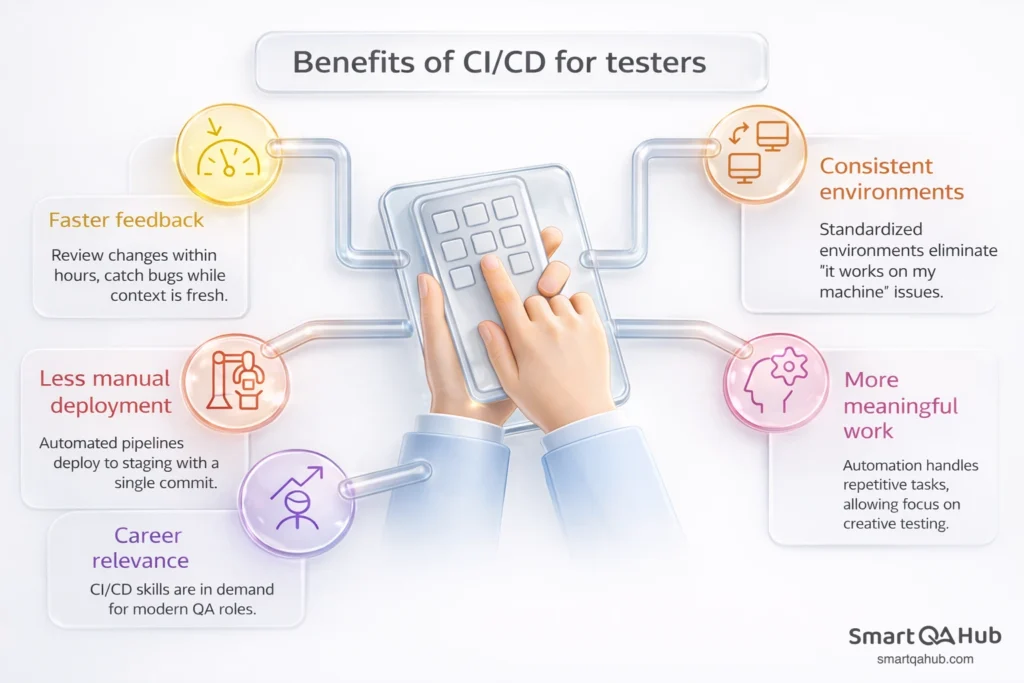
- Faster feedback on code quality: In traditional workflows, testers might wait days or weeks before seeing new code. With CI/CD, you can review changes within hours of development. Bugs get caught while context is fresh, making them faster to reproduce, investigate and fix.
- Consistent, reliable test environments: How many times have you struggled with environment setup? CI/CD pipelines create standardized environments automatically. The same configuration that runs in the pipeline can run locally, eliminating mysterious “it works on my machine” discrepancies.
- Less manual deployment headaches: Before CI/CD, deploying to test environments often required coordination with operations, manual file transfers and configuration tweaks. Automated pipelines deploy to staging with a single commit, so you spend time testing, not waiting for deployments.
- More time for meaningful work: When automated tests handle regression checking, smoke tests and basic functionality verification, you can focus on exploratory testing, usability evaluation and edge cases that require human judgment. Automation handles the repetitive; you handle the creative.
- Career relevance: CI/CD skills appear in most QA job descriptions now. Understanding pipelines, contributing to test automation and collaborating effectively with DevOps teams makes you valuable in modern development organizations.
Common mistakes when starting with CI/CD
Learning CI and CD comes with predictable stumbling blocks. Here’s what to watch out for:
- Skipping test automation basics: CI/CD amplifies your automated tests. If those tests are flaky, poorly designed or have gaps, CI/CD amplifies those problems too. Before worrying about pipeline configuration, ensure your test fundamentals are solid.
- Ignoring failed pipeline notifications: It’s tempting to tune out constant notifications, especially on busy teams. But a failing pipeline often means broken functionality. Get in the habit of investigating failures promptly or helping establish team norms about who responds to what.
- Not understanding what the pipeline actually tests: Many testers know that “tests run in the pipeline” without knowing which tests, what they cover or what they miss. Spend time understanding your specific pipeline: what’s automated, what’s not and where gaps exist.
- Expecting CI/CD to replace all manual testing: Automated pipelines excel at regression testing, build verification and catching obvious breaks. They can’t evaluate user experience, judge visual design or explore unexpected scenarios creatively. CI/CD complements manual testing; it doesn’t eliminate it.
- Treating pipeline configuration as “someone else’s job”: You don’t need to become a DevOps engineer, but understanding pipeline basics helps you contribute meaningfully. Suggesting test improvements, identifying missing coverage and debugging failures all require some pipeline literacy.
- Ignoring pipeline performance: Slow pipelines frustrate everyone. If your test suite takes two hours to run, developers avoid running it. Pay attention to test execution time and advocate for keeping the pipeline fast enough to be useful.
FAQ: Frequently asked questions about CI/CD tools
How long does it take to set up a CI/CD pipeline from scratch?
Can CI/CD work for small teams or solo developers?
What’s the difference between a CI/CD pipeline and DevOps?
How do you handle database changes in a CI/CD pipeline?
Start smaller, ship smarter
CI/CD tools automate the repetitive work of building, testing and deploying software. Continuous integration keeps code changes flowing smoothly into a shared repository with constant automated testing. Continuous delivery prepares every successful build for release, while continuous deployment goes further by releasing automatically.
For testers, CI/CD means faster feedback, consistent environments and more time for the testing that actually requires human judgment. Understanding how pipelines work and where testing fits within them makes you more effective and more valuable to modern development teams.
The tools vary (Jenkins, GitLab CI/CD, GitHub Actions and others), but the concepts remain consistent. Learn your team’s pipeline first, understand the stages and gradually deepen your knowledge.


