


Continuous Testing: What It Is and Why It Matters

 21 MIN
 22 Aug 2025
Continuous testing helps teams accelerate software delivery by integrating software testing early in the development and running it consistently throughout the entire process. This proactive approach helps catch bugs early – long before they can impact the production environment or reach the hands of users – saving a lot of time and effort later in the process. It’s a natural fit for modern development strategies like Agile, DevOps, and continuous delivery, where speed, feedback, and reliability are key to success.
Table of content
Today’s fast-paced software world demands both speed and quality — and that’s where incorporating continuous testing comes in. Are you a junior tester or an aspiring QA engineer wondering what continuous testing is and how it’s different from traditional methods? You’re in the right place.
In this article, we’ll explain the continuous testing meaning in a simple way, compare it with old-school testing, and show why it matters in Agile and DevOps. We’ll also introduce easy-to-use continuous testing tools for beginners and walk you through continuous automated testing step by step.
By the end, you’ll understand how continuous integration, continuous testing, and continuous delivery processes (CI/CD) all work together – and you’ll feel more confident using these practices in your own projects.
What is continuous testing? Core concepts explained
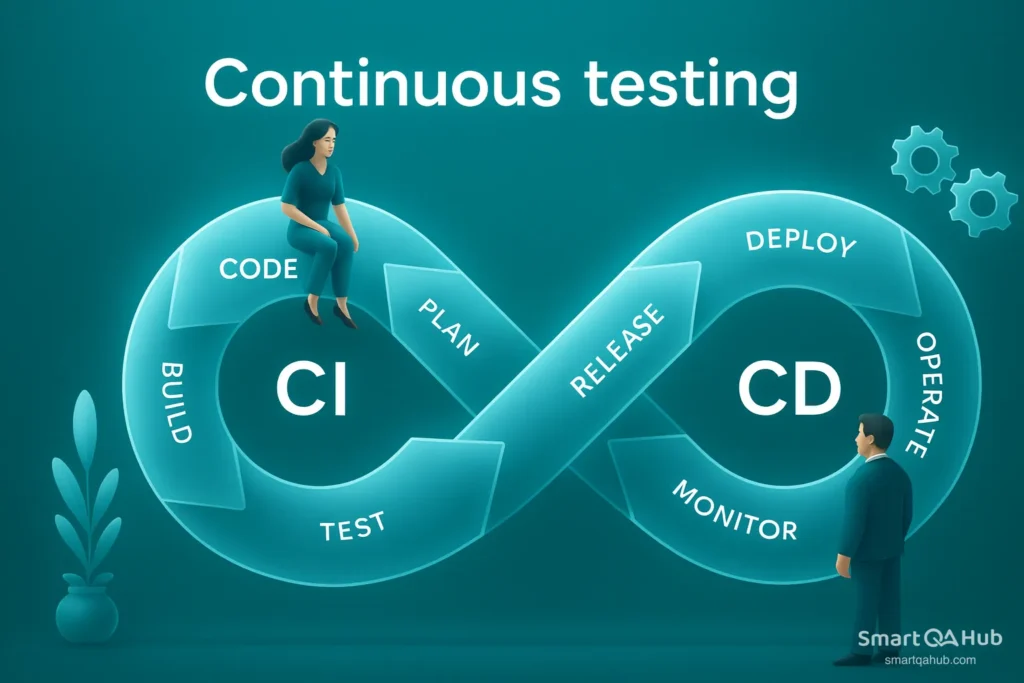
Continuous testing involves executing automated tests continuously at every phase of the software development life cycle, from writing code all the way to deployment. This way, teams catch defects early and often, speeding up development and improving software quality.
Automation is key here. Tests like unit, integration, and UI tests run automatically within the software pipeline. If a test fails, the team gets instant feedback and can fix issues before moving forward. When tests pass, code confidently moves to the next stage, such as staging or production.
Note: It’s spelled “continuous testing” (with two “u”s). Many newcomers accidentally search for continous testing (with one “u”), but the correct term is continuous. Keep this in mind as you encounter the term in documentation and job postings!
It’s essential for modern DevOps and powers smooth continuous integration, continuous testing, and continuous delivery (CI/CD) pipelines. The goal of continuous testing is to help software development teams avoid big testing bottlenecks and deliver reliable software faster.
Continuous testing vs. conventional testing methods
How does continuous testing differ from traditional testing? The main difference is when and how system testing is done.
In older methods like waterfall, testing was a separate step after development finished. Testers ran manual checks late in the project, which often led to bugs being found too late – causing delays and quality issues.
Continuous testing flips this on its head. Testing happens all the time during development, using automation to run tests on every code change. This means teams get fast feedback and can fix problems immediately, keeping projects on track and quality high.
To illustrate the key differences, here’s a quick comparison:
Benefits of continuous testing in today’s development environment
With today’s fast-paced development styles like Agile, DevOps, and continuous delivery, teams need to deliver software quickly and with great quality. Continuous testing plays an important role and has become a must-have because it helps meet both these needs. Here’s why it’s so important:
1. Faster time to market
Instead of waiting for a big testing phase at the end, continuous testing checks each small change right away. This means teams can release updates and new features much faster. The software gets better step by step — no long delays waiting for testing to finish.
2. Better software quality
When bugs are found quickly (sometimes within minutes of writing the code), they don’t pile up until the end. Catching problems early means fewer bugs slip into the final product, making the software more stable and reliable.
3. Continuous feedback and teamwork
Continuous testing gives the whole team instant feedback about the quality of the code. Developers, testers, and operations work together all along the way, not just handing work off. This creates a strong DevOps culture where everyone shares responsibility for making the software development lifecycle great.
4. Lower costs
Fixing bugs early is much cheaper than fixing them later. When problems are caught the same day they’re introduced, teams avoid costly delays and rework. Over time, this saves money and effort.
5. Meeting user expectations
Users today expect regular updates that work smoothly. Continuous testing often helps teams deliver these updates with confidence, keeping users happy and engaged.
Did you know that according to the World Quality Report 2023-24, organizations that fully implement continuous testing practices reduce their software release cycles by up to 40%?
In short, continuous testing keeps your software development fast, smooth, and high-quality – exactly what modern teams and users need!
Challenges of continuous testing and misconceptions
Continuous testing is super helpful, but sometimes people misunderstand what it really means. If you’re new to it, here are some myths and the real facts behind them:
Myth 1: “Continuous testing is just running automated tests all the time.”
Reality: The truth is, while automation plays a key role, continuous testing goes far beyond simply hitting the “Run” button. It includes planning what to test, analyzing results, improving tests, and working together as a team. Think of it as a full quality strategy, not just pushing a button.
Myth 2: “Continuous testing is only for Agile or DevOps teams.”
Reality: It’s true that DevOps and Agile helped make continuous testing popular, but you don’t have to be in those teams to use it. Even if your team isn’t fully Agile yet, you can start automating tests and running them often. You can even use mock environments or virtual services to test early. So, start where you are – you don’t need to wait for a perfect setup.
Myth 3: “Continuous testing means no more need for manual testers.”
Reality: Nope! Manual testing (especially exploratory testing and usability testing) still plays a crucial role. Automation handles repetitive checks, but humans are much better at exploring the app, finding tricky bugs, and judging usability. Manual testers also design smart tests and analyze tricky results. Continuous testing actually helps testers by freeing them from boring tasks so they can focus on the fun, creative testing strategies.
Myth 4: “Continuous testing is just a buzzword and doesn’t really help.”
Reality: Continuous testing really works! Teams using it release software faster and with fewer bugs. Automating repetitive tests and engaging QA from the start of development helps save time and boost quality.
It’s not just hype – it’s becoming a standard best practice everywhere.
In short, continuous testing offers a smart, teamwork-driven approach that helps deliver better software faster. Don’t fall for the myths – give it a try!
Continuous testing tools for beginners
One of the most common questions from new testers is: “What tools do I need for continuous testing?” The good news is that there’s a rich ecosystem of tools to help you automate tests, manage your testing process, and integrate with development pipelines. As a beginner, you don’t need to master every continuous testing tool out there. Start with a few essentials from each category – this will give you a solid foundation to build on.
Essential continuous testing frameworks you should know
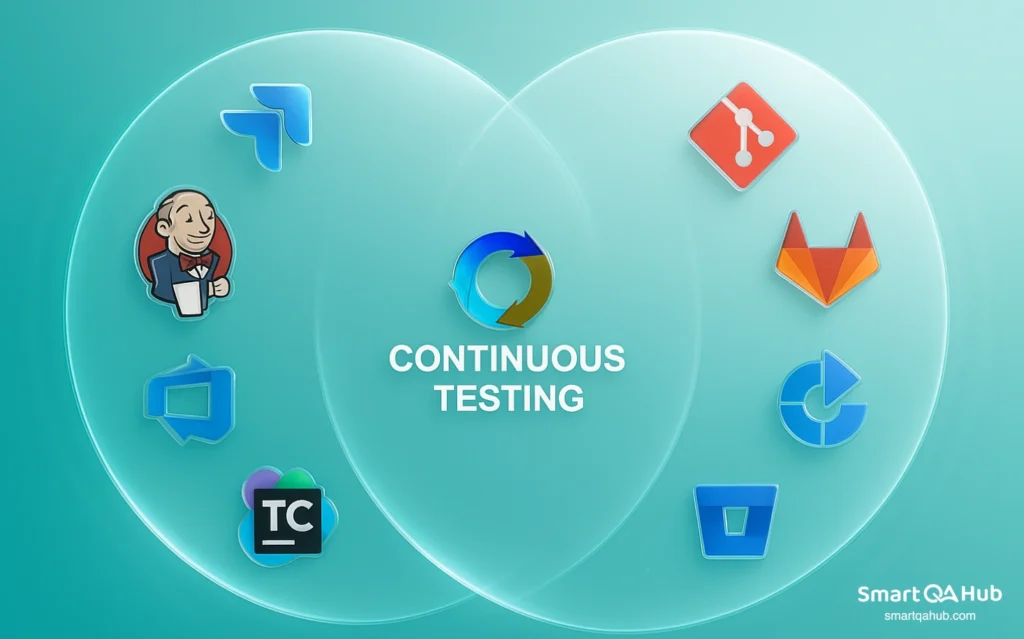
Test automation frameworks are the foundation of continuous testing. They help you write and run tests automatically, saving time and catching bugs early. Here are some popular frameworks you should know about:
1. Selenium
Selenium is an open-source automation tool that helps you test web applications across different browsers. It supports various programming languages like Java, Python, C#, and JavaScript, making it versatile for developers and testers alike. By mimicking actual user interactions on websites, Selenium is widely favored for testing browser-based user interfaces. Its flexibility and huge community support make it a great starting point.
2. Appium
Appium is like Selenium but for mobile apps. It’s open-source and works for both iOS and Android. It uses similar methods and syntax to Selenium, so if you know Selenium, you’ll feel at home. Appium lets you automate software testing that interacts with mobile app interfaces.
3. JUnit / TestNG (and other xUnit frameworks)
These are popular frameworks for writing unit tests – small tests that check individual pieces of code. JUnit and TestNG are for Java, PyTest or unittest for Python, NUnit for C#, and more. Unit testing runs fast and catches bugs early, which makes them super important in continuous testing.
4. Cucumber
Cucumber facilitates behavior-driven development (BDD) by allowing you to write test scenarios in plain English with a straightforward syntax called Gherkin. This approach helps non-technical team members easily grasp the tests, improving collaboration among developers, testers, and business stakeholders. Additionally, Cucumber works with various programming languages.
5. Cypress
Cypress is a newer, JavaScript-focused framework that’s gaining popularity for front-end web testing. It’s known for being fast and easy for developers to use, making it a solid choice if you work with modern web apps.
These are just a few examples – there are many others like Robot Framework (keyword-driven testing) or Playwright (web testing). The key is to pick a framework that matches your project’s technology and start learning it step by step.
Pro tip: Don’t get overwhelmed by all the choices.
Start with one framework (Cypress is great for beginners in web testing) and practice writing simple automated tests. Once you get the hang of concepts like finding elements, checking results, and organizing tests, those skills will transfer easily to other tools.
Test management and reporting tools
Automation scripts are useful, but for continuous testing to work effectively, you also need tools that organize your tests and help share the results with your development and testing teams. Tracking test cases, test runs, and outcomes is key for everyone to stay on the same page. Here are some important types of tools to know:
Test management software
These tools help you plan, organize, and keep track of your tests. Popular options include TestRail, qTest, Zephyr for Jira, and the open-source TestLink. They let you store your test cases, schedule test runs (manual and automated), record results, and generate reports. Having a test management tool means you always know what’s been tested and what’s still left, which is crucial when testing happens continuously.
Bug tracking systems
When tests find bugs, you need to log and manage them properly. Tools like Jira, Azure DevOps, and Bugzilla are widely used to report defects, assign them to developers, and track fixes. Many test management tools integrate with bug trackers. For example, a failed automated test can automatically create a bug ticket in Jira, saving time and keeping everything connected.
Reporting and dashboard tools
Continuous testing produces lots of data – test results, coverage info, trends, and more. Reporting tools collect this data and show it in easy-to-understand dashboards. Allure Report is a popular open-source option that turns test results into clear graphs and summaries. It works with many test frameworks and creates interactive reports. Also, many CI/CD platforms like Jenkins and GitLab have built-in dashboards to track test results and spot flaky tests or problem areas quickly.
If you’re just starting with a few automated tests, you might not need all these tools right away. You can use spreadsheets or simple trackers at first. But as you grow into continuous testing on real projects, these tools become very helpful. They keep your testing organized, make collaboration easier, and ensure everyone knows what’s covered.
For example, linking automated test results to user stories or requirements in a test management tool helps show exactly what’s been tested and what’s missing. As you gain experience, getting comfortable with at least one test management tool and using reports from your testing frameworks will boost your effectiveness.
Continuous integration platforms with testing support
To make continuous testing truly work, you need a Continuous Integration (CI) or CI/CD platform. These systems automatically build your app and run tests every time someone changes the code. They connect the whole process like this:
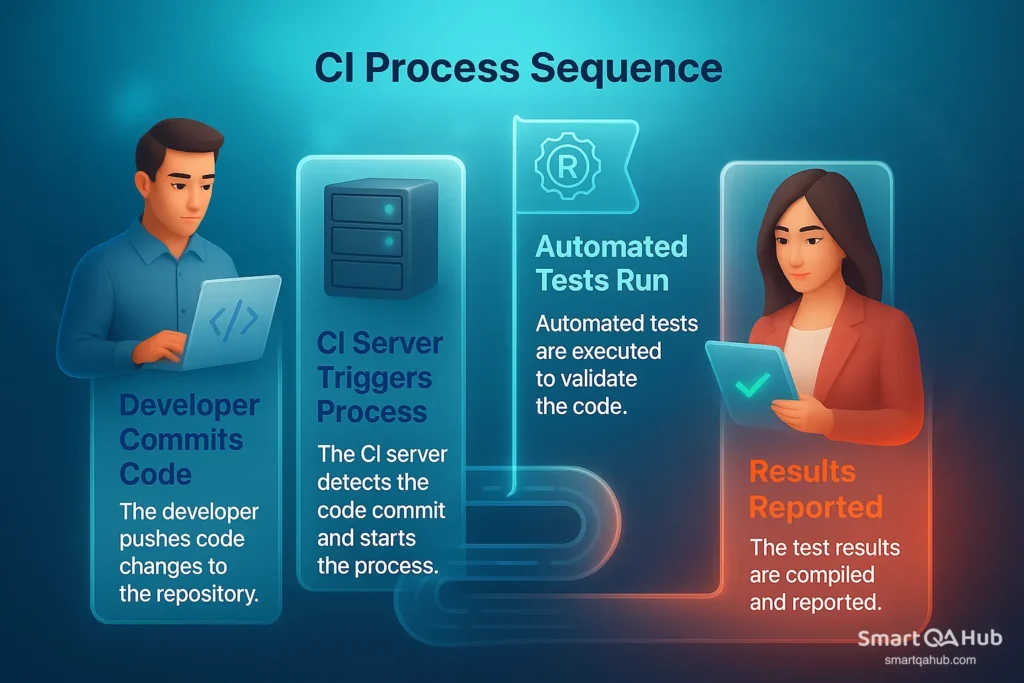
If a test fails, the CI platform can alert the team or even stop the bad code from moving forward.
Popular CI/CD platforms (great for beginners)
Jenkins
Jenkins is a very popular open-source CI server. It’s highly customizable with tons of plugins. You can create pipelines to check out code, build your app, run tests, and deploy or share results. Jenkins lets you schedule test runs (like nightly regression tests) and automatically run tests on every code change or pull request. Its dashboard shows test results and trends, helping teams catch issues early. Many QA teams love Jenkins for its flexibility and strong community support.
GitHub Actions
If your code lives on GitHub, GitHub Actions offers built-in CI features. You write a simple workflow in YAML that might say, “Run tests on every push.” It’s cloud-based and easy to use, making it perfect for beginners. It integrates right inside your GitHub repository so setup is quick.
GitLab CI/CD
GitLab has its own integrated CI/CD system. You define pipelines with a .gitlab-ci.yml file, and GitLab runners execute your jobs on every commit. GitLab CI/CD is free for most use cases and supports advanced features like parallel testing and containerized builds.
Other options
There are many other CI platforms like Azure DevOps Pipelines, CircleCI, Travis CI, Bitbucket Pipelines, and TeamCity. Whether cloud-hosted or self-managed, they all help automate building and testing your software.
Why integrate automated tests into CI/CD?
Connecting automated tests to your CI/CD pipeline means tests run automatically every time new code arrives. For example, Jenkins can run your Selenium tests on every code merge and produce a test report. You can set “quality gates” — rules that fail the build if critical tests don’t pass. This stops bugs early and keeps your codebase stable.
Many teams schedule test suites to run nightly or with every deployment. This constant checking helps catch issues early and ensures reliable releases.
Implementing continuous automated testing: A step-by-step guide
How do you go from understanding continuous testing to implementing continuous testing on a project? You can start small and gradually expand – the key is to integrate testing into your workflow incrementally.
Setting up your first continuous testing environment
Step 1: Set up version control and a CI pipeline
If your project isn’t already using version control (like Git), begin there – it’s a must-have for continuous integration. Once your code is in a repository (for example, GitHub or GitLab), set up a CI pipeline. You can install Jenkins or use a cloud CI service to watch your repository. The goal: every time new code is pushed, the CI server automatically builds your project and starts running tests.
Step 2: Pick and configure your test framework
Choose a test framework that fits your project – like JUnit for unit tests or Selenium for web UI tests. Write a few simple tests just to make sure everything is connected properly. For example, create a unit test that always passes – just to verify your setup works. Try running the tests locally first before moving on.
Step 3: Hook your tests into the CI pipeline
Update your pipeline configuration to run the tests automatically. In Jenkins, add a step in your Jenkinsfile or job that runs the test commands (like npm test or mvn test). In GitHub Actions or GitLab CI, add a testing job or stage. The idea is that after the code builds, the pipeline runs your automated tests and reports the results.
Step 4: Prepare the test environment and data
Think about where your tests will run. Will they use a local development database, or a staging environment? Make sure the required test data and configurations are ready. Beginners often start with an in-memory database or a simple dev environment. If your tests call external services (APIs, for example), use stubs or mocks initially. Your CI pipeline should have access to all needed environment variables or files to run tests smoothly – for example, running Selenium tests with a headless browser.
Step 5: Run your pipeline and improve
Make a test commit and watch your CI pipeline in action. It should build the code and run the tests automatically. If anything breaks (like missing files or service errors), adjust your setup accordingly. Tweaking is normal during the first runs. Once everything passes, congrats! You now have a basic continuous testing setup – every new code change will trigger automated tests.
Pro tip: Start small. Don’t try to automate every single test case on day one. Begin with a handful of critical tests in your pipeline.
This might be just a smoke test to verify the build, or a few unit tests for core functions. It’s better to get the pipeline running fast and reliably with a few tests than to overwhelm it with hundreds at first.
You can gradually expand your test suite as you gain confidence. Continuous testing is an iterative journey – build it up step by step, and you’ll avoid being overwhelmed while still making steady progress.
Creating effective test cases for continuous testing
Why it matters? A continuous testing setup is only as good as the test cases behind it. Since tests run frequently and automatically, they must be reliable, focused, and easy to maintain.
Tips for writing solid test cases
- Automate what matters most: Focus on high-impact, repeatable tests first.
- Keep tests atomic: Each test should check one thing to simplify debugging.
- Use real-world data: Input variations help reveal edge-case bugs.
- Be clear and self-cleaning: Make assertions obvious and ensure tests don’t leave a mess behind.
- Control your environment: Use stable and isolated test setups for consistent results.
- Refactor often: Remove outdated tests, improve flaky ones, and keep your suite lean.
Pro tip: 100 solid tests are better than 500 flaky ones. Focus on quality, not quantity.
Also, involve developers in test reviews – they know the code and can suggest better strategies or edge cases.
Best practices to continue testing throughout development
Continuous testing isn’t a one-time setup – it’s a practice that evolves with your project. Here’s how to ensure the effectiveness of continuous testing:
- Test early and often: Don’t wait. Run tests from the first commit and throughout development.
- Automate wherever possible: Unit, API, and UI tests – automate what can be automated.
- Include testing in every pipeline stage: Run tests on every commit, merge, and deployment. Make it part of the continuous CI/CD routine.
- Use realistic test data: Match production-like scenarios (but avoid sensitive data).
- Collaborate across teams: Quality is everyone’s job. Developers, testers, and product owners should all contribute to application testing.
- Keep evolving: Monitor flaky tests, speed up slow ones, and add new tests as features grow.
Continuous testing = continuous improvement. Tweak, tune, and adapt your tests as your app and team evolve.
If you follow these principles, your continuous testing setup will stay effective over time – giving you fast feedback and the confidence to ship with quality.
How continuous delivery testing improves release quality
Continuous testing doesn’t stop once code is merged – it plays a vital role in the continuous delivery phase as well. “Continuous delivery testing” refers to the tests and checks that occur in the later stages of the software delivery pipeline (staging, pre-production, and even production monitoring) to ensure each release is truly ready for customers. When done right, this dramatically improves release quality. Here’s how:
1. End-to-end verification
Each build runs tests like integration, performance, and acceptance to ensure readiness for release.
2. Immediate feedback
Staging and post-deployment tests catch issues early and reduce the risk of defects reaching production.
3. Improved user confidence
UI and production-level tests help maintain quality and boost user trust in frequent updates.
4. Faster, safer releases
Frequent, high-quality releases are made possible through automated testing at every pipeline stage.
Continuous delivery testing bridges the gap between “it works on my machine” and “it works in production.” By the time you hit the Release button (or often, it’s an automated release), you already know the build has passed dozens of checks. This leads to far fewer surprises in production and a smoother experience for end users.
Continuous testing trajectory: You can be successful
Getting started with continuous testing can feel overwhelming – new tools, new workflows, new expectations. But you don’t need to master it all at once. Many testers start small and build up.
Here’s how to grow:
- Begin with basics: Automate a few key test cases in a CI pipeline.
- Build consistency: Gradually add more tests and improve testing coverage.
- Embrace collaboration: Work with developers and DevOps to integrate testing into the pipeline.
- Stay curious: Learn from tutorials, communities, and real project feedback.
As you gain experience, you’ll spend less time on repetitive testing and more on meaningful tasks like designing scenarios, improving quality gates, and analyzing trends.
FAQs – Frequently asked questions about continuous testing
How is continuous testing different from regular automated test tools?
How does continuous testing relate to continuous integration and continuous delivery (CI/CD)?
Does continuous testing mean we don’t need manual testers anymore?
Can small teams or projects that aren’t “agile” still do continuous testing?
What is “continuous delivery testing” and how is it different from regular continuous testing?
Conclusion: Continuous testing is a mindset shift that pays off
Continuous testing integrates quality into every stage of development, rather than treating it as a last-minute step. It helps catch bugs early, reduce manual work, and release stable software.
The key benefit is fast feedback – tests run with every code change, so you act on real data, not guesses. Start small, automate one test at a time, and build from there. Continuous testing isn’t just a trend; it’s smart engineering.


