


Black Box Testing: How to Test Clearly without Seeing Inside

 15 MIN
 23 Aug 2025
Black-box testing is a testing method that makes it easier to get started with software application testing, especially for beginners. If you’re wondering about the black box testing meaning, it’s quite simple: it’s a testing approach where you test a web application without knowing anything about its internal code or logic.
Table of content
With black box type of testing, you don’t need to understand or look at the code at all. It allows you to think like a user – pressing buttons and entering data – while treating the software’s internals as a mystery. The result? You catch bugs and verify functionality from an end-user perspective, without needing programming knowledge.
Black box meaning and why it accelerates cycles of testing process
Black box testing is a technique testing web applications based only on what goes in and what comes out, without knowing anything about how it works inside or how the code is written. You treat the software like a sealed “black box”: you provide an input and observe the output, without peeking inside at how the result was produced.
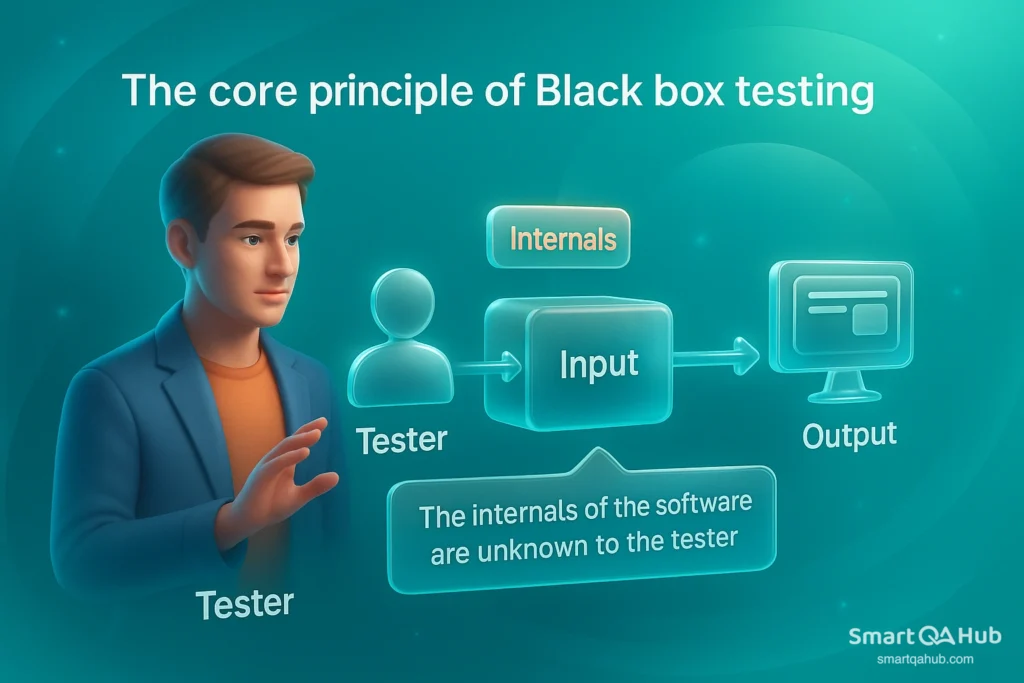
This core principle makes black box testing especially friendly to newcomers and fast to implement. You don’t need to be a developer – anyone with a clear understanding of the requirements can start testing. In fact, black box testing is often less time-consuming than white box testing because there’s no need to study the code or architecture. Testers can jump straight to designing test scenarios from user stories or specs. Below are a few reasons black box testing can accelerate testing cycles:
- Fast start, no coding needed: You don’t need to know how to code to do black box testing. Even beginners or subject matter experts can jump in right away.
- No wasted effort: Techniques like equivalence partitioning let you test just one input from each group, so you avoid repeating the same kind of tests.
- Quick automation: Black box tests can often be automated using tools, making repeat testing much faster and saving time in the long run.
Covers more, faster: Black box testing focuses on how the app behaves from the outside, so you can quickly test key user flows without worrying about the internal code. Since you act like a real user, you’re more likely to find real-world issues — and do it efficiently.
Pro tip: Faster feedback in agile teams
In agile and fast-paced teams, black box testing is a great way to validate new features quickly. You don’t have to wait for code documentation or internal knowledge transfers – just grab the latest build and start testing functionality of software against acceptance criteria.
Getting started with manual black box testing
As a beginner, manual black box testing is a great way to start validating software. Manual means you, as the tester, are executing the tests by hand (clicking through the UI, typing inputs, observing outputs) rather than using an automated script. Here are some practical tips for getting started with manual black box testing:
- Start with the requirements: First, understand what the software should do. Read the feature details or user story. For example, if you’re testing a payment form, know what a successful payment should look like, and what happens when it fails.
- Act like a real user: Use the app as a typical user would. Click buttons, fill out fields, and explore the interface. Think about real situations – like “What if I enter an invalid email?”
- Match inputs to expected results: For each feature, create test cases by giving specific inputs and writing down what you expect to happen. If the result matches your expectation, the test passes. For example, logging in with valid credentials should take you to the dashboard – that’s a test case.
- Test normal and unusual cases: Don’t stop at just the correct inputs. Try edge cases and invalid data too. For instance, if a field accepts ages from 1 to 100, test something normal (30), the limit (100), and an invalid one (like 0 or 150).
- Keep notes and observe results: Write down your test steps and what happens. If something doesn’t behave as expected – like a correct input being rejected – it could be a bug. It’s your job to report those issues clearly.
Performing these steps manually gives you a solid understanding of the software’s behavior. It’s normal to start manual – as you gain experience, you can look into automating repetitive tests. In fact, manual black box testing and automation go hand-in-hand: you first figure out what to test manually, then you can use tools to speed it up.
Pro tip: Remember that manual black box testing can become time-consuming for highly repetitive tasks, so plan to automate those cases for efficiency in large projects.
When to perform black box testing
In many situations, black box testing is the best choice. Here are some common cases where it makes sense:
- Checking if new features work properly: When a new feature or user story is finished, black box testing verifies that it behaves as expected – without reading the code. For example, test a “forgot password” feature by entering an email and checking if the reset message is sent.
- User acceptance testing (UAT): Before release, black box testing is often used during UAT. Business users or end-users run through set scenarios to check if the software feels right and meets their needs.
- No access to internal code: Sometimes you test systems you don’t have full access to, like third-party APIs or tools. Black box testing is ideal here – you use inputs, observe outputs, and rely on documentation. For example, test a payment gateway using its public API.
- Fast regression testing: After bug fixes or updates, you can quickly re-run key black box tests (like login or checkout) to make sure nothing else broke. It’s a simple way to catch issues without diving into the code.
- Simulating security attacks: When testing security from the outside – like when ethical hackers try to find weaknesses – black box testing is used. These testers behave like real attackers, with no inside access.
In general, use black-box testing techniques whenever you want an unbiased, user-level assessment of the software. It’s especially useful early in web application testing, when you might not have the full system knowledge, or whenever the main concern is “does the software meet its outward requirements?”
Types of black box software testing
Not all black box testing is the same. In fact, there are several black box testing examples, each focusing on specific areas of the software. You can think of them as different testing methodologies to inspect a system without opening it up. The three main categories are:
- Functional testing – what the software does
- Non-functional testing – how well the software does it
- Regression testing – making sure nothing broke after updates
Let’s break each type of software testing down in a beginner-friendly way.
Functional black box testing
This is the most common example of black box testing. It checks if the software features work as they should, based on the requirements. You don’t care how the feature was built or what the code looks like – you just enter inputs and expect correct outputs.
Example: Test a login page. Try logging in with the correct credentials – it should work. Try with wrong ones – it should show an error message.
Other examples include:
- Filling out and submitting forms
- Clicking buttons to see if pages load correctly
- Uploading files and checking if they’re saved
Common sub-types of functional black box tests:
- Smoke testing: Quick basic checks (e.g.: Does the app start? Does the login button work?)
- Integration testing: Ensures different parts/modules of the app work together
- System testing: Checks the whole system end-to-end
Bottom line: Functional testing is a black box testing type. All functional tests can be done using black box testing methods, and they make up a large part of most testing tasks.
Non-functional black box testing
While functional testing focuses on what the software does, non-functional testing is about “how well” it does it. You still don’t need to see the code – just observe behavior, speed, look, feel, and overall quality.
Examples of non-functional black box testing:
- Performance testing: Does the app respond quickly under heavy load? (e.g.: Does the page load in under 2 seconds when 1000 users are online?)
- Usability testing: Is the UI user-friendly? Can real users complete tasks easily?
- Compatibility testing: Does the app work on different devices, browsers, or operating systems?
- Security testing: Are there any visible weaknesses an outsider could exploit?
Pro tip: These tests help ensure the app is not just functional, but also usable, stable, and secure. They complement functional tests to give a complete view of software quality.
Regression black box testing
Regression testing checks that everything still works after a change. You simply re-run old tests on the new version of the app to make sure no new issues were introduced.
Example: Last week, the checkout process worked fine. Developers updated the payment system this week. You re-run the same checkout tests to confirm it still works. If something that used to work is now broken – that’s a regression bug.
You don’t need to look at the code to spot regressions. Just compare the old behavior with the new behavior.
Regression black box tests can check:
- Functional features (e.g. login, signup, form submission)
- Non-functional aspects (e.g. page load times, app responsiveness)
Many teams keep a set of regression test cases they run before every release – manually or via automation.
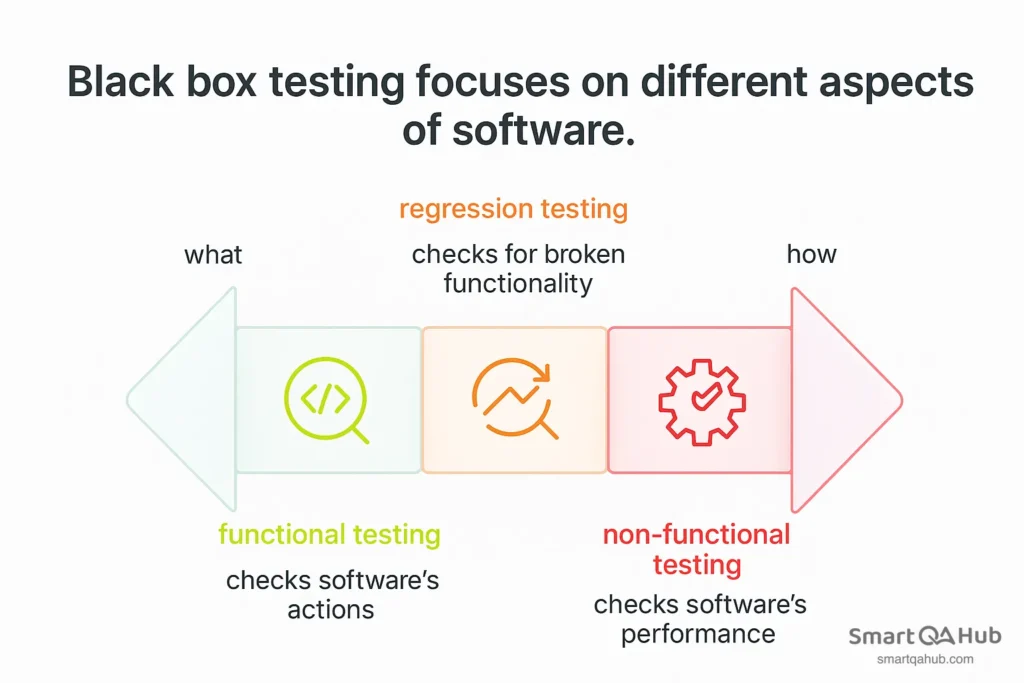
Worth knowing: Overview of the main types of black box testing. Functional testing focuses on testing what the software does, non-functional testing checks how well it does it, and regression testing checks nothing old got broken when new changes were made.
Effective black box testing techniques
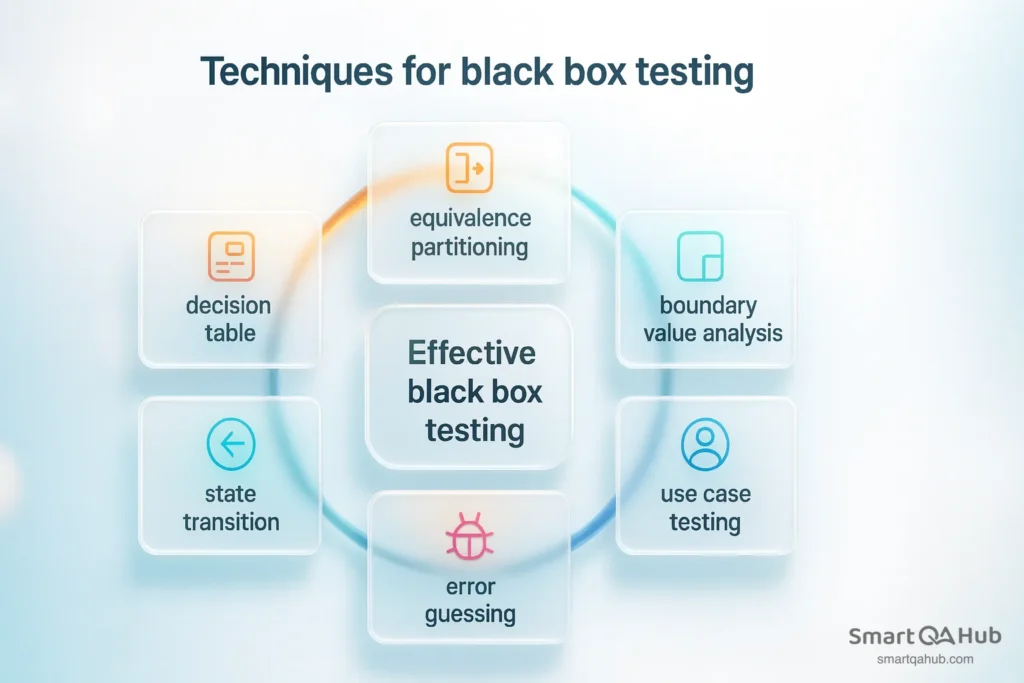
You don’t need to know what’s going on under the hood – but you do need smart ways to test from the outside. Here are some of the most useful black box testing techniques, explained simply:
1. Equivalence partitioning
Instead of checking every single input, you divide them into groups where each group is expected to behave the same. For example: test one valid email, not 50. One invalid one, not 20. Saves time, catches problems fast.
2. Boundary value analysis
If the system accepts numbers 1 to 100, try 0, 1, 100, and 101. Off-by-one errors are everywhere, and boundaries are where apps often break.
3. Decision table testing
If your app behaves differently based on combinations of conditions (like payment method + shipping option), a decision table helps organize and test those combos clearly.
4. State transition testing
For apps with workflows (login, logout, password reset), this technique checks how the system reacts when users move from one state to another. Does it crash if someone skips a step? This helps you find out.
5. Error guessing
You’ve seen enough weird bugs to know where things break. Try the kind of inputs that usually cause trouble – super long strings, special characters, empty fields. No rules here, just experience.
6. Use case testing
Test real-life scenarios like “a user buys a product and pays with a discount code.” This confirms that things work as expected in practical, end-to-end flows – just like a real customer would experience.
These techniques help you test smarter, not harder – no code required. Want examples or visual diagrams for each? I can help with that too.
Top black box testing tools and frameworks
Black box testing is a software testing without knowing the internal code of the software. To make this easier and faster, testers use specialized tools. Here are 7 key tools commonly used for black box testing:
- Selenium – The go-to tool for automating web browser testing, perfect for simulating user actions without needing to see the code.
- Postman – A powerful API testing tool that lets you send requests and validate responses easily.
- JMeter – Great for load and performance testing, simulating multiple users to see how your app handles stress.
- SoapUI – Specialized in testing SOAP and REST APIs, supporting both functional and security testing.
- Appium – Open-source mobile automation tool for testing Android and iOS apps from the outside.
- Cypress – A modern end-to-end testing framework for web apps that’s fast, easy to use, and allows you to debug tests directly in the browser.
- OWASP ZAP – Open-source security scanner designed for black box testing of web app vulnerabilities.
Black box testing cyber security
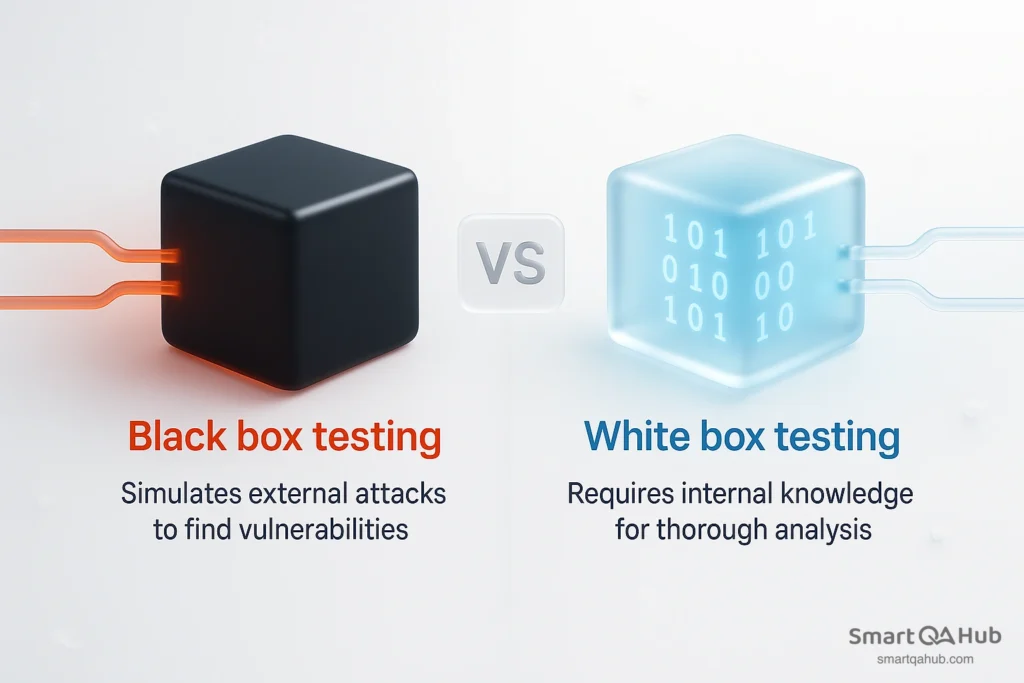
When we talk about black box testing in cyber security, we’re usually referring to security testing done from an outsider’s perspective. In other words, security professionals test a system with no inside information, similar to how a real attacker would approach it. This is commonly seen in penetration testing engagements: a company hires ethical hackers to probe their systems without giving them internal details, to see if they can breach the defenses.
In cyber security, a black box test means the tester knows only what any external entity could discover – for example, the URL of a website and maybe some basic documentation. The tester then uses that limited knowledge to find vulnerabilities. Black box security testing is valuable because it shows how the system holds up against an attack by someone who doesn’t have special access. It answers questions like: Can a hacker get in? What weaknesses would they find first? According to industry practices, black box testing is a standard method in penetration testing – the ethical hacker simulates an external attack with no prior knowledge of the system’s internals.
Did you know that…?
Most real-world cyber attacks start from a black box perspective. Hackers don’t have your source code – they just scan what’s publicly exposed and look for weak spots.
Black box security testing fundamentals
Black box security testing is simple at its core: you try to break into a system using only what’s publicly accessible. You don’t get source code, credentials, or internal documents – just what any outsider could see.
Testers scan the application, look for input fields, and try classic attacks like SQL injection or cross-site scripting (XSS). They mimic real attackers by probing for clues – error messages, strange responses, or system crashes – to uncover vulnerabilities.
It all starts with reconnaissance: gathering public info, mapping the system’s surface, and identifying targets. From there, testers try to exploit exposed weak points. Common findings include:
- Unprotected admin pages
- Inputs that accept harmful commands
- URLs or cookies that give access to other users’ accounts
Everything is done externally, without code access. This reveals what real attackers might find if they poked around your system.
The upside? A realistic look at your external security.
The downside? It may miss deeper, internal issues. That’s why black box and white box testing are often combined — to ensure that the code itself is also analyzed.
Black box testing remains essential as a first step in defense, helping confirm your system’s external security is intact.
Black box application security testing
In application security, black box testing often means using automated tools like DAST (Dynamic Application Security Testing). These tools interact with a live app – no code access – sending inputs and watching for suspicious outputs.
DAST tools can uncover things like stack traces, injection flaws, or error leaks by sending malicious data to the app and analyzing responses. They test websites, APIs, mobile backends – anything that can be reached from the outside.
Another method is fuzzing – bombarding an app with random data to find crashes or odd behavior. Again, no code needed. Just throw input at the system and observe.
Attackers often chain multiple small vulnerabilities together. That’s why modern black box testing includes automated attack patterns for black-box security testing of multi-party web applications – multi-step scenarios that simulate complex attacks across interconnected apps and services. Tools like OWASP ZAP can help find these in surprising places.
FAQs: Frequently asked questions about black-box testing
What is black box testing?
Is functional testing black box?
What is the benefit of black box testing?
Conclusion: Takeaway for a junior tester
Black box testing in the software development isn’t just for checking if features work – it’s key for security too. Tools like DAST and vulnerability scanners use the same outsider approach as real attackers. As you grow in QA or security, you’ll likely use both manual and automated testing techniques to spot weak points. Always think like someone without access – because that’s how real threats approach your app.


