


Manual Testing, Types and Examples: Human Insight in a Digital QA World

 15 MIN
 08 Sep 2025
Manual testing is a cornerstone of software quality assurance (QA) where human testers manually execute test cases on an application without using automated tools. This hands-on approach verifies that the software behaves correctly and meets user requirements. In the following guide, we’ll explain what manual testing is, characteristics of manual testing, why it’s important, and how to do it effectively, especially for beginners.
Table of content
In a world where automation dominates the testing conversation, you might wonder: is manual testing still relevant? The short answer is yes — and more than you might think.
Even today, manual testing plays a vital role in delivering high-quality software. It helps catch bugs that automated scripts miss, evaluates the actual user experience, and gives you — the tester — a chance to think critically, explore creatively, and bring a human touch to the QA process.
Let’s break it down and explore what manual testing really means, why it matters, and how it remains a cornerstone of quality assurance manual testing in modern software development.
What is manual testing
In simple terms, manual testing is the process of a human tester validating software functionality by actively using the application. Unlike automated testing (which uses scripts), manual testing requires a person to play the role of an end-user – clicking buttons, entering data, and observing outcomes to identify defects. This matters because it brings the human perspective into testing. A manual tester can notice visual glitches, confusing workflows, or unexpected behaviors that a program might not catch.
Anyone with solid QA training can start manual testing. You don’t need to know Python, Java, or Selenium. That makes it the go-to testing approach for new projects, early-stage products, and teams just getting started with testing.
The importance of manual testing in software development
In today’s fast-paced world of software development, automation often takes center stage. We hear about CI/CD pipelines, automated regression tests, and AI-powered testing tools. But let’s not forget the unsung hero of quality assurance: manual testing – because sometimes, only a human can spot what truly matters to other humans.
Manual testing vs automation testing
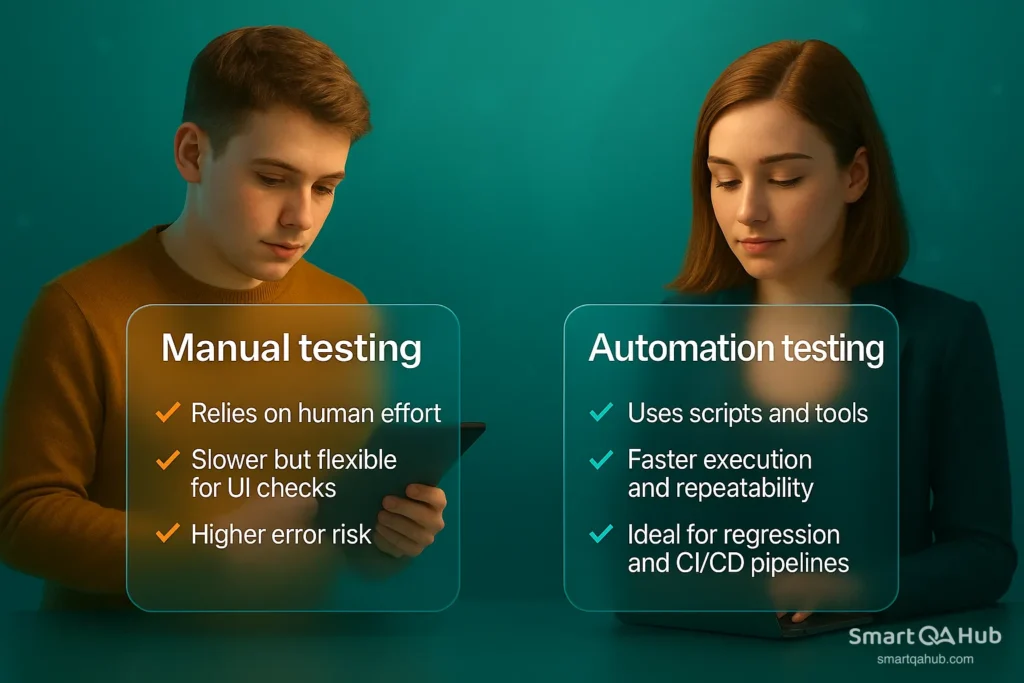
Automated tests are great for running large batches of repeatable tests quickly. But how do you find out whether a feature feels natural to use, or if unclear messaging might leave users puzzled?
That’s where manual testing shines. It brings human intuition and empathy into the development process – qualities that even the most advanced script can’t replicate.
Think of manual testing as a sanity check, a creative exploration, and a user advocate – all rolled into one.
Enhanced user experience
Manual testing looks beyond functionality — it evaluates usability. You step into the user’s shoes and ask: Is the workflow intuitive? Do error messages make sense? Are buttons where users expect them? Automation checks if something works; you check if it works for people.
Catching real-world bugs
Automated scripts follow strict paths. You don’t. You can simulate real-world behavior, edge cases, and unexpected inputs. While a script may pass a form, you might notice it breaks the layout on mobile or crashes with long dropdown values.
Validating requirements
You don’t just confirm features exist — you check if they align with business needs. Manual testing is essential to ensure that software matches requirements, supports real-life workflows, and complies with standards. You apply human judgment where automation can’t.
Adapting to change
In agile environments, change is constant. Manual testing gives you flexibility — you can test evolving features without waiting for scripts, and explore areas where documentation is lacking. You’re ready to pivot quickly when things shift. That’s why manual QA is often the first to test new functionality before it’s stabilized and automated.
The human element
Software is made for people. People are emotional, unpredictable, and nuanced. Manual testers bring empathy, curiosity, and context. Testing manually gives you the chance to advocate for real people — because software isn’t just about passing tests. It’s about solving problems, delighting users, and making life easier.
A key team player
Manual QA testers serve as the connection between developers and end-users. Your feedback shapes better design, highlights invisible problems, and improves quality. You’re not just reporting bugs — you’re making the product better with every insight.
Even as test automation grows more powerful, manual testing remains deeply embedded in QA workflows. According to industry surveys, over 80% of testers still rely on manual testing for critical parts of their work (source: Katalon.com).
Why? Because not everything can (or should) be automated. Some things are better left to human observation, creativity, and judgment.
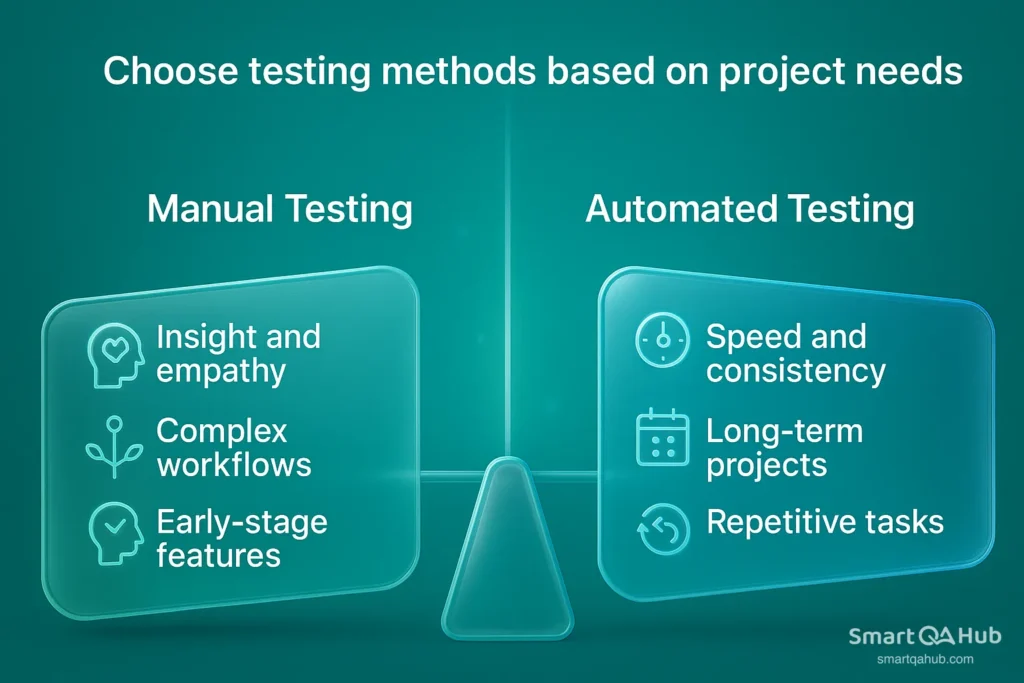
Advantages and disadvantages of manual testing
Like any approach, manual testing has its advantages and disadvantages. Understanding them helps you choose the right testing strategy — whether you’re deciding where to apply human insight or when to scale with automation. So, what are the advantages of manual testing, and where does it fall short?
Below, we break down the manual testing advantages and disadvantages in software QA, helping you decide when it’s the right fit and when to complement it with automation.
Advantages vs. disadvantages of manual testing
| Advantages of manual testing | Manual testing disadvantages |
|---|---|
| ✅ Human judgment – You can assess usability, look & feel, and real-world workflows. | ❌ Slower execution – Especially noticeable with repetitive or large test suites. |
| ✅ Exploratory power – Testers can adapt, think creatively, and explore unexpected behaviors. | ❌ Not scalable – Hard to repeat large test sets with consistent accuracy. |
| ✅ Low initial setup – No need for tools, coding skills, or frameworks to get started. | ❌ More prone to human error – Especially during lengthy or repetitive tasks. |
| ✅ Great for UI/UX – You notice things automation misses, like confusing layouts or text. | ❌ Lacks repeatability – Different testers may get slightly different results. |
| ✅ Ideal for early-stage or fast-changing features – You can test without waiting for scripts. | ❌ Time-consuming – Manual test cycles are slower, especially in regression testing. |
The biggest advantage of manual testing is that it brings human intelligence, flexibility, and empathy to the QA process — qualities that are essential when testing user experience, visual design, and complex behavior. Advantages of manual testing in testing software include the ability to explore, adapt, and provide real-time feedback.
However, the manual testing disadvantages become apparent when scale, speed, and consistency are needed. It’s not the best fit for repetitive regression runs or large-scale coverage.
In practice, the smartest QA teams combine both. Use manual testing where human insight matters — and automation when you need speed, reliability, and scale.
Important manual testing techniques
Manual testing isn’t just about clicking around until something breaks. It’s a craft — one that relies on a mix of manual testing techniques in software testing, creativity, and critical thinking. As you test manual, you’re not just looking for bugs. You’re trying to understand how the software behaves, how it feels to real users, and whether it truly meets expectations.
To do that effectively, you’ve got a powerful toolkit at your disposal. Let’s explore the key techniques of manual testing that help you cover all the angles — from unexpected edge cases to user satisfaction.
Exploratory testing
This is testing with your brain fully engaged. In exploratory testing, there are no strict scripts or checklists. Instead, you interact with the application freely, learning how it works as you go and designing test cases on the fly.
You might start with a goal (e.g., “test the checkout flow”), but how you reach it is entirely up to you. You follow your instincts, ask “what if?” questions, and observe how the system responds. This manual testing method is great for uncovering weird bugs, inconsistencies, or workflows that just feel off.
Think of it as testing the software with curiosity. You explore, experiment, and uncover hidden issues that scripted tests would never find.
Ad hoc testing
Ad hoc testing is like exploratory testing’s wilder cousin. There’s no documentation, no test plan — just you, the product, and your instincts.
You randomly click, swipe, input strange data, refresh at odd moments, or press buttons in the “wrong” order just to see what happens. This technique is especially useful when you want to do a quick sanity check or spot-check a build after a last-minute fix.
Usability testing
Functionality is only part of the story — software also needs to be usable. In usability testing, your focus shifts to the user experience.
Is the interface clear? Are the labels understandable? Can a new user complete a task without getting lost? You assess how intuitive, accessible, and user-friendly the product really is. This type of testing is an important part for customer-facing applications where first impressions matter.
Black box testing
This is one of the core manual testing techniques. In black box testing, you don’t need to know how the code works behind the scenes. You treat the application like a black box — you input something, observe the output, and compare it against the expected behavior.
You’re verifying whether the software does what it’s supposed to do from a user’s point of view, regardless of how it’s implemented.
White box testing
Unlike black box testing, white box testing requires some understanding of the underlying code and structure. You might test specific functions, logic branches, or paths through the code.
Though more common in developer-driven testing, manual testers with technical skills can use white box techniques to pinpoint issues deeper in the system, such as logic flaws, broken algorithms, or poor error handling.
Regression testing
Every time new code is introduced, there’s a risk that something that used to work… doesn’t anymore. That’s where regression testing comes in.
As a manual tester, you revisit previously working features to make sure new changes haven’t broken them. While automation often helps with regression, manual regression testing is still common — especially in fast-changing or less stable environments where automated tests might not keep up.
Integration testing
In complex systems, no module exists in isolation. Integration testing is about making sure different parts of the system — like the frontend and backend, or external services — communicate correctly and function as a whole.
For example, you might manually test whether a new UI component correctly calls a backend API, displays the returned data properly, and handles errors gracefully.
Acceptance testing
At the end of the testing process comes the big question: Is the product ready for users? Acceptance testing is your final verification step before go-live.
This type of testing often mirrors real-world scenarios, based on business requirements or client expectations. Whether you’re running tests yourself or observing end-users during a UAT (User Acceptance Testing) session, your job is to make sure the software meets the agreed standards.
Different types of manual testing
Manual testing includes a range of functional and non-functional approaches. Here are the most common types:
Functional testing
This verifies that the software behaves according to defined requirements. As a manual tester, you simulate user actions – clicking buttons, submitting forms, logging in – to confirm that each feature does what it’s supposed to. It’s usually performed at the component, integration, and system levels.
Integration testing
Integration testing checks how different modules or systems interact. You manually verify data exchange between components, like frontend-to-backend communication or connections between services, to ensure they work together smoothly.
System testing
System testing is a full end-to-end evaluation of the entire application. You test complete workflows across multiple features to ensure everything functions properly as a whole, from both technical and user perspectives.
Acceptance testing
Acceptance testing determines whether the software meets business requirements and is ready for release. Often done by end-users or stakeholders, you help run real-world scenarios to validate that the product delivers what was promised.
Performance testing (manual observations)
While automated tools are best for load testing, manual testers can catch performance issues early. You monitor response times and system behavior during regular use to detect slowdowns or freezes that affect usability.
Security testing (manual checks)
You manually test for basic security vulnerabilities by entering invalid or malicious input, checking for unauthorized access, or observing how sensitive data is handled. It’s a simple but effective way to uncover serious risks.
Compatibility testing
You test the application across various devices, browsers, and operating systems to ensure it looks and behaves consistently. This helps you catch layout issues, missing functionality, or browser-specific bugs that could affect the user experience.
These types of manual testing allow us to ensure the software works as expected, performs reliably, and provides a smooth experience across various environments.
Manual testing process and example
Manual testing is obsolete, you may say, and might seem old-school in the age of automation, but it remains a vital part of software quality assurance — especially when it comes to catching usability flaws, exploring new features, or simply thinking like a user. If you’re just getting started with manual quality assurance, or you’re looking to understand manual testing for freshers, this chapter walks you through the basic process — with real-world context.
The manual testing process
Whether you’re a junior tester or diving into manual testing for freshers, the process generally follows these key steps:
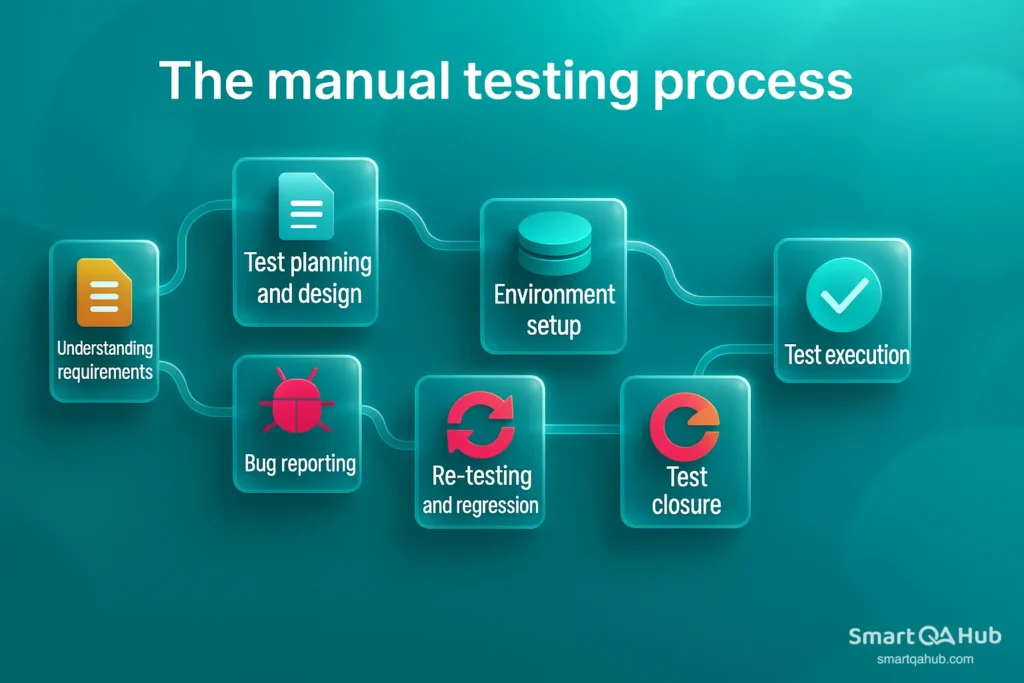
- Understanding requirements
Before testing begins, you need to know what the application is supposed to do. This includes reading user stories, design documents, or specifications. - Test planning and design
Based on the requirements, you write manual test cases — outlining inputs, expected results, and the steps needed to perform manual tests. - Environment setup
Prepare the test environment: set up the application, database, browser, or device where testing will take place. - Test execution
This is the core of testing manual testing. You run your test cases manually, document the actual results, and compare them with the expected ones. - Bug reporting
If you find defects, you log them with details like steps to reproduce, screenshots, and severity. This helps developers fix the issues efficiently. - Re-testing and regression
Once fixes are applied, you re-test the affected features. You may also run other relevant test cases to ensure no new issues were introduced. - Test closure
Finally, summarize test results, report metrics, and analyze what went well and what could be improved for the next cycle.
Examples of manual testing in action
Let’s bring it to life. Here are some manual testing examples you might perform in real projects:
- Login functionality
You test valid and invalid credentials, check if the login button is responsive, and make sure error messages are helpful. - Form validation
For a contact form, you try leaving fields empty, entering invalid email formats, or submitting excessive characters — all manually. - Shopping cart flow
You add and remove items from the cart, apply a discount code, proceed to checkout, and test how the UI responds at each step. - Cross-browser testing
You open the website in Chrome, Firefox, and Safari to see if layout and buttons behave consistently — something best done manually at first. - Mobile responsiveness
Rotate a phone, resize the window, and manually interact with a mobile menu to see how the app adjusts to different screen sizes.
These examples of manual testing reflect real tasks in QA roles and are perfect starting points for those new to the field.
Your First Steps Into QA
Manual testing isn’t going anywhere — and for good reason. It’s the human side of QA, where testers do more than just check if buttons work. You feel the user journey, spot awkward interfaces, and catch bugs that automated scripts might miss. That personal, hands-on touch is what makes manual testing so powerful.
FAQ: Frequently asked questions about manual testing
Whether you’re new to QA or brushing up on the basics, here are some common manual testing questions and answers to help you understand manual quality assurance better. This manual testing FAQ section focuses on testing essentials every tester should know.
What is the definition of manual testing in software testing?
How does QA manual testing differ from other types of software testing?
What manual testing websites can beginners practice on?
- SauceDemo – A fake e-commerce site to test logins, carts, and checkout flows.
- DemoQA – Practice with UI testing forms, drag-and-drop, alerts, and more.
- Parabank / GlobalSQA – Banking demos where you test transfers, logins, etc.
- Buggy apps like TheOpenKart or OrangeHRM – Intentionally buggy for learning.
- uTest, Test.io – Crowdtesting platforms offering real-world projects and paid gigs.
Test these sites like you would a real product: create test scenarios, look for bugs, and report your findings.
What are the basics of manual testing that every beginner should know?
- Understand requirements – Know what the software should do.
- Write test cases – Clear, step-by-step checks with expected outcomes.
- Run & report – Execute tests and log bugs with detail (steps, screenshots, severity).
- Know testing types – Functional, regression, UAT, etc. Learn when to use each.
- Bug life cycle – Track issues from creation to closure.
Basic techniques – Try exploratory testing, boundary value analysis, and more. - Mindset – Stay curious, think like a user, and notice the small things.
These fundamentals will help any beginner grow into a confident manual QA tester.
By mastering these basics – requirements, test case writing, execution & reporting, knowing test types, and foundational techniques – a beginner will be well-equipped to start contributing as a manual QA tester. Always remember to learn from each testing experience; over time, you’ll refine these skills and gain speed and intuition in finding bugs.
What’s next?
Master the basics, experiment with different test types, and eventually try automation — not to replace manual testing, but to boost your toolkit. Look into tools, testing communities, and certifications like ISTQB if you want to grow professionally.
Manual testing is more than clicking around — it’s critical thinking, user empathy, and detail obsession. And that’s what makes it irreplaceable.
Happy testing, and keep exploring!
Additional resources
To further develop your understanding and skills in manual testing, here are some additional resources you may find helpful:
- Recommended books: “Foundations of Software Testing” by ISTQB (Dorothy Graham et al.) – a great introduction to testing principles and techniques; “How to Break Software” by James Whittaker – a practical guide on thinking like a tester with lots of example test cases; “Lessons Learned in Software Testing” by Cem Kaner – offers 293 bits of wisdom from expert testers.
- Online courses: Look for beginner QA courses on platforms like Udemy or Coursera (e.g. Coursera’s “Software Testing and Automation” specialization includes manual testing basics). LinkedIn Learning also has courses like “Manual Software Testing” that cover test design, bug reporting, etc. These courses often provide hands-on exercises to practice manual testing in a guided way.
- Testing communities: Join communities such as Ministry of Testing (MoT) – they have forums and local meetups where you can learn from other testers. The Testing Stack Exchange online forum is a place to ask questions and see solutions. You can also engage in discussions on the r/QualityAssurance or r/software testing subreddits. Being active in communities allows you to share experiences, get job leads, and stay updated on new techniques.
- Certification options: Consider obtaining a certification like ISTQB Certified Tester – Foundation Level, which is a widely recognized credential covering manual testing fundamentals, terminology, and processes. For broader QA, there’s also Certified Software Tester (CSTE) offered by QAI. Certifications can provide structured learning and prove your knowledge to employers. Just ensure you pair the certification study with practical practice, since hands-on experience is crucial.
Each of these resources will help reinforce what you’ve learned in this guide and take your manual testing expertise to the next level. Good luck on your journey as a QA professional!


