


API Testing Made Simple: From Zero to Production-Ready Endpoints
 18 MIN
 10 Sep 2025
API testing can prevent customer-facing errors that damage trust and harm business reputation. It catches critical issues faster and more reliably than traditional software testing methods. The goal is simple: catch problems during development before they reach users.
Table of content
What is API testing and why it matters
If you’ve ever asked yourself, “What is API testing in software?” or simply, “What is API testing?”, here’s the clear answer: API testing is a type of process of checking whether an API – your application programming interface – behaves exactly as expected – reliably, securely, and under different conditions.
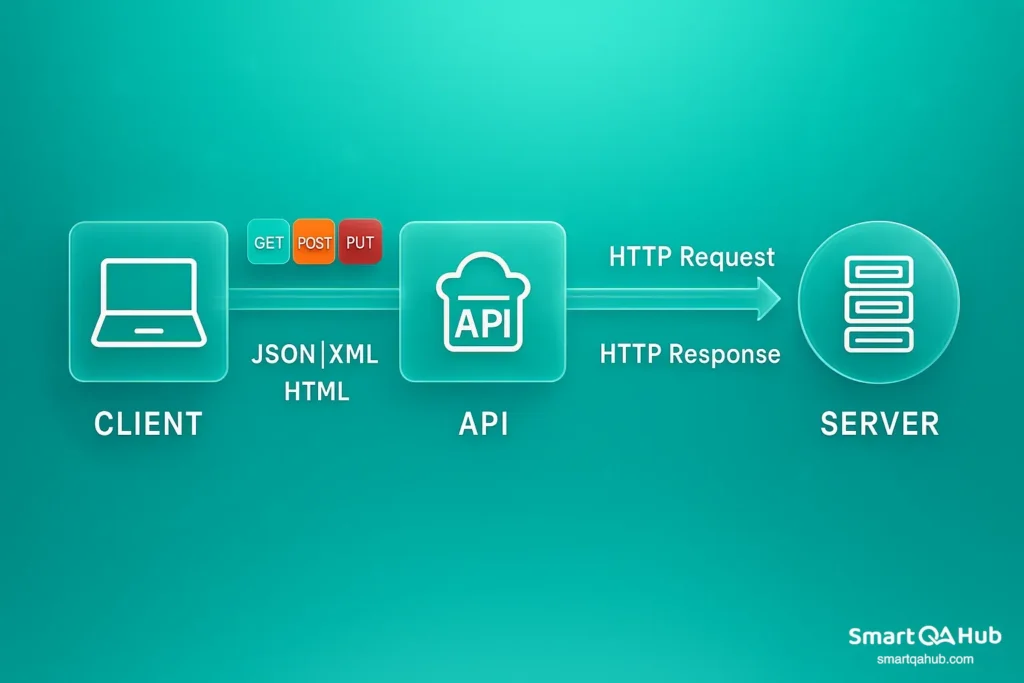
Instead of interacting with a graphical interface, API test automation works directly with the communication between systems. When you perform an API test, you send a request – a structured message – to the API endpoint, specifying what action you want to perform or what data you want to retrieve. The API processes this request on the server side and sends back a response containing the requested information, status codes, and sometimes error messages.
API testing verifies that for every request sent, the API returns the correct response: with the right data, in the expected format, within an acceptable time, and with proper handling of errors or invalid inputs.
Source:[Part 2] REST API components & How to read them
In short, API testing in software ensures your application’s brain – the logic and data layer – works under real-world scenarios, not just in ideal conditions.
What is API? – APIs (Application Programming Interfaces) are the invisible connectors that allow different software systems to communicate and share data smoothly. They define how requests and responses are structured, enabling apps, services, and third-party tools to work together reliably. Simply put, APIs are the backbone of today’s interconnected digital world.
Key parts of an API request
When you work with an API, you’re essentially sending a “message” to another system and waiting for a response. For the system to understand you, you need to structure this message according to clear rules – similar to writing a letter with an address, greeting, and content. An API request has several key parts that determine where your request goes, what you want from the server, and how it should handle your data. Understanding these parts helps you use APIs more effectively, debug issues faster, and build more reliable tests.
1. HTTP method (or Verb)
This tells the API what kind of action you want to perform. The most common methods are:
- GET — Retrieve data from the server. For example, “Give me the list of users.”
- POST — Send data to the server to create something new. Like, “Create a new user with this info.”
- PUT — Update existing data fully. For example, “Replace the user’s info with this new data.”
- PATCH — Update existing data partially, like “Change only the user’s email.”
- DELETE — Remove data, such as “Delete this user from the system.”
2. URL (Uniform Resource Locator)
This is the address you send your request to. It specifies which part of the API you want to talk to. For example:
https://api.example.com/users/123Here, you’re targeting the user with ID 123.
3. Headers
Headers are like the envelope of your message. They carry important metadata about the request, such as authentication tokens to prove who you are, the Content-Type which tells the server what format your data is in (like JSON), and the Accept header that specifies what response format you expect back.
4. Body (Payload)
The body contains the actual data you want to send with your request. It’s mostly used with POST, PUT, or PATCH methods. For example, if you’re creating a new user, the body might look like:
{
  "name": "John Doe",
  "email": "john@example.com"
}
Benefits of API testing
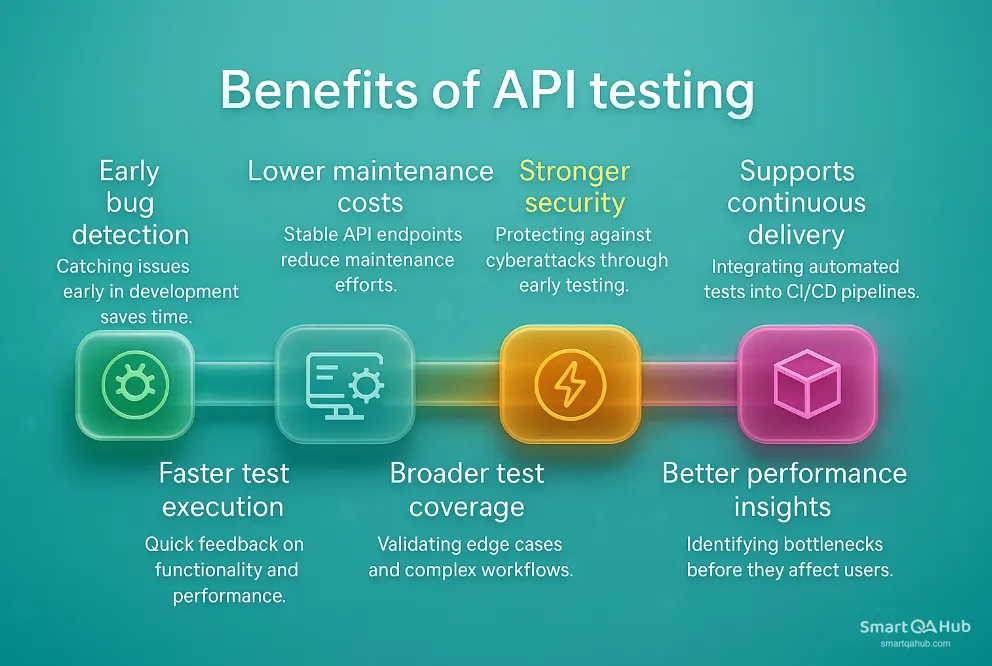
API testing isn’t just another box to tick in your development checklist – it’s a high-leverage activity with direct impact on software quality, development speed, and user satisfaction. Here’s why it pays off:
1. Early bug detection
Because API type of testing works at the integration level, you can run it before the user interface is even built. This lets you catch and fix issues early in the development cycle, when they’re faster and cheaper to fix.
2. Faster test execution
API tests typically run much faster than GUI tests. Without a visual API layer to load and render, you get quick feedback on functionality, performance, and security – perfect for Agile and CI/CD pipelines.
3. Lower maintenance costs
UI tests are sensitive to design changes, but API endpoints usually stay more stable. This means fewer broken tests when the interface changes, and less time spent on maintenance.
4. Broader test coverage
With API testing, you can validate not only standard scenarios but also edge cases, complex workflows, and error handling paths that UI tests might never reach. This leads to more comprehensive API quality assurance.
5. Stronger API security
APIs are a frequent target for cyberattacks. Testing authentication, authorization, and data encryption early ensures vulnerabilities are caught before release.
6. Better performance insights
API testing can include API performance and load checks, revealing bottlenecks long before they affect users. This helps keep your app responsive, even under high demand.
7. Supports continuous delivery
Automated API tests can be integrated directly into CI/CD pipelines, giving developers rapid feedback and enabling faster, safer releases.
Types of API testing and when to use them
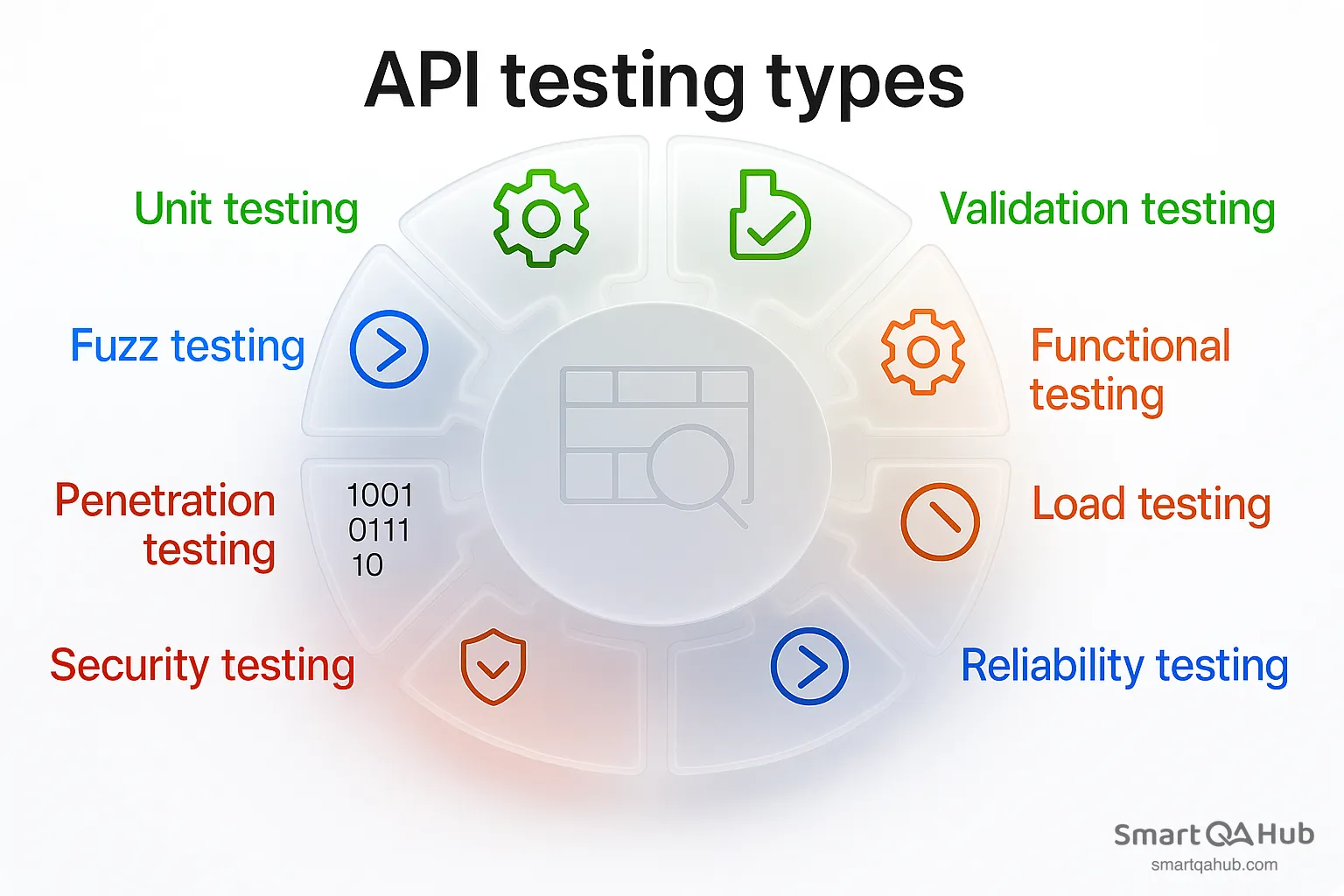
API testing isn’t one-size-fits-all — different API testing types answer different questions about the health, performance, and security of your API. Let’s walk through the most important API testing methods, with some practical context so you can see where each comes into play.
1. Validation testing
Think of validation testing as the “big picture” check. Here, you’re asking: Does this API actually do what the business needs it to do, and is it built in a sustainable way?
Key checks include:
- Is the API design aligned with product goals?
- Does it follow compliance or policy rules when accessing and storing data?
- Is the overall approach maintainable, or will it cause headaches down the road?
Example: Before a payment API goes live, you verify not only that it processes payments, but also that it follows PCI-DSS standards and doesn’t store sensitive card details in an insecure way.
2. Functional testing
This is the bread and butter of API testing — checking whether each function behaves exactly as expected.
You’ll focus on:
- Input/output correctness
- Handling invalid inputs
- Meeting business logic requirements
Example: Testing an endpoint that returns user profiles — you’d verify that it sends correct user data for valid IDs, and a proper error message for IDs that don’t exist.
3. Load testing
Load testing is about pushing your API to see how much it can handle under normal and peak usage.
Goals include:
- Finding performance bottlenecks before your users do
- Understanding how the API behaves under stress
Example: A ticket booking API might work fine for 100 requests per minute, but during a major concert sale, it needs to handle 10,000 requests per minute without failing.
4. Reliability testing
Reliability testing answers the question: Can we trust this API to behave the same way every time?
You’re looking for:
- Consistent outputs for the same inputs
- Stable connections between systems
Example: A weather API should return the same temperature for the same city and time across multiple API calls, not fluctuate wildly due to inconsistent backend processing.
5. Security testing
Security testing is where you put on your “paranoid” hat — and for good reason.
You’ll check:
- If unauthorized users are blocked from sensitive actions
- Whether encryption is applied correctly
- That tokens and keys can’t be guessed or stolen
Example: Verifying that an admin-only API endpoint for deleting accounts cannot be accessed by a regular user, even if they try to craft the request manually.
6. Penetration testing
If security testing is about verifying known protections, penetration testing is about thinking like an attacker.
You simulate real-world attacks to see:
- How far you can get without proper credentials
- Whether vulnerabilities like SQL injection or weak authentication exist
Example: Hiring a security tester to attempt breaking into your banking API from scratch, without any insider knowledge — exactly how a malicious hacker would operate.
7. Fuzz testing
Fuzz testing is chaos with a purpose — you send massive amounts of random or malformed data to the API to see if it breaks.
The goal is to expose:
- Crashes, memory overflows, or unexpected behavior
- Weak error-handling mechanisms
Example: Sending strings that are 10,000 characters long or binary garbage data to an endpoint to see if it gracefully rejects the request instead of crashing the server.
8. Unit testing
Unit testing zooms in on the smallest pieces of the API — usually individual endpoints or methods — in isolation.
You verify:
- That each unit works as expected without considering the rest of the system
- Fast, lightweight checks that can run on every code commit
Example: Testing the /calculate-discount endpoint with a set of fixed inputs to make sure it returns the right percentage every single time.
From test cases to production-ready endpoints
Building a great API isn’t just about writing code – it’s about ensuring it performs flawlessly when it really counts. Moving from theory to practice means transforming your test cases into rock-solid, production-ready endpoints. Your API needs to be resilient, secure, and reliable before it ever meets a real user. That journey involves some key steps that separate good APIs from great ones.
Designing your first API test cases
Before you start hammering away at tests, you’ve got to understand your API inside and out. Dive into the API documentation to grasp its purpose and core functionalities – what problems it solves, and how it expects to be used.
Now, imagine your users. How will they interact with your API in real life? What happy paths will they take? But don’t stop there – think about the edge cases, those tricky boundary conditions that often break things unexpectedly.
A strong test case verifies:
- The right status codes are returned (not just “200 OK,” but also proper handling of errors like “404 Not Found” or “401 Unauthorized”)
- The response format and structure match your API specs perfectly
- The data in response bodies is exactly what users need (no surprises!)
- Error handling is graceful, with clear messages to guide developers.
Each test case should be a well-documented little story, complete with a unique ID, detailed description, clear preconditions, step-by-step actions, and expected outcomes. This way, anyone on your team can pick up the test and know exactly what to expect.
Crafting reusable test suites
Testing APIs can get complex – especially as your system grows. That’s why reusable test suites are a game-changer. They let you run the same tests across different environments, versions, or even entirely different APIs without reinventing the wheel each time.
Parameterization is your secret weapon here. Instead of writing separate tests for every input, use variables to feed different data sets into the same test logic. This modular testing strategy reduces redundancy, saves time, and boosts API test coverage without turning your test suite into a sprawling mess.
Mastering authentication & token refresh
Your API is only as secure as its authentication. Testing needs to cover all scenarios – from valid logins to invalid tokens and everything in between.
If you’re using token-based authentication methods like OAuth or JWT, your tests also have to handle token expiration gracefully. Since access tokens can expire mid-session, your test suite should be smart enough to automatically refresh tokens, ensuring that long-running tests don’t suddenly fail for avoidable reasons.
Stress-testing the edge cases
The real test of any API is how it behaves when things go wrong. Edge case testing throws unusual or extreme requests at your API – missing parameters, malformed JSON, invalid data types, and boundary values like maximum string lengths or numbers outside expected ranges.
These tests expose weaknesses and help you build error responses that are not just correct, but helpful. Clear, consistent error messages save time and frustration for developers consuming your API.
Versioning & backward compatibility
APIs live in a fast-paced world where change is constant. But your users depend on stability. That’s where versioning comes in.
By adopting semantic versioning (think MAJOR.MINOR.PATCH), you send clear signals about what’s changed:
- MAJOR versions = breaking changes
- MINOR versions = new features that don’t break existing clients
- PATCH versions = bug fixes and small tweaks
Careful versioning ensures you can innovate and improve without leaving anyone behind. Backward compatibility testing becomes an essential part of your suite, guarding against surprises that could disrupt your users’ workflows.
API testing tools
The right API testing software can save time, improve accuracy, and fit seamlessly into your development and CI/CD workflows. While the perfect choice depends on your team’s needs, here are some of the most widely used and effective API testing frameworks available today.
1. Postman
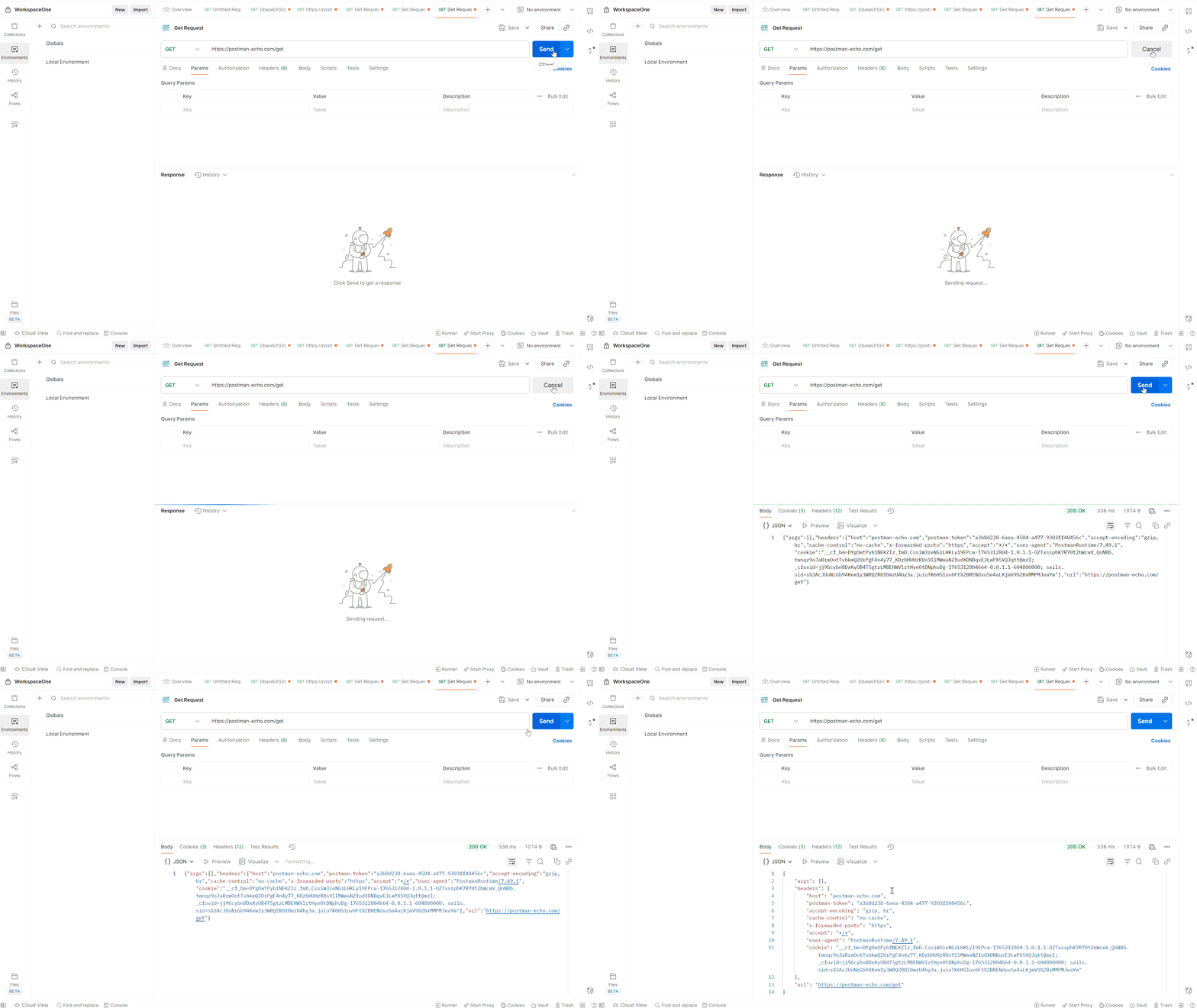
One of the most popular API testing tools, Postman offers an intuitive interface for creating and sending API requests, organizing them into collections, and automating regression testing. With features like environment variables, pre-request scripts, and the built-in Collection Runner, Postman is perfect for both quick manual checks and structured automated testing. It also integrates well with version control and CI/CD tools.
Source: https://www.postman.com
2. SoapUI
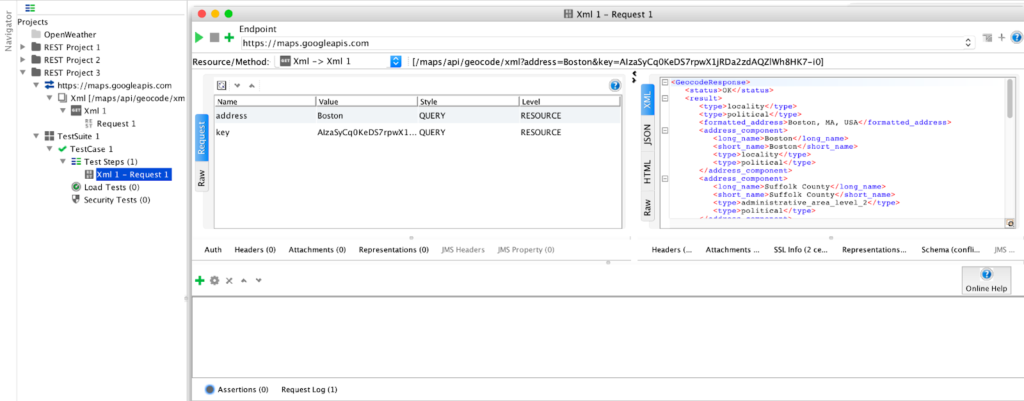
SoapUI is a veteran in the API testing world, supporting both REST and SOAP APIs. It provides a comprehensive set of features for functional, security, and load testing. The free version covers basic test automation scenarios, while the commercial ReadyAPI edition adds advanced options such as data-driven testing, API mocking, and detailed reporting – making it popular in enterprise environments.
Source: https://www.soapui.org
3. JMeter
Apache JMeter is best known for performance and load testing but can also handle functional API testing. It’s ideal for simulating large-scale traffic and identifying bottlenecks before they impact users. JMeter is open-source, highly configurable, and works well in automated pipelines. Its scripting capabilities make it a favorite for API testers who need deep control over test execution.
4. Katalon Studio
Katalon Studio is an all-in-one testing solution that supports web, mobile, desktop, and API automation. For API testing, it offers a codeless interface for non-programmers, with scripting available for advanced users. It handles both REST and SOAP services, integrates with tools like Jenkins and Git, and supports built-in reporting for better traceability.
5. Rest Assured
Rest Assured is an open-source Java library designed specifically for REST API testing. It’s developer-friendly, with a fluent syntax that makes tests easy to read and maintain. Perfect for teams who want to keep tests in the codebase, Rest Assured fits naturally into Java-based projects and continuous integration pipelines.
6. Karate DSL
Karate DSL combines API testing, UI automation, and performance testing in a single framework. It uses a simple, readable syntax based on Gherkin (Given-When-Then), making it easy for both testers and developers to write tests without heavy coding. Karate also supports data-driven testing, JSON or XML validation, and parallel execution – ideal for scaling test coverage.
7. Bruno
Bruno is a modern, open-source API client built for speed and simplicity. It’s lightweight, offline-first, and uses plain text files for collections – making it version-control friendly. While not as feature-rich as Postman, it’s fast, minimal, and perfect for testers who want a distraction-free environment for designing and running API requests.
Cypress for API testing
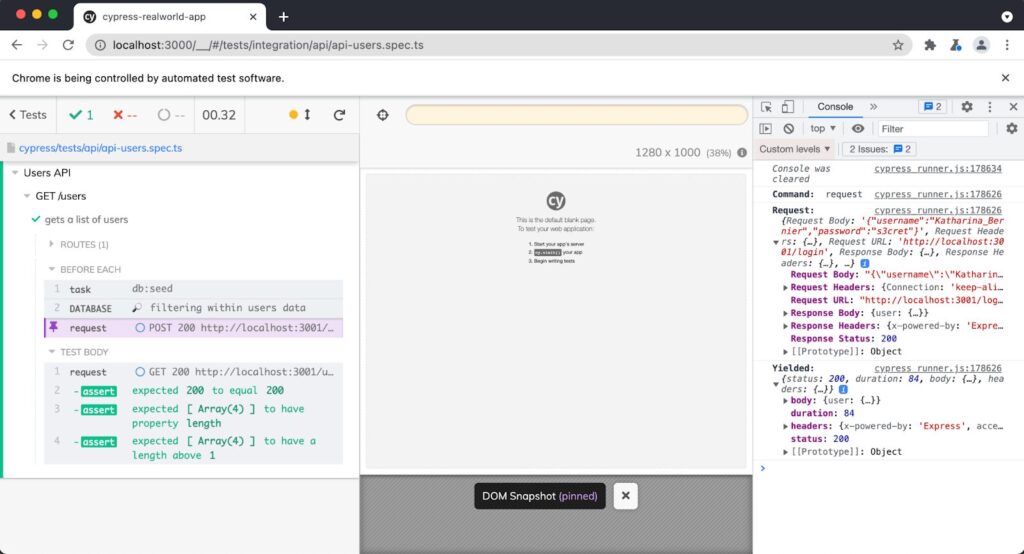
Cypress, primarily famous for UI end‑to‑end testing, also boasts powerful capabilities for API testing – especially valuable when integrated directly into existing testing workflows.
Source: https://learn.cypress.io
Why Cypress works for API testing
Ideal use cases
Cypress fits well for teams already using it for UI tests. You can layer API testing into existing infrastructure for:
- Validating API functionality quickly.
- Seeding or preparing backend data right before UI tests.
- Mocking complex scenarios in automated workflows.
Playwright for API testing
Playwright, developed by Microsoft, is often viewed through the lens of browser automation. But in recent years, it has evolved into a powerful unified testing platform – letting teams blend UI and API testing seamlessly.
What makes Playwright a game-changer for API testing?
When Playwright makes sense?
Playwright shines in complex, modern apps needing in-depth UI + API validation. Ideal for:
- End-to-end tests that need both browser interaction and backend validation in one logical flow.
- Scenarios requiring authenticated API sequences driven from UI or vice versa.
FAQs: Frequently asked questions about the API testing
Why is API testing important in software development?
What are the different types of API testing?
How do you create effective API test cases?
What are some best practices for API testing?
How does API testing differ from UI testing?
Smart API testing process today means reliable performance tomorrow
In summary, smart API testing today lays the groundwork for reliable and efficient software performance tomorrow. Each type of software testing – from unit and API integration to contract, end-to-end, performance, and security – serves a unique purpose in ensuring your API functions flawlessly. Starting with simple test cases that validate status codes, response formats, and error handling sets a strong foundation. Building reusable test suites and focusing on critical areas like authentication and edge cases helps prevent common production issues.
Although the process from test cases to production-ready endpoints requires time and dedication, the benefits – better software quality, faster development cycles, and confident, dependable APIs – make the effort worthwhile. By embracing these testing principles, you create a solid base for APIs that your users can trust and rely on as your projects grow and evolve.


