


How to Build a Data Driven Framework That Actually Works

 13 MIN
 12 Sep 2025
Data driven framework eliminates the need to waste time testing the same feature manually with dozens of data sets. Instead of copying login credentials from a spreadsheet, running the test, collecting results, and repeating the process again and again, this approach streamlines execution, reduces errors, and maximizes testing efficiency.
Table of content
Imagine running a single test that can check dozens, even hundreds of different scenarios – all at once. That’s the power of Parameterized Testing, also known as Data-Driven Testing (DDT). Instead of writing a separate test for every possible input, you feed multiple data sets into one test and instantly expand your coverage. It’s a game-changer for testers who need to keep up with fast releases and complex applications.
In this article, we’ll explore how DDT can save you time, reduce repetitive testing work, and help you catch edge cases that would otherwise slip through the cracks. If you’ve ever wondered what does DDT stand for testing, it’s a method that separates test logic from test data to make automation more scalable. Whether you’re struggling to validate every scenario or just want a smarter, more efficient way to test, learning how to leverage data-driven testing can transform the way you work.
What is data driven framework?
A data driven testing framework is a testing approach that separates the test data from test logic, making your automated tests more flexible, maintainable, and efficient. Instead of embedding hard-coded values directly into your test scripts, a data driven testing framework stores data externally – commonly in Excel spreadsheets, CSV files, databases, or XML files. The same test script can then be executed multiple times with different data sets, allowing you to cover a wide range of data scenarios without rewriting the test logic.
Think of it like a reusable recipe: the instructions remain the same, but the ingredients change to create different outcomes. During execution, the framework reads data from the external source, binds it to the test script, performs the test steps, and compares actual results against expected results. This iterative approach makes it easy to identify failures, track results, and analyze trends across many scenarios.
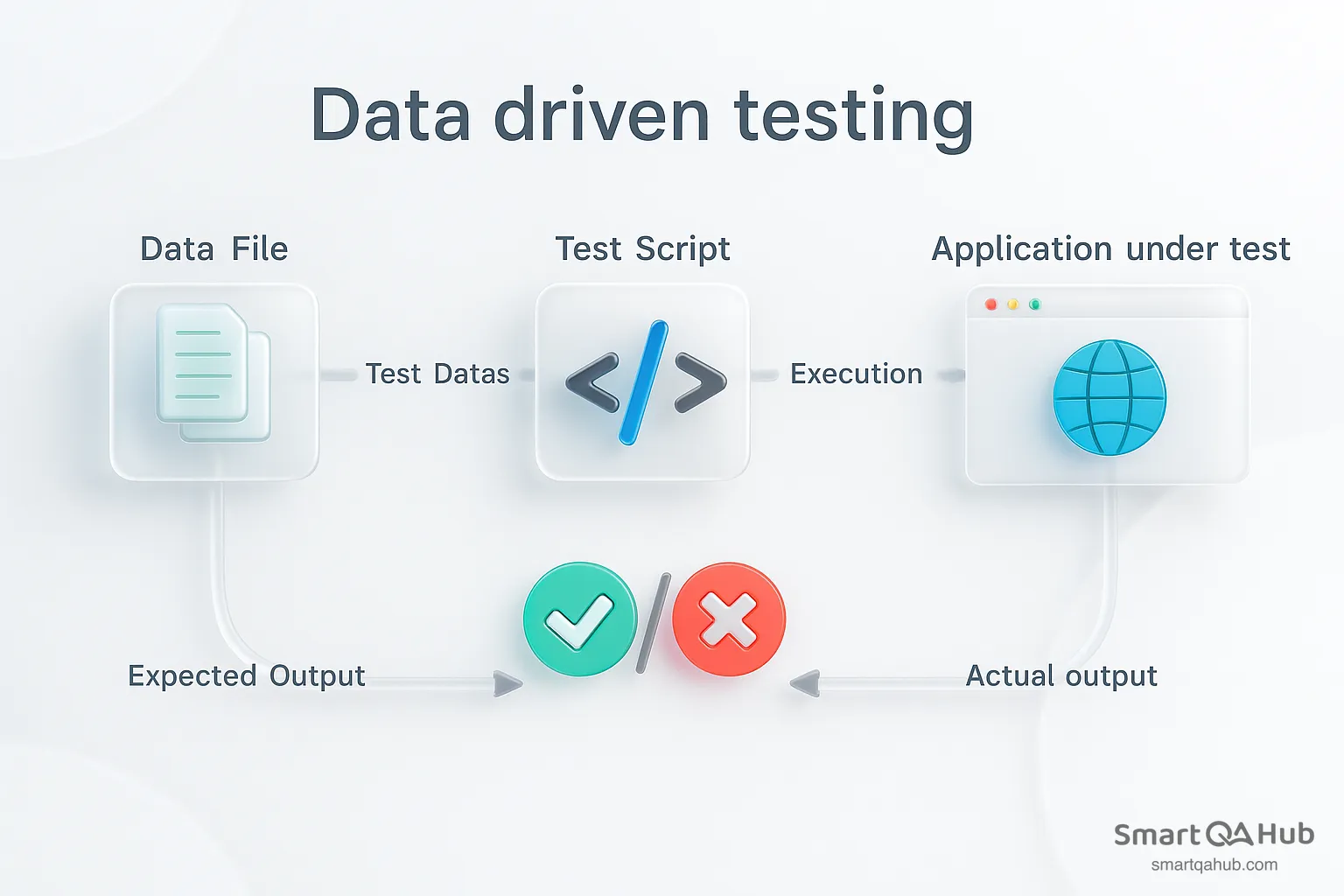
Source: https://dzone.com/
Pro tip: Testing benefits from clear data, but so does leadership. A data driven decision making framework ensures managers rely on facts, not assumptions. Combined with a data driven culture framework and a data driven strategy framework, you get a complete ecosystem where testing, planning, and decision-making are seamlessly connected through data.
Benefits of DDT
Think of running a single test case, but with nearly endless data inputs. That’s exactly what DDT allows you to do. It’s like getting a Swiss Army knife for a testing process – one tool, many uses.
So why does this matter for you and your team?
1. Scalability
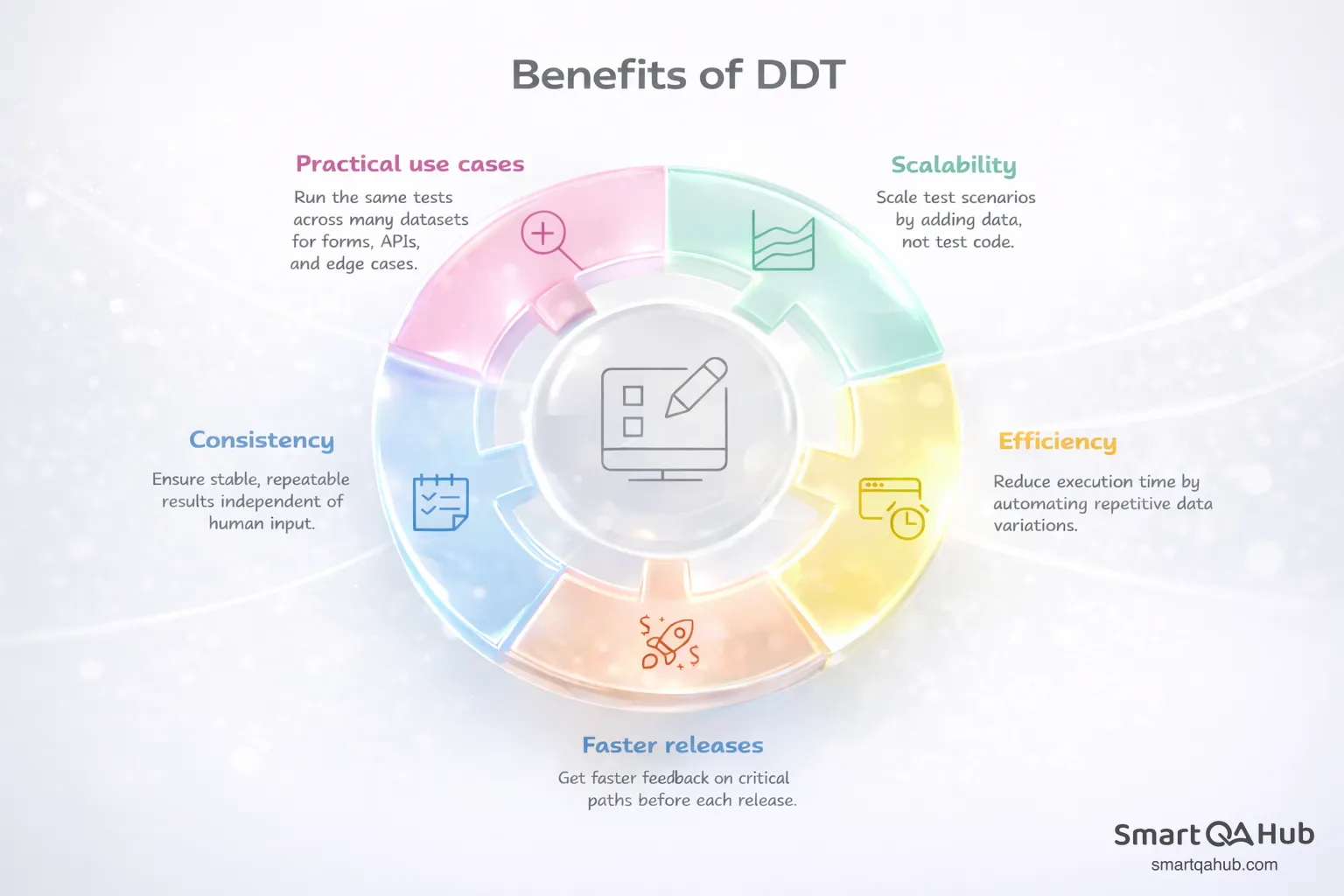
With DDT, a single test can handle dozens, hundreds, or even thousands of different input combinations. This means you can easily validate multiple scenarios with each release without writing extra tests from scratch. When your goal is to ensure your application behaves correctly under various conditions, data-driven testing lets you scale your coverage without scaling your effort.
2. Efficiency
Time and cost efficiency are two of the most tangible benefits. Manual testing for every possible input is tedious and resource-heavy. With automated data-driven tests, you can avoid repetitive work and focus on designing meaningful scenarios. Instead of testing one input test data at a time, your test automatically runs through all your data sets, saving hours – or even days – of work.
3. Faster releases
In today’s fast-paced software development environment, testing has to keep up with rapid release cycles. A data driven development framework allows your team to run more tests in less time, meaning you can validate more features and edge cases without slowing down development. It’s especially valuable when you have a large number of inputs or need to verify tricky edge cases that would otherwise be resource-draining.
4. Consistency and reliability
Automating the same test with multiple test data sets ensures that every scenario is executed consistently. You reduce the risk of human error and ensure repeatable results. Over time, this builds confidence in the reliability of your application, because you know that every combination has been properly tested.
5. Practical data-driven framework applications
Think about a login form, a checkout process, or an API endpoint. With DDT, you can test valid inputs, invalid inputs, boundary cases, and unusual combinations all in one go. You can even simulate real-world scenarios like thousands of users entering slightly different data, all without extra manual effort.
In short, data-driven testing doesn’t just save time – it amplifies your testing power. You can cover more scenarios, detect bugs faster, and release higher-quality software without burning out your team. For any project with growing complexity, DDT is a practical approach that keeps testing thorough, efficient, and scalable.
Traditional automation testing vs. data driven framework
Traditional automation embeds test inputs directly into scripts, whereas data driven frameworks dynamically inject data from external data sources like Excel. This key distinction creates numerous advantages:
| Aspect | Traditional Testing | Data-Driven Framework |
|---|---|---|
| Test Data Storage | Hard-coded within scripts | Stored externally (Excel, CSV, database, XML) |
| Script Reuse | Script needs modification for each scenario | Same script reused with different data sets |
| Test Coverage | Limited due to fixed inputs | Extensive coverage across multiple scenarios |
| Maintenance | Time-consuming when inputs change | Quick updates by modifying only data sources |
| Flexibility | Low – adding new scenarios requires code changes | High – new scenarios added by updating data |
| Automation Efficiency | Slower, repetitive | Faster, more scalable, handles large data sets |
| Edge Case Testing | Difficult to manage | Easy – just include edge cases in the data source |
Consider how much maintenance time you might save by implementing this separation of concerns in your testing workflow.
Types of data-driven testing frameworks
Data driven frameworks come in several specialized variants, each framework offering unique capabilities for different testing scenarios. Choosing the right framework type makes your testing efforts more effective.
Keyword driven testing
Keyword-driven testing separates test design from execution through predefined keywords that represent specific actions. This approach enables anyone to create automated tests using simple drag-and-drop actions, regardless of their programming knowledge. The framework stores operations or methods separately as keywords in external data files (typically Excel sheets), allowing testers to keep functionalities separate.
This abstraction helps non-technical team members contribute to test creation without dealing with complex code. Business analysts can define test scenarios using familiar keywords like “login”, “click”, or “verify” without writing a single line of code.
Excel driven testing
Excel-driven testing uses spreadsheets to store test data outside your code. Since WebDriver doesn’t directly support reading Excel files, tools like Apache POI handle the data extraction. This method allows you to increase test parameters simply by adding more fields to your Excel file.
Your team can modify test cases without changing the underlying code. Most testers appreciate this approach because Excel provides a familiar interface for organizing test data in rows and columns.
XML driven testing
XML-driven testing uses structured XML files to organize test data hierarchically. These files can store various configurations for different scenarios, such as payment methods and amounts. Parsing libraries extract this data at runtime, enabling dynamic test execution.
XML works particularly well when you need to represent complex data relationships or when your application already uses XML for configuration files.
Negative testing with invalid inputs
Negative testing intentionally uses invalid inputs to verify system resilience. This approach helps identify security vulnerabilities, prevent crashes, and strengthen error handling. During this software testing process, testers provide incorrect input data to ensure the system responds appropriately with proper error messages.
Examples include testing with:
- Empty fields where input is required
- Invalid email formats for login screens
- Boundary values that exceed system limits
- Special characters in numeric fields
Each framework type serves specific data needs, so consider your project requirements when selecting the most suitable approach.
From theory to practice: Data-driven testing examples
Putting a data driven framework example into practice can help you see the real benefits of separating test data from test logic. This section explores practical scenarios where data testing automation framework makes testing faster, smarter, and more efficient.
Example 1: Login functionality
Testing a login form may sound simple at first, but there are countless variations to consider. You need to check the happy path where the username and password are both valid, but also cases where the username exists but the password is wrong, or the password is correct but the username is invalid. And of course, there’s always the scenario where someone tries to log in without filling out anything at all.
Manually writing separate tests for each of these cases quickly becomes repetitive. A data-driven approach is far cleaner: you can store all of your test credentials in a dataset and let your login test iterate through them. This way, you cover all the essential paths without multiplying the number of test scripts.
Example 2: E-commerce checkout
When testing an online store, one of the trickiest parts is verifying that shipping costs are calculated correctly. Customers may order from different countries, select different delivery methods such as standard, express, or overnight, and sometimes take advantage of free shipping promotions. Each of these variations changes the final checkout amount.
Hardcoding all these possibilities into separate tests would be a nightmare. Instead, with data-driven testing, you can store your shipping scenarios in a spreadsheet or database. Your automated test simply runs through them one by one, ensuring that the correct fee is applied in every possible situation.
Example 3: Registration form validation
A registration form often has strict rules: the email must have the right format, the password has to be strong enough, and the phone number must follow certain standards. Users, however, rarely type everything perfectly. Some will forget the “@” in their email, others will create weak passwords, and some will type phone numbers without a country code.
By using data-driven testing, you can keep all these valid and invalid inputs in a dataset. The same test can then run with dozens of variations, confirming that the system correctly accepts what it should and rejects what it must. This makes it far easier to adapt when data validation rules change in the future.
Example 4: Banking or finance applications
Financial applications demand precision. A small error in calculating interest or loan repayments can have serious consequences. Tests need to cover a wide range of scenarios: small and large principal amounts, low and high interest rates, short and long repayment durations, and even edge cases like zero balances or negative inputs.
With data-driven testing, all of these scenarios can be stored in one place, and the test logic simply processes them in sequence. This ensures that the calculations remain accurate and consistent, no matter how the input changes.
Example 5: API testing
APIs need to handle every type of request — from clean and well-formed to broken or overloaded. For example, you may want to test valid JSON payloads, requests with missing or incorrectly typed fields, and very large payloads that push the system to its limits.
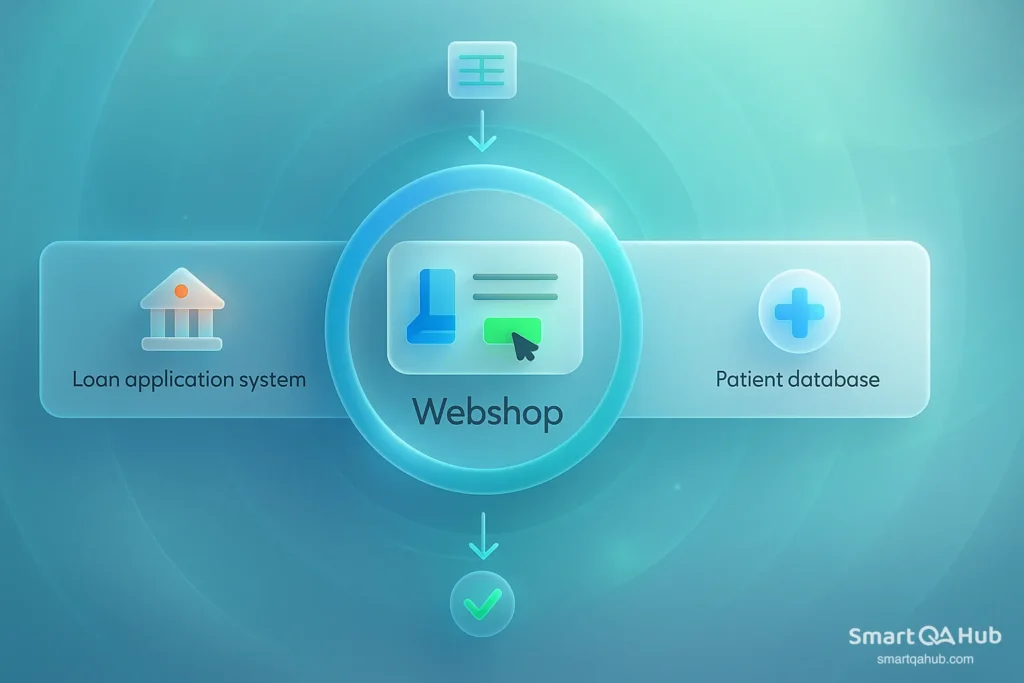
Source: https://www.leapwork.com/
Rather than writing separate tests for each case, data-driven testing lets you keep a library of payloads in a structured data format like JSON files. Your test framework can feed these into the API one by one, verifying the responses and ensuring the system behaves correctly across all input types.
How to build a scalable data-driven testing framework
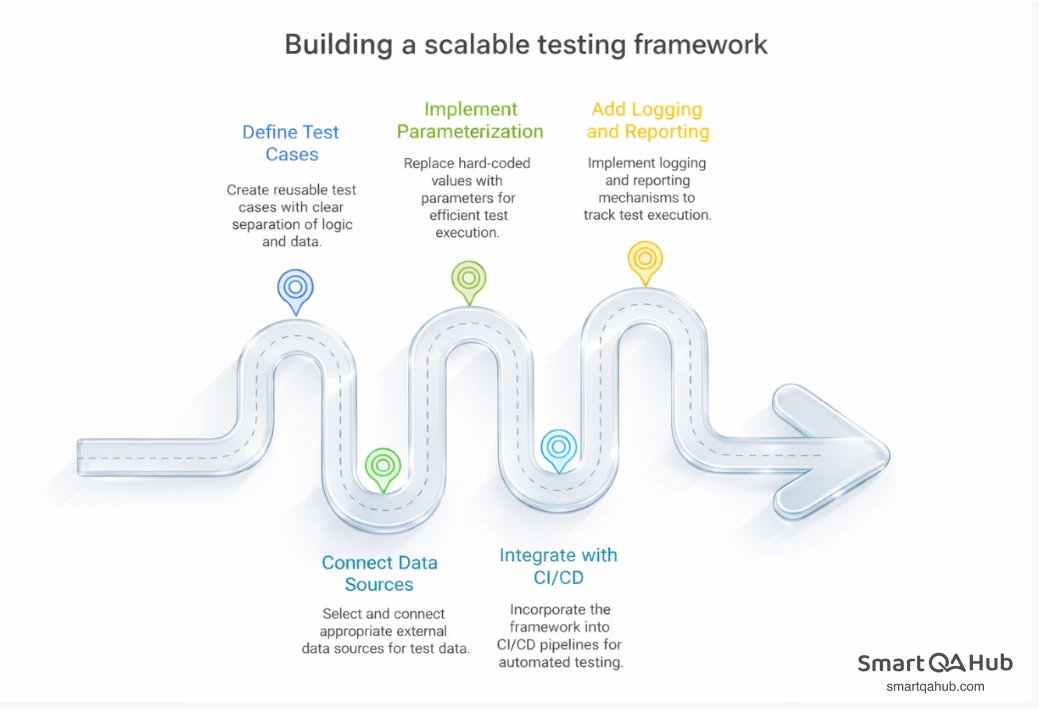
Building a scalable data driven framework requires a systematic approach with five key steps. Each step builds upon the previous one to create a robust testing solution that grows with your needs.
Step 1: Define reusable test cases
Start by creating test cases with clear separation between test logic and test data. Organize your project with dedicated folders such as /scripts, /data, and /mappings. This structure allows your team to quickly locate resources and reduces the risk of errors when updating test data.
Step 2: Connect external data sources
Select appropriate external data sources for your test data:
| Data Source | Best Use Case | Notes |
|---|---|---|
| Excel/CSV | Simple tabular data | First row = column names |
| Databases | Complex relational data | Requires connection string |
| XML/JSON | Hierarchical or object data | Ideal for structured payloads |
For Excel files, place a copy in a dedicated data folder within your project’s root directory. This keeps your test data organized and easily accessible.
Step 3: Implement parameterized test execution
Avoid hard-coded values. Instead, leverage parameterization to reuse test logic across multiple input sets.
@ParameterizedTest

@ValueSource(ints = {1, 3, 5, -3, 15})

void isOdd_ShouldReturnTrueForOddNumbers(int number) {

    assertTrue(Numbers.isOdd(number));

} Assert.assertTrue(driver.findElement(By.id("dashboard")).isDisplayed());

}Here, the same test is executed multiple times with different inputs, improving coverage without duplication.
Step 4: Integrate with CI/CD pipelines
Incorporate your framework into your CI/CD pipeline to automate test execution whenever code changes occur. This integration provides fast feedback to developers and ensures application stability. Tools like Jenkins, Travis CI, or CircleCI can trigger tests automatically upon code commits, catching issues before they reach production.
Step 5: Add logging and reporting layers
Implement logging and reporting mechanisms to track test execution. Use logging frameworks like log4j to capture execution information, including errors and warnings. For reporting, testing tools such as ExtentReports or TestNG generate detailed test result summaries for stakeholders.
Proper logging helps you identify patterns in test failures and understand which data combinations cause issues most frequently.
Using AI to enhance your data-driven automation framework
Artificial intelligence offers practical tools to enhance your data driven automation framework, helping testers handle large datasets, improve test coverage, and create more reliable, efficient testing environments.
Generate AI for synthetic test data creation
AI technologies enable testers to generate unlimited amounts of high-quality, diverse test data without exposing sensitive information. These AI systems create realistic datasets that mimic the structure and statistical properties of real-world data. AI-generated test data can span multiple languages, making it valuable for testing localization and multilingual applications. Traditional methods require seed lists that limit scalability, but AI models learn from existing patterns to generate contextually rich data from scratch.
Transform AI for masking and modifying data
You’ll often need to mask production data during testing cycles. AI-powered data masking intelligently recognizes sensitive information including personal identifiable information (PII), financial records, and proprietary business data. It applies context-aware obfuscation techniques that ensure compliance with privacy regulations like GDPR, HIPAA, and CCPA. 90% of developers reported increased satisfaction after integrating AI-powered tools into their workflows.
Extract AI for selective data usage
AI can analyze patterns and dependencies to select optimal subsets of data tailored for specific testing needs. This capability reduces resource consumption while maintaining test effectiveness. This approach speeds up the testing cycle by eliminating the manual extraction, transformation, and obfuscation processes previously required.
FAQ: Frequently asked questions about the data driven testing
What is a data driven What are the key steps to build a scalable data-driven testing framework? framework in software testing?
How does a data-driven framework in Selenium differ from traditional test automation?
What are the key steps to build a scalable data-driven testing framework?
How can AI enhance a data-driven automation framework?
What are the benefits of implementing a data driven framework?
Building a data driven framework that works
A data driven framework (DDF) separates test logic from test data, allowing one script to run against external and diverse data sets such as Excel, CSV, databases, or XML/JSON. This approach reduces maintenance, increases coverage, and enables non-technical contributors to design tests without touching code.
Instead of hard-coding values, DDF uses parameterization and loops to bind data at runtime, executing the same steps for each dataset. Core elements include reusable test cases, organized data sources, parameter binding, and an execution engine, all of which can integrate with CI/CD pipelines and detailed reporting.
Applied to scenarios like login validation, loan processing, or e-commerce checkout, DDF can cut maintenance costs by up to 70% and speed up test creation by 40–60%. Variants such as keyword driven framework, Excel-driven and negative testing offer flexibility, while AI enhances efficiency through synthetic data generation, masking, and selective extraction – making DDF a scalable, future-ready testing solution.


