


Unit Testing Essentials: Catch Bugs Before They Catch You

 15 MIN
 02 Jan 2026
Unit testing could have prevented this: Friday afternoon. You push code to production, already thinking about the weekend. Then your phone buzzes. Something’s broken. Users are complaining. Somewhere in your beautiful code, a bug was hiding like a gremlin waiting to ruin your evening.
Table of content
Most of these moments are preventable. The secret weapon? Unit testing.
If you’ve ever wondered what unit testing actually is or why developers swear by it, you’re in the right place. Let’s dive in.
So, what exactly is unit testing?
Let me define unit testing simply. Imagine building with LEGO blocks. Before assembling your spaceship, wouldn’t you check that each block isn’t cracked? That’s unit testing for software.
The unit testing meaning boils down to testing the smallest pieces of code in isolation. These pieces, called “units,” are typically functions, methods, or classes. You’re not testing how everything works together yet. You’re testing one tiny piece at a time.
So what is unit testing in software? It’s writing small, focused tests that verify individual components behave as expected. Does this function return the right value? Does it handle edge cases? Does it throw an error when it should?
The key characteristic is isolation. When a unit test runs, it shouldn’t depend on databases, APIs, file systems, or other parts of your application. If it does, you’re not testing the unit itself – you’re testing the unit plus all its dependencies. That makes failures harder to diagnose and tests slower to run.
A quick unit testing example
Here’s a function that calculates shopping cart totals with a discount:
function calculateTotal(items, discountPercent) {
    let subtotal = 0;
    for (let item of items) {
        subtotal += item.price * item.quantity;
    }
    let discount = subtotal * (discountPercent / 100);
    return subtotal - discount;
}
A unit test for this:
test('calculates total with 10% discount', () => {
    const items = [
        { price: 100, quantity: 2 },
        { price: 50, quantity: 1 }
    ];
    const result = calculateTotal(items, 10);
    expect(result).toBe(225);
});
We give the function specific inputs and check if the output matches expectations. Two items at 100 plus one at 50 equals 250. Ten percent off should give us 225. If the function returns anything else, the test fails.
You’d write several tests like this covering different scenarios:
test('returns zero for empty cart', () => {
    expect(calculateTotal([], 10)).toBe(0);
});
test('applies no discount when percent is zero', () => {
    const items = [{ price: 50, quantity: 2 }];
    expect(calculateTotal(items, 0)).toBe(100);
});
test('returns zero when discount is 100%', () => {
    const items = [{ price: 50, quantity: 2 }];
    expect(calculateTotal(items, 100)).toBe(0);
});
Each test checks one specific behavior. When they all pass, you have confidence. When one fails, you know exactly where to look.
Who’s responsible for writing unit tests?
Short answer: developers. Unit tests are written by the same people who write the code being tested. This differs from other testing types. QA engineers typically handle integration testing, end-to-end testing, and manual testing. But unit tests? That’s developer territory.
Why? Because unit tests are tightly coupled to code structure. You need to understand the function’s internals, its edge cases, its dependencies. The person who wrote the code knows this best. They know where the tricky logic lives, what assumptions they made, what could break.
Some teams have dedicated QA engineers who review unit tests or suggest additional test cases. That’s valuable – fresh eyes catch blind spots. But the actual writing falls to developers. This is why unit testing is considered a core development skill, not a separate QA activity. If you write code professionally, writing unit tests is part of your job.
The real benefits of unit testing
You might think writing tests is extra work when you could be building features. Here’s the thing most developers learn the hard way: skipping unit tests isn’t saving time. It’s borrowing time from your future self with brutal interest rates.
Unit testing in software engineering: Where does it fit?
Understanding what is unit testing in software engineering means knowing where it sits in the bigger picture.
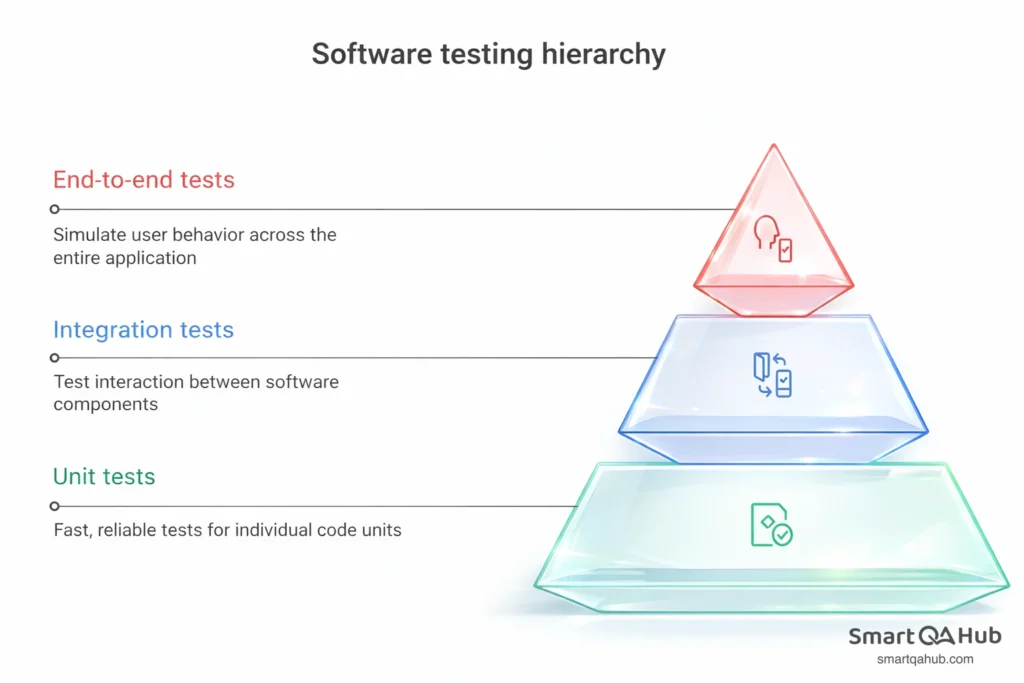
You can see the testing pyramid with three layers in the picture above. Unit tests form the foundation – the largest layer. Integration tests sit in the middle, checking how components work together. End-to-end tests sit at the top, simulating real user behavior across the entire application.
Why this shape? Unit tests are fast, cheap, and reliable. You can run thousands in seconds. They pinpoint failures precisely. Integration tests are slower and more complex – they need real databases or services. End-to-end tests are slowest and most brittle – they break when UI changes, when networks hiccup, when test data gets stale.
You want most coverage at the bottom where it’s efficient. Unit tests catch logic errors. Integration tests catch communication errors. E2E tests catch workflow errors. Each layer serves a purpose, but unit tests do the heavy lifting.
Use unit testing in your development workflow
What is unit testing in software development workflow? Typically, developers write tests alongside their code. Some practice Test Driven Development (TDD): write a failing test first, write minimal code to make it pass, then refactor. The cycle is red-green-refactor.
Others write tests immediately after implementing features, while the logic is fresh. Some write tests before major refactoring to ensure they don’t break existing behavior. The specific approach matters less than consistency – tests should exist and run regularly.
In modern development, unit tests run automatically through continuous integration. Push code to your repository, CI pipeline triggers, tests run. Any failure blocks the merge. Problems get caught before reaching your main codebase, before other developers pull them, and long before users see them.
This automation is crucial. Tests that only run manually tend to be forgotten when deadlines loom. Automated tests are a safety net you can’t accidentally remove.
Unit testing best practices
Writing tests is one thing. Writing good tests is another. Bad tests are worse than no tests – they give false confidence, break constantly, and waste time. Here’s what actually matters for unit testing best practices.
Keep tests simple and fast
Each test should do one thing. Test one scenario, one behavior, one path through your code. When it fails, you should immediately know what’s wrong without debugging the test itself.
Tests should run in milliseconds, not seconds. If your unit test suite takes more than a few seconds total, something’s wrong. You’re probably hitting real databases, making network calls, or doing expensive setup. Fast tests get run constantly – after every change, before every commit. Slow tests get skipped when deadlines press, which defeats their purpose.
Make tests readable
Here’s an uncomfortable truth: tests are code that doesn’t have tests. If they’re confusing and poorly written, they become maintenance burdens. Confusing tests get deleted or ignored.
Use clear, descriptive names. test1 tells you nothing. calculateTotal_withTenPercentDiscount_returnsDiscountedAmount tells you exactly what’s being checked. When it fails at 2 AM, you’ll appreciate knowing what broke without reading the test body.
Follow the AAA pattern: Arrange, Act, Assert. First set up your test data (Arrange). Then perform the action you’re testing (Act). Finally check the results (Assert). This structure makes tests predictable and scannable.
test('applies discount correctly', () => {
    // Arrange
    const items = [{ price: 100, quantity: 1 }];
    const discount = 20;
    // Act
    const result = calculateTotal(items, discount);
    // Assert
    expect(result).toBe(80);
});
Test behavior, not implementation

This distinction trips up many developers. Verify what your code does, not how it does it internally. If you test implementation details, you’ll break tests every time you refactor, even when behavior stays identical.
If you’re testing a coffee maker, you care that pressing the button produces hot coffee. You don’t care which internal wire heats first or how the pump mechanism works. Test the output, not the internals.
Bad tests check things like: “this private method was called,” “these internal variables were set,” “this loop ran exactly 5 times.” Good tests check: “given this input, I get this output,” “given invalid input, I get this error,” “after this operation, the state is correct.”
When tests are tied to implementation, refactoring becomes painful. You improve internal logic, behavior stays the same, but twenty tests fail because they were verifying things they shouldn’t have been. This leads developers to avoid refactoring, which leads to code rot.
Use mocks and stubs wisely
When code depends on databases, APIs, or external services, you don’t want unit tests actually talking to those systems. That makes tests slow, unreliable, and dependent on external state. Instead, use mocks and stubs.
A stub is a simple replacement that returns predetermined data. Your function normally calls an API? Stub it to return fake data instantly.
A mock goes further – it lets you verify interactions. You can check that a function was called, called with specific arguments, or called a certain number of times.
test('sends notification when order placed', () => {
    const mockNotificationService = {
        send: jest.fn()
    };
    const orderService = new OrderService(mockNotificationService);
    orderService.placeOrder({ item: 'Book', quantity: 1 });
    expect(mockNotificationService.send).toHaveBeenCalledWith(
        expect.stringContaining('order confirmed')
    );
});
But don’t overdo it. Tests that mock everything verify nothing real. They just confirm mocks were called in a certain order, which tells you little about whether your code actually works. Mock external dependencies – databases, APIs, third-party services. Don’t mock your own internal logic.
Make tests deterministic
A test should produce the same result every time it runs. Same input, same output, no exceptions. If a software test sometimes passes and sometimes fails without code changes, that’s a flaky test. Flaky tests erode trust in your entire test suite. Developers start ignoring failures, assuming they’re just flakiness. Real bugs slip through.
Avoid depending on:
- Current time or dates
- Random values
- Network calls
- File system state
- Test execution order
If you need a specific date, hardcode it. If you need randomness, use a seeded generator so results are reproducible. If tests must run in a certain order to pass, they’re not properly isolated.
Run tests automatically
Tests that don’t run might as well not exist. Set up your environment so tests run automatically:
- Locally before commits (use git hooks)
- In CI on every push
- Before merges to main branches
Make broken tests block deployment. When the safety net is always there, you trust it. When it’s optional, it gets skipped at the worst possible moments.
Popular unit testing tools
Every major language has mature testing frameworks. You don’t need to build infrastructure from scratch.
JavaScript/TypeScript: Jest dominates. It’s fast, requires minimal configuration, includes built-in mocking and assertions. Most React and Node projects use it by default.
Python: pytest is the standard. Flexible, readable syntax, massive plugin ecosystem. It makes writing tests feel natural rather than ceremonial.
Java: JUnit has been the standard for over two decades. Excellent IDE integration, works with all build tools, and a huge community knowledge base.
C#/.NET: xUnit provides a modern, clean API. Good isolation between tests, works well with dependency injection patterns common in .NET.
The principles we’ve discussed apply regardless of unit test framework. Learn software unit testing concepts in one language, apply them anywhere. Tools differ; fundamentals don’t.
AI tools are entering this space too – suggesting test cases you might have missed, generating boilerplate test code, identifying untested paths. They’re not replacing developer judgment, but they’re useful accelerators.
When NOT to write unit tests
Not everything needs a unit test. Part of being effective is knowing where to focus energy.
- Simple getters and setters with no logic don’t need tests. If there’s nothing that can break, there’s nothing to verify.
- Purely declarative code like configuration objects or static data mappings has nothing to test. What would you even assert?
- Thin wrappers around external libraries often aren’t worth testing. You’d just be testing that the library works, which is their maintainers’ job.
- Sometimes integration tests make more sense. If code’s entire purpose is coordinating between systems, testing it in isolation might tell you nothing useful. A function that just orchestrates database calls and API requests might need an integration test to verify anything meaningful.
The goal isn’t 100% code coverage. Coverage is a metric, not a target. The goal is confidence that your code works. Focus testing effort on code with complex logic, code likely to break, code that would cause serious problems if it failed. Pragmatic beats dogmatic.
Getting started
If you’re new to unit testing or your project lacks tests, don’t try to retrofit everything at once. That’s overwhelming and often abandoned.
- Start small. Pick one function – something with clear inputs and outputs. Write one test. Make it pass. Feel the small satisfaction. Then write another test.
- Begin with new code. Testing code you’re currently writing is easier than reverse-engineering tests for old code. Make it a habit: before marking a feature complete, write tests for its core logic.
- Run tests locally before committing. Get comfortable with the workflow. Notice how tests catch mistakes before they become problems. Let the positive feedback loop build your habit.
- Integrate into CI as soon as practical. Automated unit tests that run on every push keep everyone honest.
- Don’t aim for 100% coverage immediately. Aim for useful coverage. Test the critical paths, the complex logic, the things that would hurt if they broke. Coverage will grow naturally as testing becomes habitual.
Your first tests might be awkward. That’s fine. Like any skill, testing improves with practice. The important thing is starting.
FAQ: Frequently asked questions about unit testing
How many unit tests should I write for one function?
Is unit testing still useful if I already have integration or end-to-end tests?
What’s the difference between code coverage and good unit testing?
When is unit testing a waste of time?
Wrapping up
What is unit testing? Testing individual code pieces in isolation to verify they work correctly. It’s a safety net that catches bugs early, enables confident refactoring, serves as living documentation, and makes you more effective.
The unit testing definition is simple. The impact is profound. Teams that embrace unit testing ship more reliable code, move faster, and spend less time fighting fires in production. You don’t need perfection. You don’t need to test everything. You need to start, build the habit, and let benefits accumulate.
Next time you write a function, ask yourself: how would I test this? Then write that test. Your future self – the one who would have otherwise spent Friday evening debugging production – will thank you.


