


Grey Box Testing: The Smart Middle Ground Between Black and White Box Testing

 12 MIN
 06 Jan 2026
Gray box testing in software testing combines the strengths of black box and white box testing into one practical approach. Instead of testing software blindly or diving deep into source code, this method uses partial knowledge of how the system operates internally. This hybrid approach helps catch integration bugs, database issues, and security vulnerabilities that other testing methods might miss.
Table of content
This guide covers the core concepts, techniques, and real examples that can be applied from day one in any QA role.
What is grey box testing and how does it work?
Think of grey box testing as the middle ground between knowing nothing and knowing everything about a system. It combines a basic understanding of how things work under the hood with an external, user-focused perspective. The result? More effective tests without needing to dive into every line of source code.
In practice, this means having access to things like system architecture, data flows, database schemas, or API documentation, while still approaching the application the way a real user would. This gray-box testing definition works across web applications, APIs, databases, and integrated systems.
Why grey box testing works better in real-world scenarios
Here’s the thing about real-world testing: it rarely happens in extremes. Complete blindness to the system is inefficient, and analyzing every code detail takes forever. Grey box testing hits that sweet spot. Developers share enough context to test intelligently, while testers keep that valuable outsider perspective.
So why did this approach catch on? Pure black box testing often misses integration issues because there’s no internal context to guide the test design. Pure white box testing is thorough but can eat up time that teams simply don’t have. Gray box testing in software engineering bridges this gap, offering focused, practical testing without the overhead.
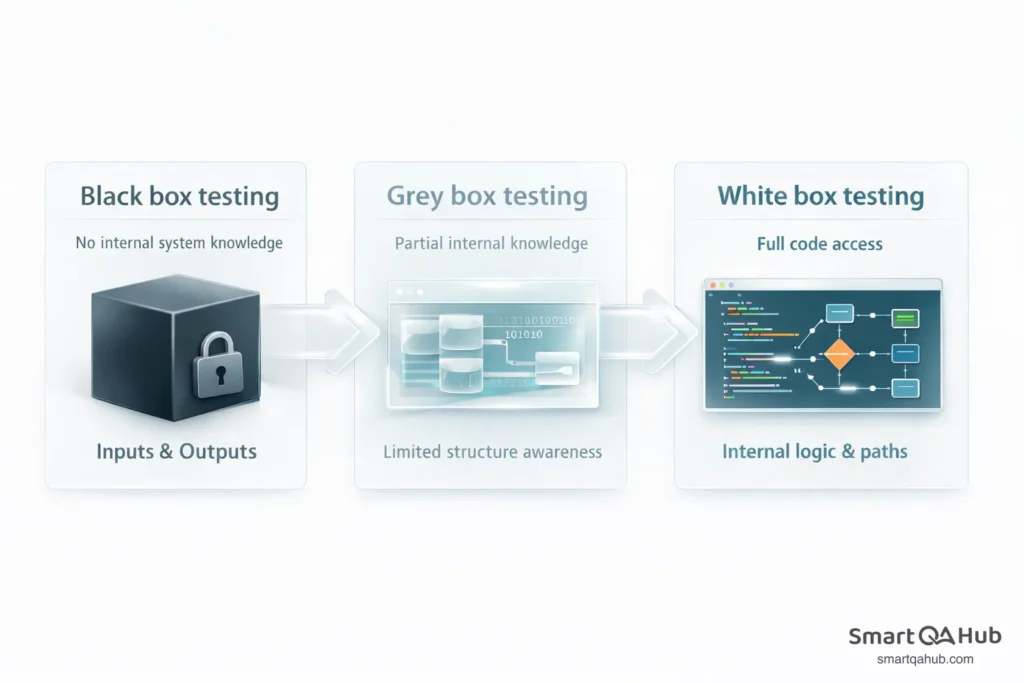
Gray box testing diagram showing the relationship between white box and black box testing.
Differences between black box, gray box, and white box testing
Understanding where grey box testing fits helps in choosing the right approach for each situation. Here is how black box, white box and grey box testing differ in practice.
Black box testing focuses purely on inputs and outputs. Functionality is tested without knowing how the system processes data internally. This works well for acceptance testing and validating user requirements, but it can miss bugs hiding in component interactions.
White box testing provides full visibility into the source code. Tests are designed based on code paths, conditions, and logic branches. This catches detailed defects but requires programming skills and takes significant time.
Grey box testing sits between these approaches. The system’s architecture and data flow are understood without analysing every code detail. This balance makes it practical for catching integration issues while remaining accessible to grey box testers still building technical skills.
| Aspect | Black box | White box | Gray box |
|---|---|---|---|
| Internal knowledge | None | Complete (source code) | Partial (architecture, data flow) |
| Technical background | Any level | Programming required | Some technical understanding |
| Best for | User acceptance, functional tests | Unit tests, code coverage | Integration, API, database testing |
| Time investment | Low to medium | High | Medium |
| Bug detection focus | Functional defects | Logic and code-level bugs | Integration and data issues |
When grey box testing approach makes the most sense
Grey box testing proves most valuable in specific scenarios that appear regularly in software projects.
Integration testing is where grey box testing truly shines. When multiple modules or services need to work together, understanding how data flows between them helps in designing targeted test cases. Information passing at connection points can be verified without reading the code of each component.
Database testing benefits from grey box approaches because the database can be queried to verify that application actions create expected data changes. Knowing the schema structure helps check data integrity across related tables.
API testing works naturally with grey box methods. The expected request and response formats are understood from documentation, then the API is tested to see whether it handles various inputs correctly. This catches issues in how frontend and backend systems communicate.
Security testing uses grey box techniques to identify vulnerabilities. Having partial knowledge of the system architecture helps focus on potential weak points, such as authentication flows or data validation processes.
Types of grey box testing
Several types of grey box testing address different aspects of software quality. Understanding these variations helps in selecting the right approach for each situation.
- Matrix testing examines the variables and configurations within an application. A matrix of different input combinations is created and each is verified to produce the expected result. This helps identify which variable combinations cause failures.
- Regression testing in a grey box context means verifying that new changes have not broken existing functionality. Knowledge of which components connect helps focus regression tests on areas most likely affected by recent updates.
- Pattern testing analyses previous defects to predict where similar issues might occur. If a specific type of bug appeared in one module, grey box knowledge helps test for the same pattern across similar components.
- Integration testing verifies that different modules communicate correctly. The data handoff points between components are tested, checking that information transforms and transfers as expected.
- Database testing validates that application operations create correct database changes. Data integrity, query performance, and proper handling of database constraints are all verified.
- API testing confirms that application programming interfaces accept valid inputs, reject invalid ones, and return appropriate responses. Grey box knowledge of expected data formats makes this testing more precise.
Pro tip: Integration and API testing are the most common grey box scenarios in modern development teams. Starting with these builds practical skills that transfer across projects.
Grey box testing techniques explained
Grey box testing techniques help design effective test cases using partial system knowledge. These gray box testing techniques are practical methods applicable to real projects immediately.
Boundary value analysis
Boundary value analysis focuses on testing at the edges of acceptable input ranges. Systems often fail at boundaries, where valid inputs meet invalid ones. Grey box knowledge helps identify these critical points.
Consider a form field that accepts ages between 18 and 65. Pure black box testing might try random values. With grey box knowledge, the focus becomes clear: test 17 (just below minimum), 18 (minimum boundary), 65 (maximum boundary), and 66 (just above maximum). Edge cases like 0, negative numbers, and non-numeric input also need verification.
Knowing that the system stores age as an integer helps test more precisely. Decimal values like 18.5 might cause unexpected behavior if the system truncates rather than rounds. This insight comes from grey box knowledge of the data structure.
State transition testing
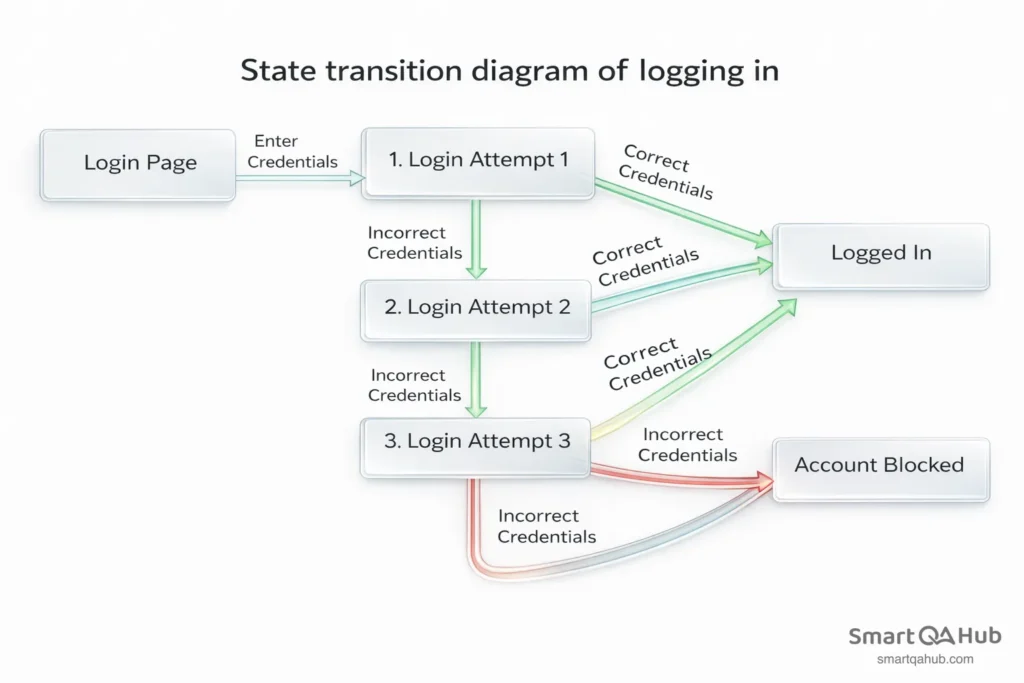
State transition testing examines how an application moves between different states or conditions. Many applications have workflows where actions are only valid in certain states.
Think about a user account lifecycle: new, active, suspended, and closed. State transition testing verifies that a new account can be activated but not closed directly, an active account can be suspended or closed, a suspended account can be reactivated or closed, and a closed account cannot be reopened.
Grey box knowledge reveals what triggers each transition. Perhaps activating an account sends a confirmation email and creates a database record. Testing covers not just whether the state changes, but whether these connected actions complete correctly.
Decision table testing
This technique organises complex business rules into structured tables. When multiple conditions determine an outcome, a decision table ensures all meaningful combinations get tested without missing scenarios. Grey box knowledge of the underlying algorithm helps identify which combinations actually matter.
Grey box testing example: step-by-step walkthrough
A practical gray box testing example helps illustrate how concepts apply to real projects. This walkthrough covers testing a login functionality with grey box knowledge.
Scenario: Testing a web application’s login system with access to the authentication flow documentation, database schema for the users table, and API endpoint specifications. Source code access is not available.
Setting up the test environment
Before testing, the available grey box resources need gathering:
- Architecture diagram showing how the login request flows from browser to server to database
- Database schema revealing that the users table includes fields for email, hashed_password, login_attempts, and account_status
- API documentation specifying the expected request format and response codes
- Knowledge that the system locks accounts after 5 failed login attempts
This partial knowledge shapes the test strategy without requiring code access.
Writing and running a grey box test
Here’s how grey box testing looks in practice with a real login authentication scenario.
Test case 1: Successful login with valid credentials
Enter correct email and password. Verify that the response returns a success status, the user session is created, and the database login_attempts counter resets to zero.
Test case 2: Failed login with invalid password
Enter correct email with wrong password. Verify the error message displays appropriately and the login_attempts counter increments by one in the database.
Test case 3: Account lockout after repeated failures
Attempt login with wrong password five consecutive times. Verify the account_status changes to “locked” in the database and subsequent login attempts are blocked even with correct password.
Test case 4: SQL injection attempt
Enter a malicious input like ‘ OR ‘1’=’1 in the email field. Verify the system rejects this input safely and the database shows no unexpected queries or changes.
Notice how grey box knowledge informed each test case. The database fields to verify, expected response codes, and potential security vulnerabilities were all known in advance. This is more targeted than pure black box testing but does not require reading authentication code.
Benefits of grey box software testing (and limitations)
Understanding the benefits of gray box testing helps in advocating for this approach in projects.
- Better test coverage results from targeting high-risk integration points. Instead of testing randomly, the focus lands on areas where components connect and data transforms. This catches bugs that slip through single-component testing.
- Faster defect detection happens because test cases address known architectural patterns. Understanding where problems typically occur means tests are designed accordingly, reducing time spent on low-value test cases.
- Improved collaboration develops naturally when testers understand system architecture. Communication with developers becomes more precise, describing not just what failed but where in the system it likely occurred.
- Practical balance makes grey box testing accessible without requiring deep programming expertise. Technical knowledge develops gradually while contributing to real projects. This balance suits actual project timelines and team structures.
- Security awareness grows through testing with partial system knowledge. Thinking about how attackers might exploit integration points or data flows becomes more natural over time.
However, grey box testing has limitations worth acknowledging.
- Incomplete coverage remains possible. Without full code visibility, bugs in complex logic branches might be missed. Some defects only appear through detailed code analysis.
- Dependency on documentation means grey box testing works best when architecture documents and API specifications exist and stay current. Outdated documentation can lead to incorrect test assumptions.
- Not a replacement for other testing types. Grey box testing complements, rather than replaces, thorough unit testing and user acceptance testing. A complete test strategy uses all three approaches where appropriate.
Tools for grey box testing
Several tools support grey box testing approaches without requiring expensive investments.
Selenium automates browser-based testing. User interactions can be simulated while verifying backend responses through API calls or database checks. Many teams use Selenium for grey box integration tests.
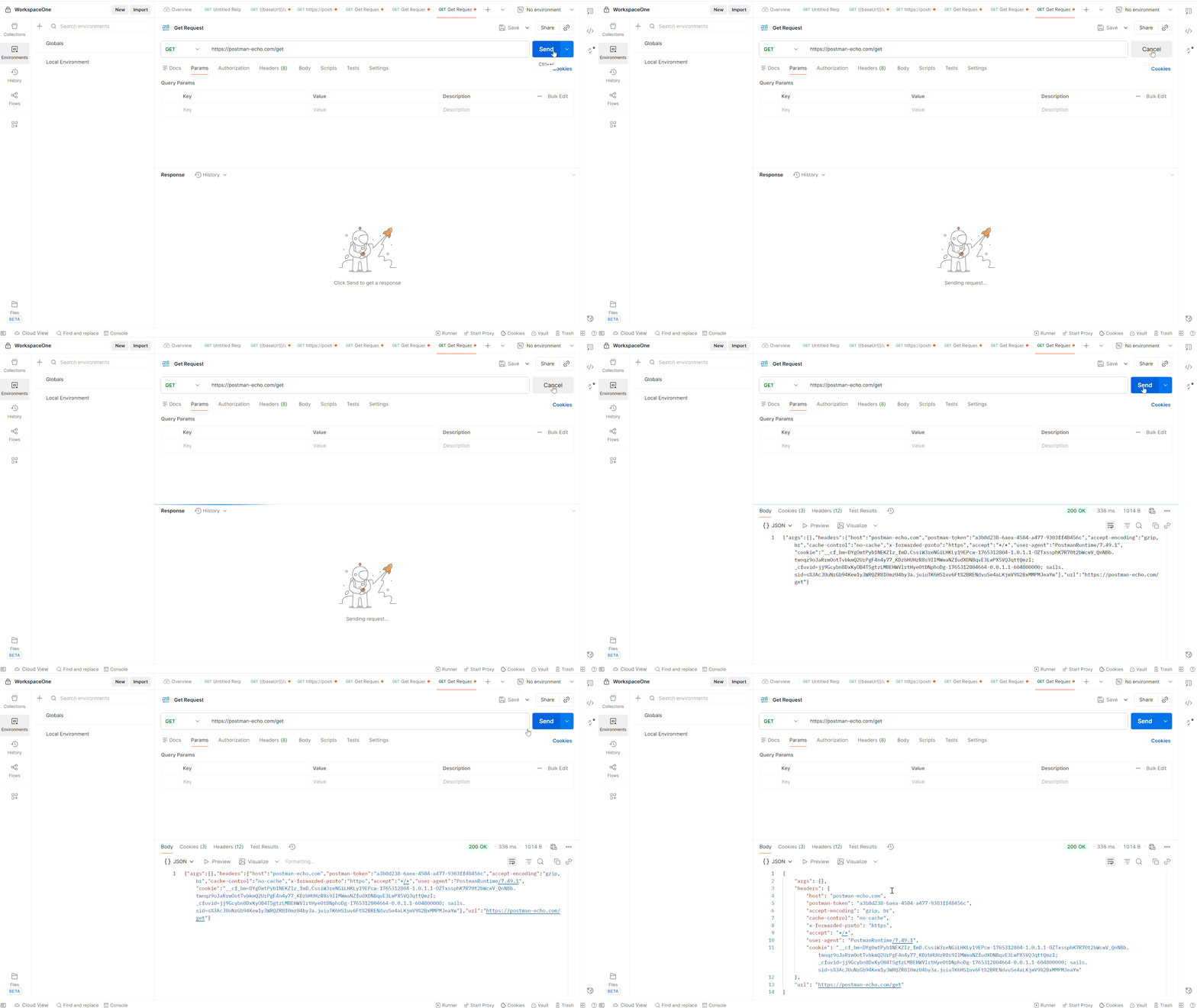
Postman excels at API testing. Requests with various inputs can be sent, responses examined in detail, and automated test collections created. The free version handles most grey box API testing needs.
Browser DevTools come built into Chrome, Firefox, and Edge. The Network tab reveals API calls and responses, showing how frontend and backend communicate. The Application tab shows cookies and local storage relevant to session testing.
Database clients like DBeaver or pgAdmin allow direct database queries. During testing, application actions can be verified against expected data changes.
Burp Suite Community Edition supports basic security testing. Requests can be intercepted, inputs modified, and system responses observed, all with free test tools.
Pro tip: Browser DevTools and Postman are free and cover most grey box testing basics. Add database access when available for a solid testing toolkit.
Grey box testing terminology
Partial knowledge refers to understanding system architecture without complete source code access, knowing how pieces connect without seeing every implementation detail.
Integration points are locations where different components or systems exchange data, making them prime targets for grey box testing.
State transitions describe how an application moves between different conditions based on events or inputs.
FAQ: Frequently asked questions about grey box testing
What is the maIs grey box testing the same as gray box testing?in difference between grey box and black box testing?
Is coding knowledge required for grey box testing?
Is grey box testing the same as gray box testing?
How much internal knowledge is enough for grey box testing?
Time to test smarter, not harder
Grey box testing offers a practical, balanced approach to finding software defects. Combining partial internal knowledge with external testing perspectives catches integration bugs, database issues, and security vulnerabilities that other methods might miss. This technique matches how modern software development teams actually work, making it essential knowledge for building a testing career.
The next step is applying grey box thinking to an upcoming testing task. When testing a feature, consider what is known about how data flows through the system. Use that knowledge to design more targeted test cases. With practice, the technical intuition that separates good testers from great ones develops naturally.


