


Acceptance Testing: Definition and The Final Software Check Before Release

 13 MIN
 16 Feb 2026
Acceptance testing is the final testing before software reaches real users. It answers one crucial question: does this product actually work the way people need it to? A system can pass hundreds of technical tests and still fail the moment a real person tries to use it. That gap between a technically functional system and a truly usable product is exactly what acceptance testing bridges.
Table of content
Acceptance testing is the phase where business requirements meet reality, where assumptions get challenged and where the decision to launch (or not) gets made. Understanding this testing phase isn’t just useful knowledge. It’s the skill that separates testers who merely find bugs from those who prevent costly failures.
The final checkpoint before launch
Imagine a relay race. The baton has passed through several runners like unit testing, integration testing, system testing and now it reaches the final stretch. That final runner is acceptance testing. If this phase fails, the product doesn’t cross the finish line.
Software acceptance testing sits at the end of the Software Development Life Cycle, right after system testing and just before deployment. It’s the moment when real users, business stakeholders, or clients step in to verify that the software does what it’s supposed to do. Not just technically, but practically. Does it solve the problem it was built to solve? Can people actually use it in the real world?
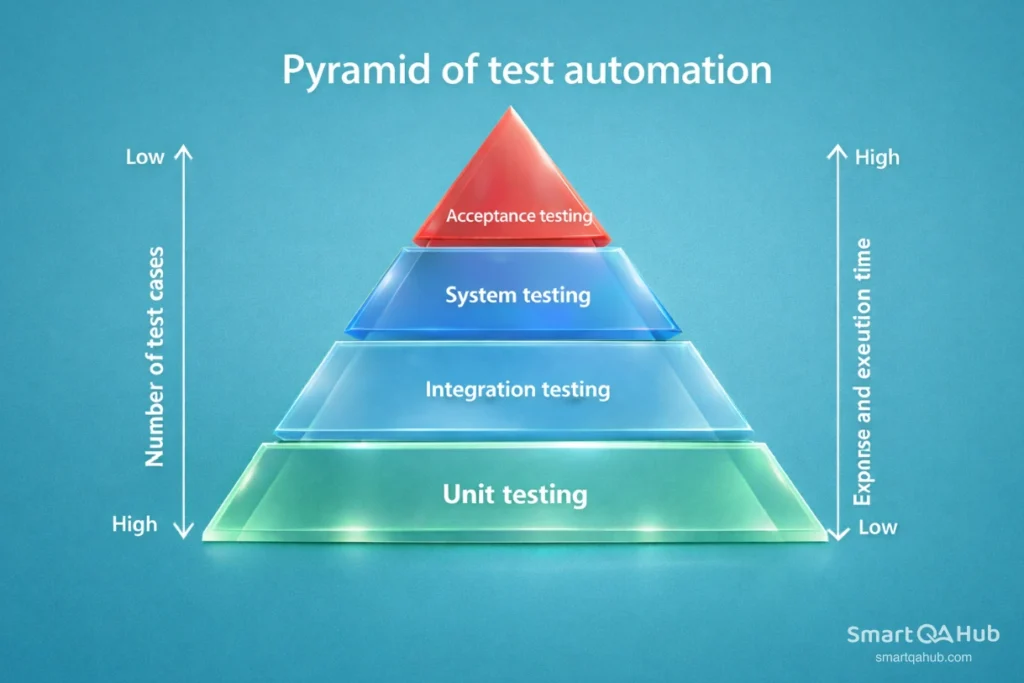
This is what makes acceptance testing different from everything that came before. Earlier tests ask whether the code works correctly. Acceptance testing asks whether the product works meaningfully.
What is acceptance testing?
The acceptance testing definition is straightforward: it’s a formal testing phase that determines whether a software system meets business requirements and is ready for delivery. The goal is to validate not just verify that the product fulfills its intended purpose.
According to the ISTQB acceptance testing definition, acceptance testing focuses on verifying that the system meets user needs, business requirements, and agreed acceptance criteria, so stakeholders can confidently decide whether the product is ready for release. In simpler terms, acceptance testing meaning comes down to one question: should we release this software, or not?
From technical correctness to business value
What is acceptance testing in software testing specifically? It’s the phase where the focus shifts from technical correctness to business value. The development team has already confirmed the software works as designed. Now it’s time to confirm it works as needed. End users, clients, or designated testers evaluate whether the application behaves correctly in real-world scenarios, handles expected workflows, and delivers the promised functionality.
What is the purpose of acceptance testing? To build confidence. Confidence that the software meets its goals, that users will be able to work with it effectively, and that deploying it won’t result in costly failures or frustrated customers.
Why acceptance testing matters more than you think
Here’s a scenario that happens more often than anyone would like: a development team delivers software that passes all technical tests with flying colors.Unit tests? Green. Integration tests? Perfect. System tests? No issues. Then it reaches real users and falls apart.

The login flow confuses people.
A critical feature doesn’t match how the business actually operates.
The reports generate data nobody asked for.
The software works, but it doesn’t work for the people who need it.
This is exactly what acceptance testing prevents. It catches misalignments between what was built and what was actually needed. It validates that requirements were understood correctly, implemented properly, and still make sense now that the product exists.
The cost of skipping this testing process
Acceptance testing also serves as a risk mitigation strategy. Fixing defects after release costs significantly more than catching them before deployment. Studies consistently show that the later a bug is found, the more expensive it becomes to fix. Acceptance testing is the last opportunity to catch critical issues in a controlled environment.
Beyond risk, there’s also the matter of stakeholder confidence. When business users participate in acceptance testing and sign off on the results, they take ownership of the decision to release. This shared accountability creates alignment between technical teams and business teams – something that prevents finger-pointing later.
⚠️ Why acceptance testing matters:
“If the user can’t use it, it doesn’t work.” Susan Dray
Types of acceptance testing you should know
Not all acceptance testing looks the same. Depending on the project, industry, and specific goals, different types of acceptance testing come into play. Understanding these acceptance testing types helps in planning the right approach for each situation.
User acceptance testing (UAT)
User acceptance testing is the most common form. End users, the people who will actually use the software daily, test the system to confirm it meets their needs. UAT focuses on realistic scenarios: Can a sales representative create a new customer record? Can a manager approve a purchase order? Can a user reset their password without calling support?
UAT isn’t about finding bugs in the traditional sense. It’s about validating that the software supports real workflows and delivers genuine value. The testing happens in an environment that closely mirrors production, using realistic data and conditions.
Operational acceptance testing (OAT)
Operational acceptance testing, sometimes called production acceptance testing, evaluates whether the software is ready for day-to-day operations. This goes beyond functionality. OAT checks backup and recovery procedures, system monitoring capabilities, maintenance processes, and disaster recovery plans.
Think of OAT as asking: “Can we actually run this in production without everything falling apart?” It’s particularly important for systems that require high availability or handle sensitive data.
Contract and regulation acceptance testing
Contract acceptance testing (CAT) verifies that the software meets all specifications defined in a contract or service level agreement. This is common in client-vendor relationships where payment depends on meeting specific deliverables.
Regulation acceptance testing (RAT) ensures compliance with legal, industry, or governmental standards. Healthcare software must comply with patient privacy regulations. Financial applications must meet security and audit requirements. Aviation systems face strict safety standards. RAT confirms that compliance requirements aren’t just documented, they’re actually implemented.
Alpha and beta testing
Alpha testing is internal acceptance testing performed at the developer’s site. The QA team or internal staff test the software in a controlled environment, simulating end-user behavior. It’s the last chance to find major issues before exposing the product to external users.
Beta testing opens the product to a select group of real users outside the organisation. These users test the software in their own environments, under real conditions. Beta testing generates invaluable feedback about usability, performance, and unexpected issues that internal testing might miss.
Acceptance testing best practices
Understanding how to do acceptance testing requires breaking the process into manageable phases. While specific approaches vary by organisation, the core structure remains consistent.
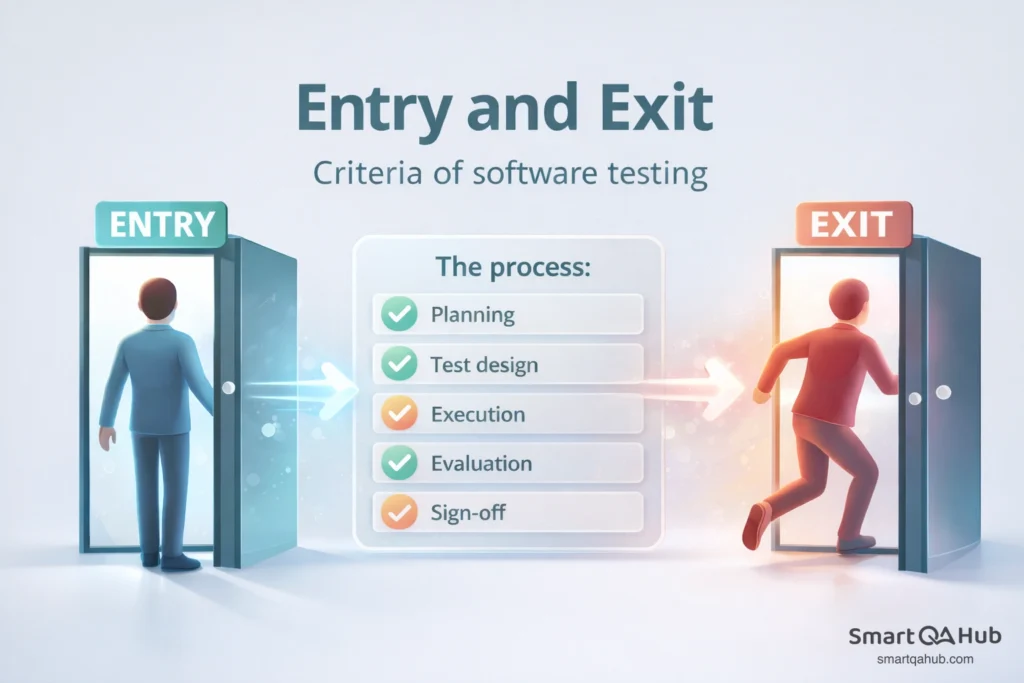
Before you start: Entry criteria
Acceptance testing shouldn’t begin until certain conditions are met. These entry criteria act as a quality gate, ensuring the software is actually ready for this phase.
Typical entry criteria include: system testing is complete and signed off, all critical defects from previous phases are resolved, requirements documentation is available and approved, the test environment is configured and stable, and test data is prepared. Starting acceptance testing without meeting these criteria wastes time and produces unreliable results.
The process: From planning to sign-off
The acceptance testing process typically flows through five phases:
- Planning involves defining scope, identifying test scenarios based on business requirements, allocating resources, and setting timelines. A solid test plan outlines what will be tested, who will test it, and how success will be measured.
- Test design translates requirements and acceptance criteria into specific test cases. Each test case describes the steps to execute and the expected outcome. Test cases should cover positive scenarios (things working correctly) and negative scenarios (handling errors gracefully).
- Execution is where the actual testing happens. Testers follow the defined test cases, document results, and log any defects discovered. Clear communication between testers and the development team keeps the process moving.
- Evaluation analyses the results. Did the software meet the acceptance criteria? Are there blocking issues? What’s the overall quality level? This phase determines whether the product is ready for release.
- Sign-off is the formal approval to proceed. Stakeholders review the test results and make a go/no-go decision. This sign-off creates accountability and documents that acceptance testing was completed successfully.
Knowing when you’re done: Exit criteria
Exit criteria define the conditions that must be met before acceptance testing can be considered complete. These typically include: all planned test cases have been executed, all critical and major defects have been fixed and retested, the software meets all defined acceptance criteria, and stakeholders have formally approved the results.
Without clear exit criteria, testing can drag on indefinitely or end prematurely. Defining these criteria upfront keeps everyone aligned on what “done” actually means.
Writing your first acceptance test
Moving from theory to practice means learning to write effective acceptance tests. This skill connects business requirements to concrete verification.
Understanding acceptance criteria
Acceptance criteria define the conditions a feature must meet to be considered complete. Good acceptance criteria are specific, measurable, and testable. Vague criteria like “the system should be fast” don’t help. Precise criteria like “the search results page loads within 2 seconds for queries returning up to 100 results” provide clear pass/fail conditions.
Acceptance criteria often follow the format: “Given [context], when [action], then [expected result].”
For example: “Given a registered user on the login page, when they enter valid credentials and click submit, then they are redirected to the dashboard.”
From user story to test case
User stories describe what a user wants to accomplish. Acceptance tests verify that the software enables that accomplishment. The connection between them should be direct and traceable.
Consider this user story: “As a customer, I want to reset my password so I can regain access to my account.” The acceptance criteria might include: the forgot password link is visible on the login page, clicking the link opens a password reset form, submitting a valid email triggers a reset email, and the reset link expires after 30 minutes.
Each criterion becomes one or more test cases. A test case for the first criterion might look like this:
| Element | Description |
|---|---|
| Test ID | TC-PWD-001 |
| Title | Verify forgot password link visibility |
| Precondition | User is on the login page |
| Steps | 1. Navigate to the login page. 2. Locate the forgot password link. |
| Expected result | The “Forgot Password” link is visible and clickable below the login form. |
Acceptance testing in action: A practical example
Let’s walk through a complete acceptance testing example for a password reset feature. This demonstrates how the concepts connect in practice.
User story: As a registered user, I want to reset my password so I can regain access to my account if I forget it.
Acceptance criteria:
- The “Forgot Password” link is visible on the login page.
- Clicking the link opens a password reset form.
- Submitting a registered email address sends a reset email.
- The user can set a new password and log in with it.
Sample test cases:
| Test case | Steps | Expected result |
|---|---|---|
| Verify link visibility | Navigate to login page, locate “Forgot Password” link | Link is visible and clickable |
| Navigate to reset form | Click “Forgot Password” link | Password reset form opens |
| Submit valid email | Enter registered email, click submit | Confirmation message appears, email is sent |
| Complete password reset | Click link in email, enter new password, submit | Password is updated, user can log in with new password |
| Submit unregistered email | Enter email not in system, click submit | Appropriate error message displays |
During execution, testers follow each test case, document whether the actual result matches the expected result, and log defects for any failures. If the “submit unregistered email” test shows a generic error instead of a helpful message, that’s a defect to report and fix.
Common mistakes that trip up testers
Even with good intentions, certain patterns lead to problems in acceptance testing. Recognizing these pitfalls helps avoid them.
- Starting without clear requirements
Acceptance testing validates requirements. If those requirements are vague, incomplete, or contradictory, the testing process struggles. Testers end up guessing what the software should do, and disagreements arise during evaluation. The solution is investing time upfront to clarify and document requirements before testing begins. If requirements aren’t clear, ask questions until they are.
- Confusing acceptance testing with system testing
System testing and acceptance testing have different purposes. System testing verifies that the software works according to technical specifications. Acceptance testing validates that it meets business needs and user expectations. Treating them as interchangeable leads to gaps. System testing might confirm that a report generates correctly, but acceptance testing reveals that the report doesn’t contain the information users actually need.
- Skipping documentation
When deadlines pressure the team, documentation often gets sacrificed. Test cases aren’t written down, results aren’t recorded, defects aren’t logged properly. This creates problems later. Without documentation, there’s no evidence that testing was done, no ability to reproduce issues, and no baseline for future testing. Even lightweight documentation is better than none.
Acceptance testing terminology
Key terms you’ll encounter in every acceptance testing project:
- Acceptance criteria: Conditions that a feature must satisfy to be accepted.
- UAT testing (user acceptance testing): Testing performed by end users to validate the software meets their needs.
- OAT testing (operational acceptance testing): Testing that validates operational readiness, including backup, recovery, and maintenance.
- Sign-off: Formal approval that acceptance testing is complete and the software can proceed to release.
- Staging environment: A test environment configured to closely mirror production.
Tools and resources
Several tools support acceptance testing processes. Test management tools like TestRail or Zephyr help organise test cases and track results. Automation frameworks like Selenium or Cypress enable automated acceptance test execution. BDD tools like Cucumber allow writing acceptance tests in plain language that stakeholders can understand.
For foundational knowledge, the ISTQB Foundation Level certification covers acceptance testing concepts and is widely recognized in the industry.
FAQ: Frequently asked questions about acceptance testing
What’s the difference between acceptance testing and system testing?
Who is responsible for the acceptance testing process?
Can acceptance testing be automated?
Your turn to practice
Acceptance testing is the final quality gate before software reaches production. It validates that the product meets business requirements, satisfies user needs, and is ready for real-world use. Understanding the different types of acceptance testing from UAT to operational and compliance testing enables selecting the right approach for each project.
The process follows a clear path: establish entry criteria, plan and design tests, execute them carefully, evaluate results, and obtain sign-off. Writing effective acceptance tests means connecting clear acceptance criteria to specific, traceable test cases. Start practicing with simple scenarios. Pick a feature, define what “done” looks like, and write test cases that verify it. That hands-on experience is how you actually learn.
Sources:
- https://www.taazaa.com/acceptance-testing-techniques-and-best-practices
- https://www.taazaa.com/acceptance-testing-techniques-and-best-practices
- https://www.virtuosoqa.com/testing-guides/what-is-acceptance-testing
- https://businessmap.io/blog/acceptance-testinghttps://semaphore.io/blog/the-benefits-of-acceptance-testing


